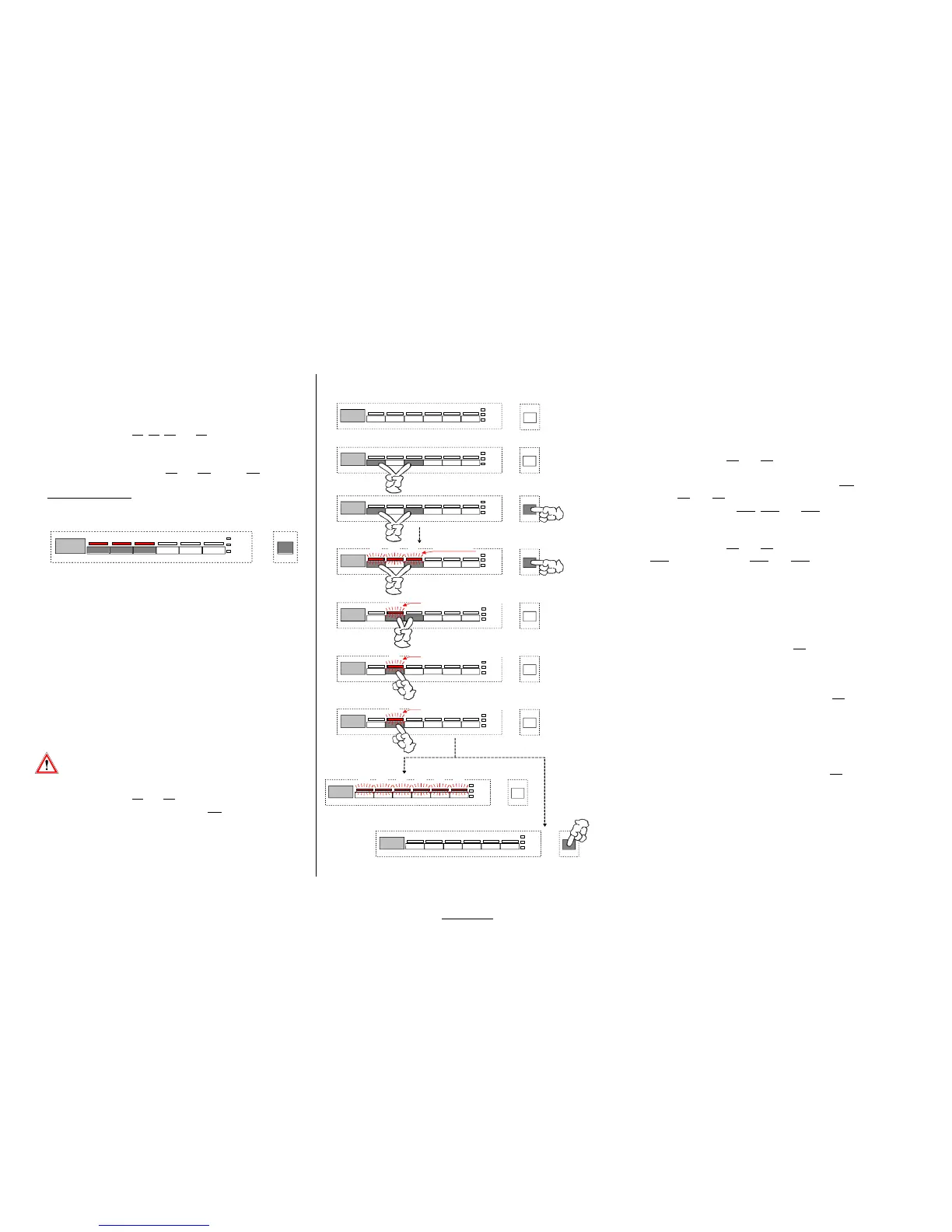
8.3.4. EDW 1503 Service function / disconnection pulse wash
General information Calling above-mentioned service function
w
Calling the Service Functions is similar with all designs
Calling the function "Switch OFF Pulse Wash"
or key arrangements.
w
Always use the keys S0
, S1, S2 and S3 independently
Appliance should be switched off
from their program assignment depending on the model.
w
In service function mode, you can ALWAYS call the Pulse
Simultaneously press S1 and S3 and ...
Wash function by using keys S2 and S3. Use key S2 to
modify the setting.
... switch on the appliance with ON/OFF switch S0.
w From works settings, Pulse Wash is always set to be active.
Keep keys S1 and S3 pressed simultaneously until the
3 acknowledging LEDs LD1
, LD2 and LD3 are flashing.
( Short-time illumination of LEDs is possible and does not constitute any fault)
Simultaneously press S2 and S3 until the acknowledging
LED-LD2
is flashing. LEDs LD1 and LD3 will go dark.
The current status whether Pulse Wash is active or not is
w
If you deselect Pulse Wash the rot.speeds of the cir-
indicated in the display.
cul. pump are always increased to "High Pulse Speed".
1P = Pulse Wash is active
Water consumption slightly increases.
0P = Pulse Wash is switched off
Extension of time is possible depending on the temperature.
Switching the Pulse Wash Function on or off:
Any further activation of function key S2 will switch the
addition alternately on or off.
After the last key pressure of the function key S2 you
can leave the special program as follows.
After 60 seconds all LEDs of the program and option keys
are lit automatically. The indication in the display goes out.
The appliance is in the "prestart" mode again
or
the appliance is switched off by ON/OFF key S0.
In order to call the totality of service functions, always first
press the function keys S1
and S3 prior to switching the
appliance on by means of ON/OFF switch S0!
The currently valid condition is saved directly after any entry.
Keep the keys pressed for abt. 4 seconds in order to activate
the function. This procedure is intentionally distinguished
from those for the customer functions.
ATTENTION: In case of reduced key assemblies
be sure to observe Description Page B 1.
EDW 1503 / VGA
LD1
LD2 LD3
S1 S2 S3
1 99
S0
2.
S1 S3
1.
S0
LD1 LD2 LD3 LD4 LD5 LD6
S1
S2 S3 S4 S5 S6
LD10
LD11
LD12
3.
S1 S3 S0
3-4 seconds
4.
S1 S3 S0
LD1 LD2 LD3
all flashing
... automatically OFF after 60 sec
S0
S0
... OFF by actuating ON/OFF manually
LD1 LD2 LD3 LD4 LD5 LD6
5.
1P
LD2
S2
S3
display and LED are flashing
6.
0P
LD2
S2
display and LED are flashing
7.
1P
LD2
S2
display and LED are flashing



 To Next Page