- 8 -
03.2004 R.K. 599 519 400 EN
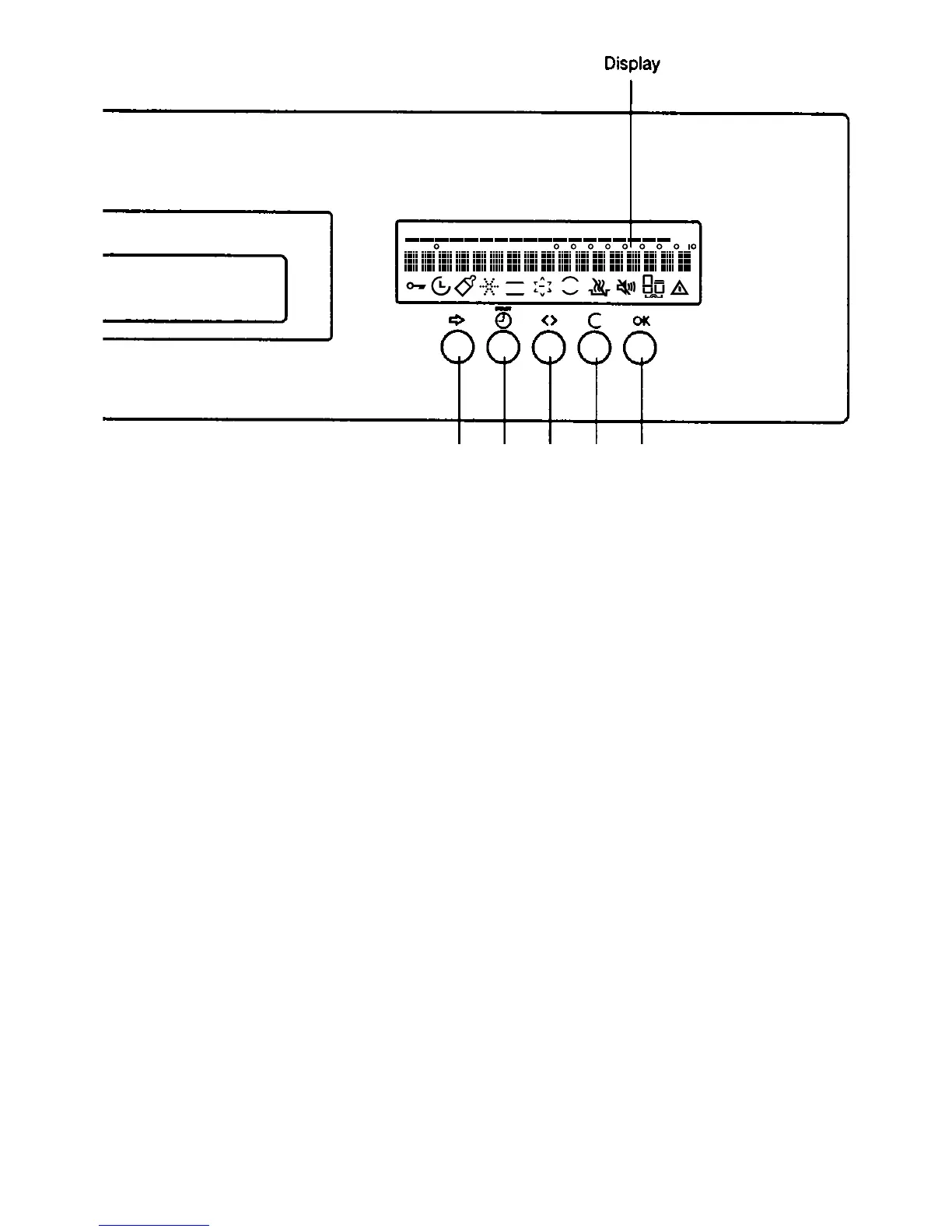
3.4. Control panel EDW 2500
1.Button - Programs
Selection up and down within a menu
Change to and from an adjustment value (e.g. water hardness)
2. Button - Start-time preselection
Start-time preselection 1 to 19 hours.
3. Button - Options
Switch between the menu "Programs" and the menu "Options" or "Settings"
During a running dishwashing program, the display can be switched between the active program step display and the
selected dishwashing program.
4. Button - Cancel
Aborting a running dishwashing program
5. Button - OK
Start program
Switching between ON and OFF with switchable functions (e.g. clear rinse)
Commence the setting process and complete with adjustable functions
Acknowledging a selection
Detailed descriptions of EDW 2500 see page 40 - 51 (chapter 8.4.1 -9.1.2)
PROGRAM
OPTIONS
mih
WRD
3 in 1
C
1
2
3
45



 To Next Page