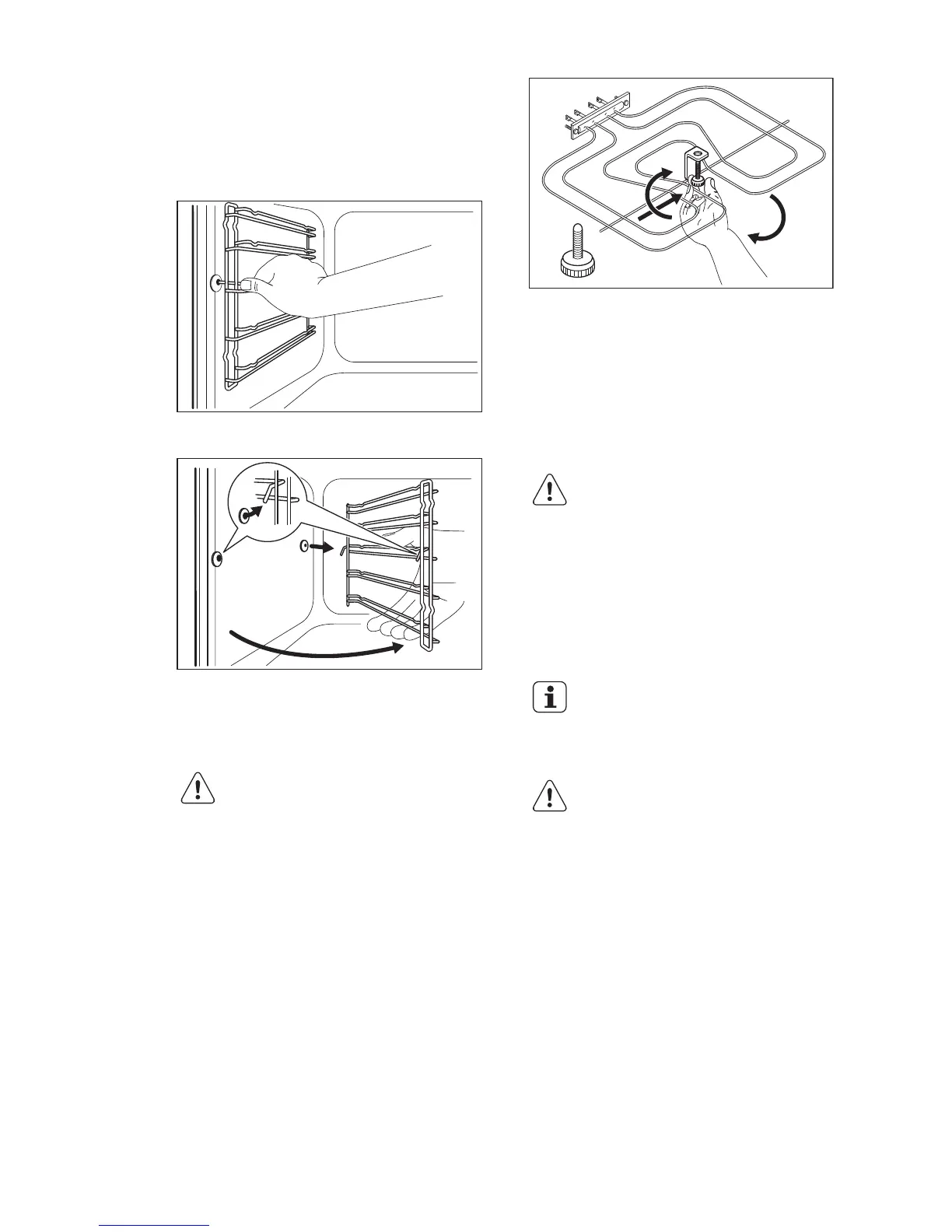
9.4 Removing the shelf supports
To clean the oven, remove the shelf
supports.
1. Pull the front of the shelf support away
from the side wall.
2. Pull the rear end of the shelf support
away from the side wall and remove it.
Install the shelf supports in the opposite
sequence.
9.5 Oven ceiling
WARNING!
Deactivate the appliance
before you remove the
heating element. Make sure
that the appliance is cold.
There is a risk of burns.
Remove the shelf supports.
You can remove the heating element to
clean the oven ceiling more easily.
1. Remove the screw which holds the
heating element. For the first time, use
a screwdriver.
2.
Carefully pull the heating element
down.
3. Clean the oven ceiling with a soft cloth
with warm water and a cleaning agent,
and let it dry.
Install the heating element in the opposite
sequence.
Install the shelf supports.
WARNING!
Make sure that the heating
element is correctly installed
and that it does not fall down.
9.6 Cleaning the oven door
The oven door has two glass panels. You
can remove the oven door and the internal
glass panel to clean it.
The oven door can close if
you try to remove the internal
glass panel before you
remove the oven door.
CAUTION!
Do not use the appliance
without the internal glass
panel.
1. Open the door fully and hold the two
door hinges.
ENGLISH
45



 To Next Page