10
USING THE RANGEHOOD
Standby mode
When connecting the hood to the power supply for the
first time or after power is returned after power outage, all
symbols on the control panel will light up from left to right
and a “beep” will sound once. Following this, the control
panel goes to standby mode and the hood will be ready
for use.
Turning on hood
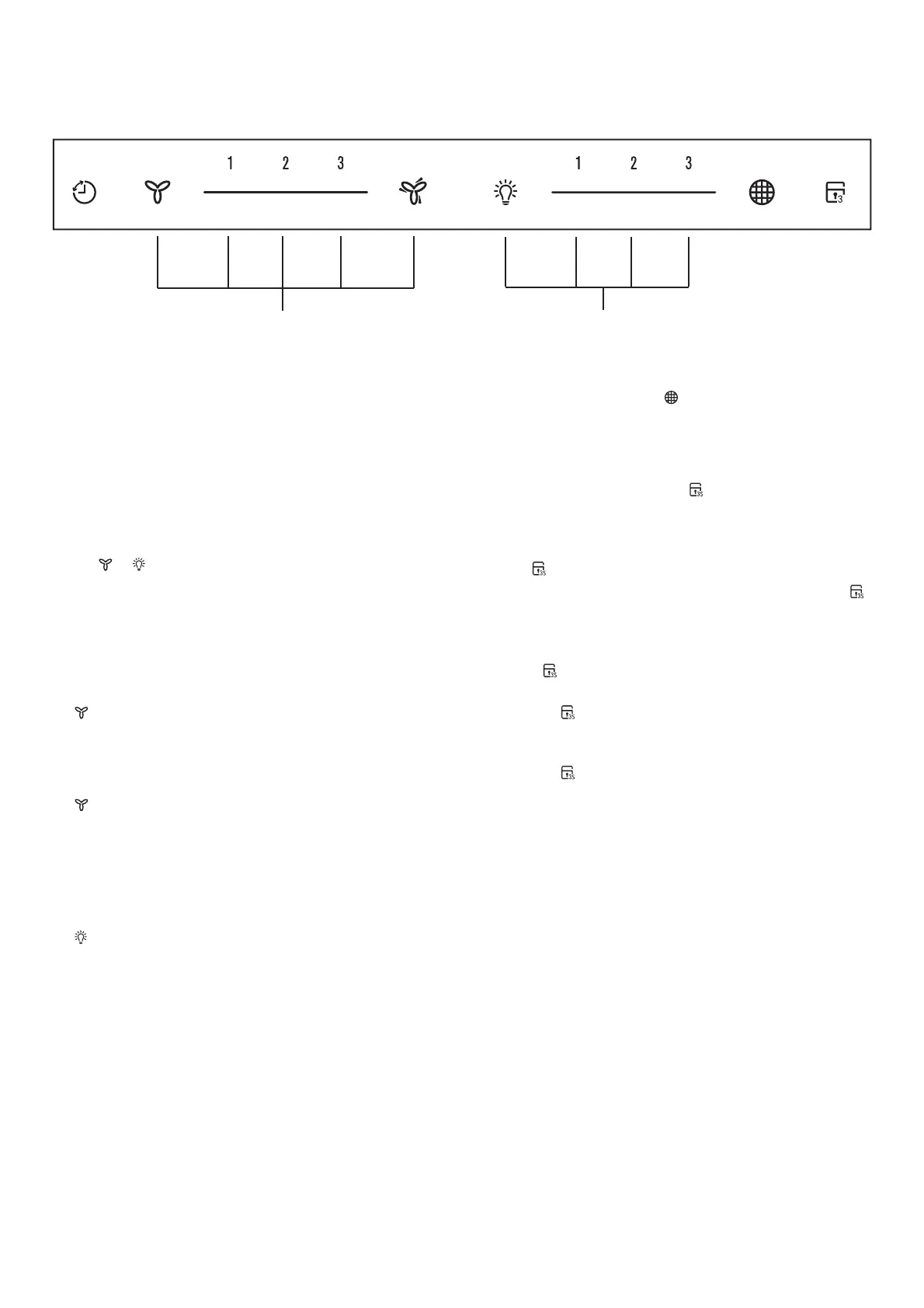
When the hood is in standby mode, user can either press
the
or button to turn on the fan or light individually.
The default factory level is 2, following that, the hood
remembers the last used setting and will start at that level
when the user presses the fan or light button. Pressing
directly on the slider strip will also allow the user to jump
straight into the level pressed.
Fan – select speed to suit cooking conditions.
– motor on/off
1 – light frying/boiling
2 – frying/wok cooking/heavy boiling
3 – grilling, intensive frying and wok cooking
– stir frying
NOTE: Touch the symbol to turn the fan boost ON, the
fan boost starts running at the highest fan speed for 1
minute before reducing to speed 3 automatically.
Light – select light level
– Light on/off
1 – low-light level
2 – mid-light level
3 – high-light level
Using the Timer
At the end of cooking, if the timer is switched on, the
rangehood will continue to run for an additional 5 minutes,
depending on the selected fan speed. This should ensure
the removal of any odours that remain after cooking.
Filter
This is the indicator/switch
to show when the filter needs
to be cleaned. Once the filters are cleaned the “Filter” alert
can be deactivated with a single touch.
Control Lock
Press and hold 3 seconds the
. button will lock the
control panel at any time. The same action will unlock the
control panel.
When control is locked, pressing any other button will
make
. button blink and a beep will sound.
t When the hood is working (light on and fan on) and
is touched then hood will stop fan but keep lighting on
while lock menu.
t When the hood is working (lights off and fan on) and
the
is touched then hood will stop fan and keep
lighting off while lock menu.
t When
is activated when hood is working it will just
change the status of fan motor and not change the
status of lighting.
t When
is touched while hood stops then it will just
lock the menu
S
Fan Light



 To Next Page