1-10
Basic Information
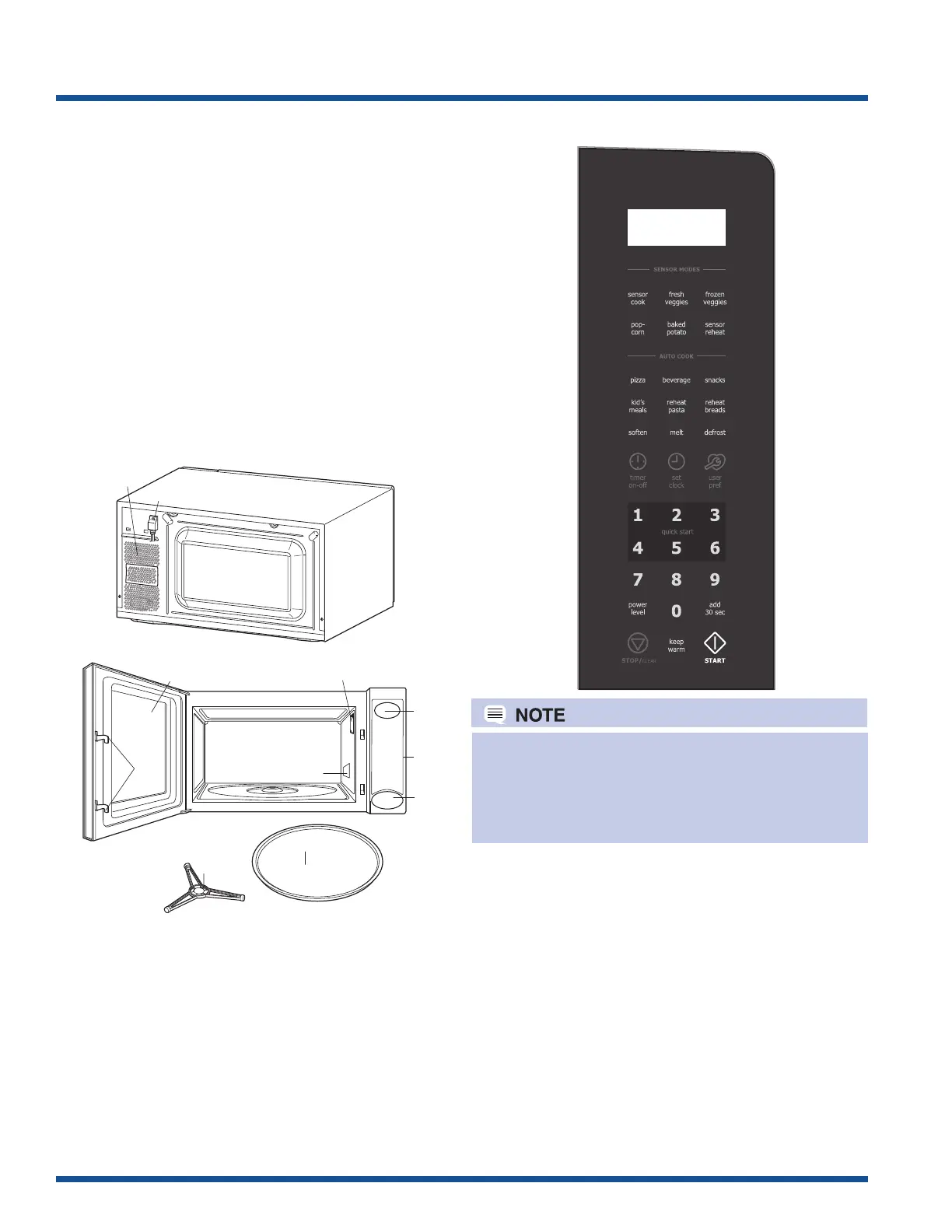
1. One touch door open button. Push to open door.
2. Door latches. The oven will not operate unless the
door is securely closed.
3. Removable turntable support.
4. Removable turntable. The turntable will rotate clock
wise or counterclockwise.
5. Oven lamp. It will light when oven is operating or
door is opened.
6. Oven door with see-through window.
7. Ventilation openings. (Rear)
8. Auto-Touch control panel.
9. Time display: Digital display, 99 minutes 99 seconds.
10. Wave guide cover.
11. Power supply cord.
Oven Diagram
Some one-touch cooking features uch as “add 30
sec” are disabled after three minutes when the oven
is not in use. These features are automatically
enabled when the door is opened and closed or the
STOP/ CLEAR pad is pressed.
1
6
5
2
10
11
9
7
8
3
4
Touch Control Panel




 To Next Page