Feature Overview
OVEN
[] [] []
SUPPORTS& OVENVENTS
[] [] [] [] [] [] [] [] [] [] [] III [] [] [] [] [] [] []
installingOven Rack Supports
ALWAYS INSTALL 0 VEN RACK
SUPPORT BEFORE TURNING ON THE
0 VEN (WHEN THE 0 VEN IS COOL).
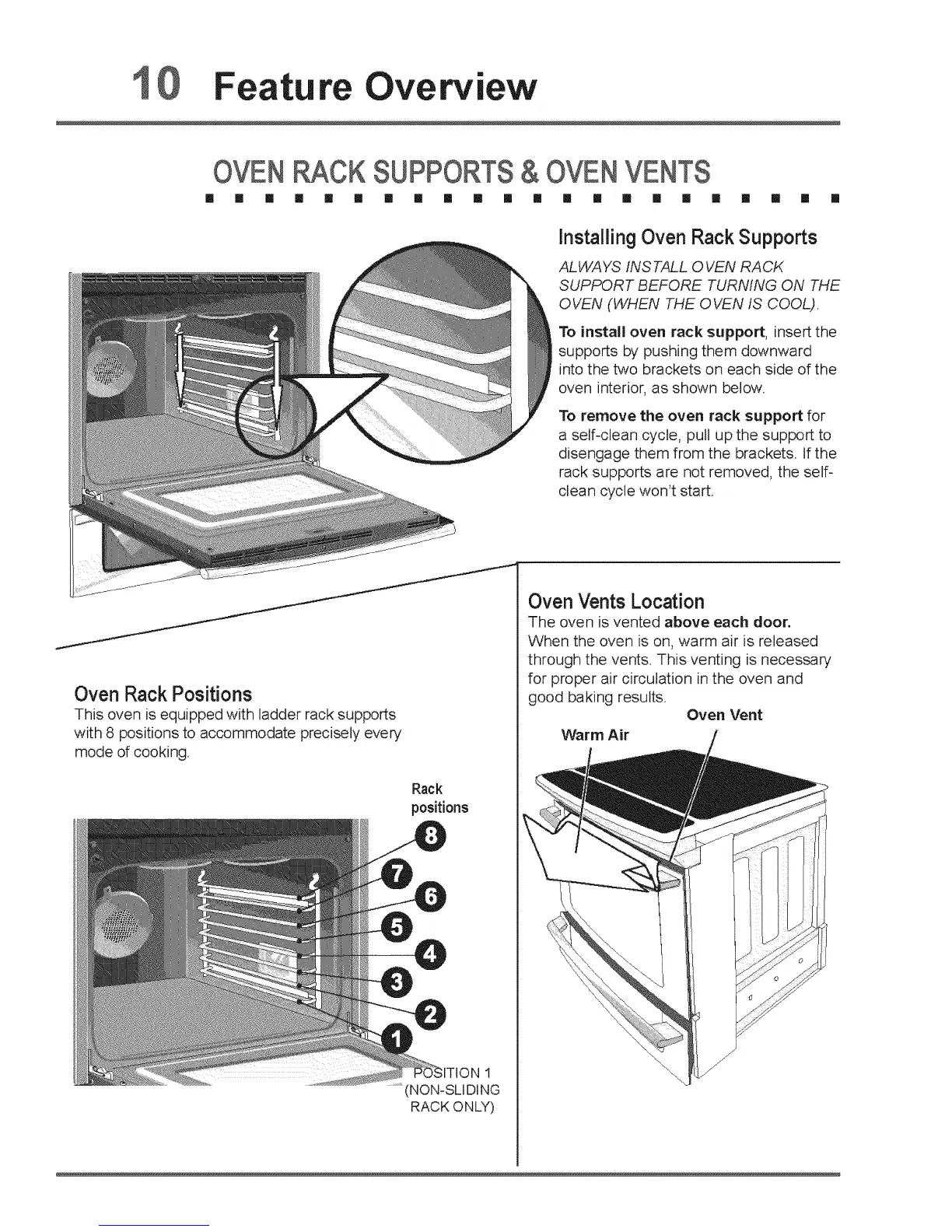
To install oven rack support, insert the
supports by pushing them downward
into the two brackets on each side of the
oven interior, as shown below.
To remove the oven rack support for
a self-clean cycle, pull up the support to
disengage them from the brackets. If the
rack supports are not removed, the self-
clean cycle won't start.
I
Oven Rack Positions
This oven is equipped with ladder rack supports
with 8 positions to accommodate precisely every
mode of cooking,
Rack
positions
1
.........(NON-SLIDING
RACK ONLY)
Oven Vents Location
The oven is vented above each door.
When the oven is on, warm air is released
through the vents. This venting is necessary
for proper air circulation in the oven and
good baking results.
Oven Vent
Warm Air






 To Next Page