2 Feature Overview
CONTROLPADFUNCTIONS
[] [] [] [] [] [] [] [] [] [] [] [] [] [] III [] [] [] [] [] [] []
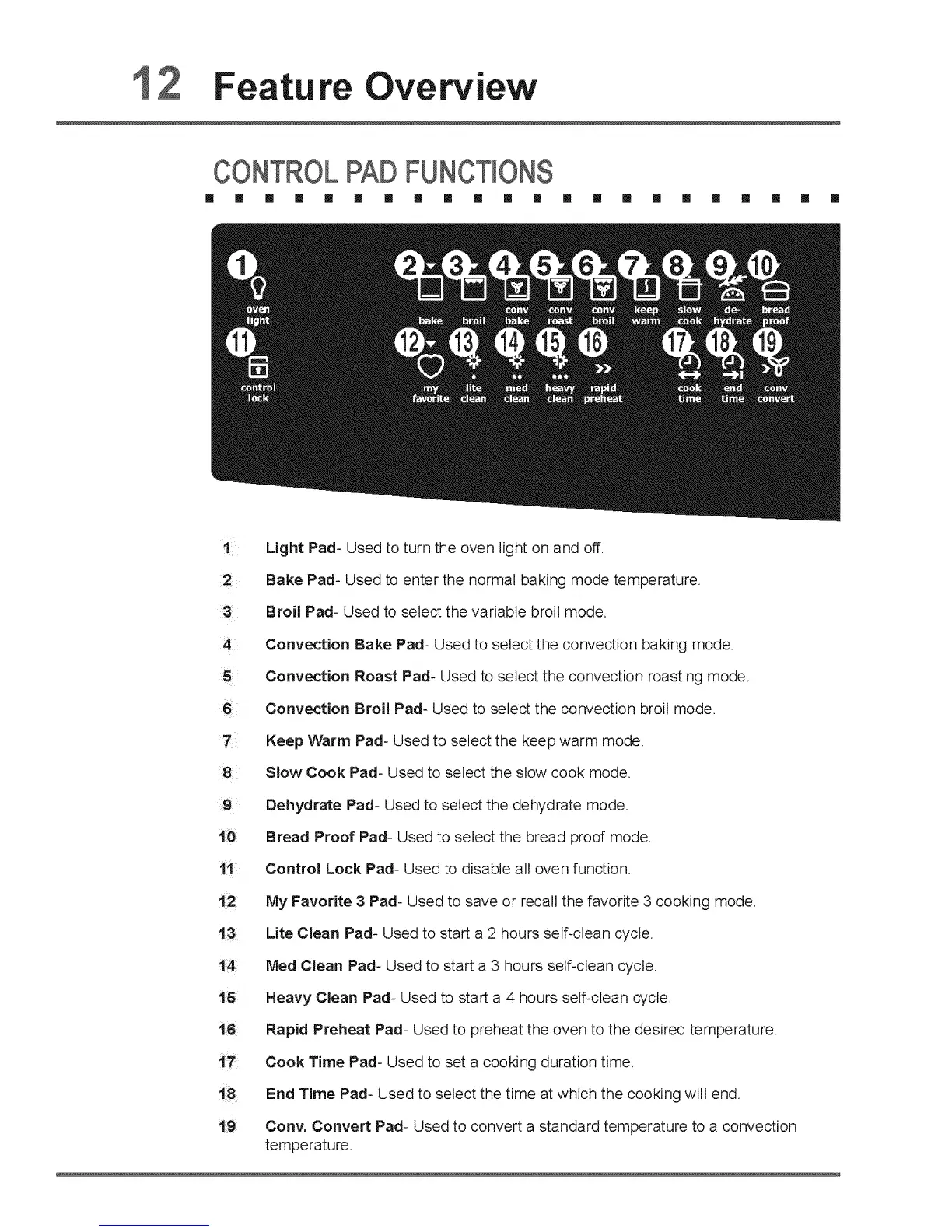
! Light Pad- Used to turn the oven light on and off.
Bake Pad- Used to enter the normal baking mode temperature.
Broil Pad- Used to select the variable broil mode.
4 Convection Bake Pad- Used to select the convection baking mode,
Convection Roast Pad- Used to select the convection roasting mode,
6 Convection Broil Pad- Used to select the convection broil mode.
7 Keep Warm Pad- Used to select the keep warm mode.
:8 Slow Cook Pad- Used to select the slow cook mode.
9 Dehydrate Pad- Used to select the dehydrate mode.
Bread Proof Pad- Used to select the bread proof mode.
Control Lock Pad- Used to disable all oven function,
My Favorite 3 Pad- Used to save or recall the favorite 3 cooking mode.
Lite Clean Pad- Used to start a 2 hours self-clean cycle.
!4 Meal Clean Pad- Used to start a 3 hours self-clean cycle.
t5 Heavy Clean Pad- Used to start a 4 hours self-clean cycle.
i6 Rapid Preheat Pad- Used to preheat the oven to the desired temperature.
i7 Cook Time Pad- Used to set a cooking duration time.
18 End Time Pad- Used to select the time at which the cooking will end.
i9 Cony. Convert Pad- Used to convert a standard temperature to a convection
temperature.






 To Next Page