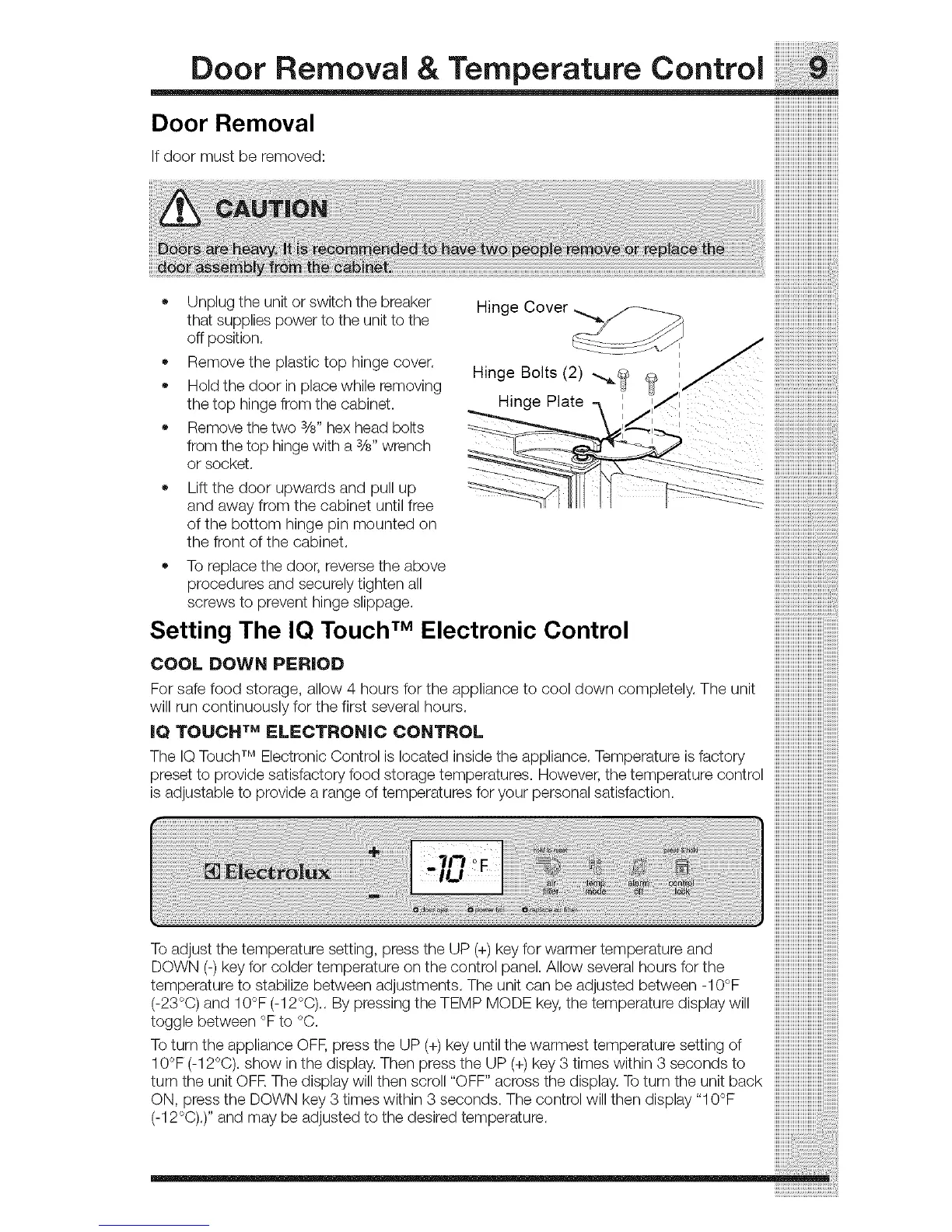
• Unplugtheunitorswitchthebreaker Hinge
thatsuppliespowertotheunittothe
offposition.
Removetheplastictophingecover.
Holdthedoorinplacewhileremoving
thetophingefromthecabinet.
Removethetwosi8"hexheadbolts
fromthetophingewitha3/8"wrench
orsocket.
!!!!!!!!!!!!!!!!!!!!!!!!!!!!!!!!!!!!!!
iiiiiiiiiiiiiiiiiiiiiiiiiiiiiiiiiiiiii
!!!!!!!!!!!!!!!!!!!!!!!!!!!!!!!!!!!!!!!!!!!i
Hinge Bolts (2) .._._
Hinge Plate iiiiiiiiiiiiiiiiiiiiiiiiiiiiiiiiiiiiiiiiii;i_
'_ iiiiiiiiiiiiiiiiiiiiiiiiiiiiiiiiiiiiiiiiiiii_
Lift the door upwards and pull up
and away from the cabinet until free
of the bottom hinge pin mounted on
the front of the cabinet.
To replace the door, reverse the above
procedures and securely tighten all
screws to prevent hinge slippage.
Setting The IQ Touch TM Electronic Control
COOL DOWN PERIOD
For safe food storage, allow 4 hours for the appliance to cool down completely. The unit
will run continuously for the first several hours.
IQ TOUCH TM ELECTRONIC CONTROL
The IQ Touch TM Electronic Control is located inside the appliance. Temperature is factory
preset to provide satisfactory food storage temperatures. However, the temperature control
is adjustable to provide a range of temperatures for your personal satisfaction.
To adjust the temperature setting, press the UP (+)key for warmer temperature and
DOWN (-) key for colder temperature on the control panel. Allow several hours for the
temperature to stabilize between adjustments. The unit can be adjusted between -10°F
(-23°C) and 10°F (-12°C).. By pressing the TEMP MODE key, the temperature display will
toggle between °F to °C.
To turn the appliance OFF, press the UP (+) key until the warmest temperature setting of
10°F (-12°C). show in the display. Then press the UP (+)key 3 times within 3 seconds to
turn the unit OFR The display will then scroll "OFF" across the display. To turn the unit back
ON, press the DOWN key 3 times within 3 seconds. The control will then display "10°F
(-12°C).)'' and may be adjusted to the desired temperature.



 To Next Page