• The appliance must not be located close
to radiators or cookers.
• Make sure that the mains plug is accessi-
ble after the installation of the appliance.
• Connect to potable water supply only (If a
water connection is foreseen).
SERVICE
• Any electrical work required to do the
servicing of the appliance should be car-
ried out by a qualified electrician or com-
petent person.
• This product must be serviced by an au-
thorized Service Centre, and only genu-
ine spare parts must be used.
ENVIRONMENT PROTECTION
This appliance does not contain gasses
which could damage the ozone layer,
in either its refrigerant circuit or insula-
tion materials. The appliance shall not
be discarded together with the urban
refuse and rubbish. The insulation foam
contains flammable gases: the appli-
ance shall be disposed according to
the applicable regulations to obtain
from your local authorities. Avoid dam-
aging the cooling unit, especially at the
rear near the heat exchanger. The ma-
terials used on this appliance marked
by the symbol
are recyclable.
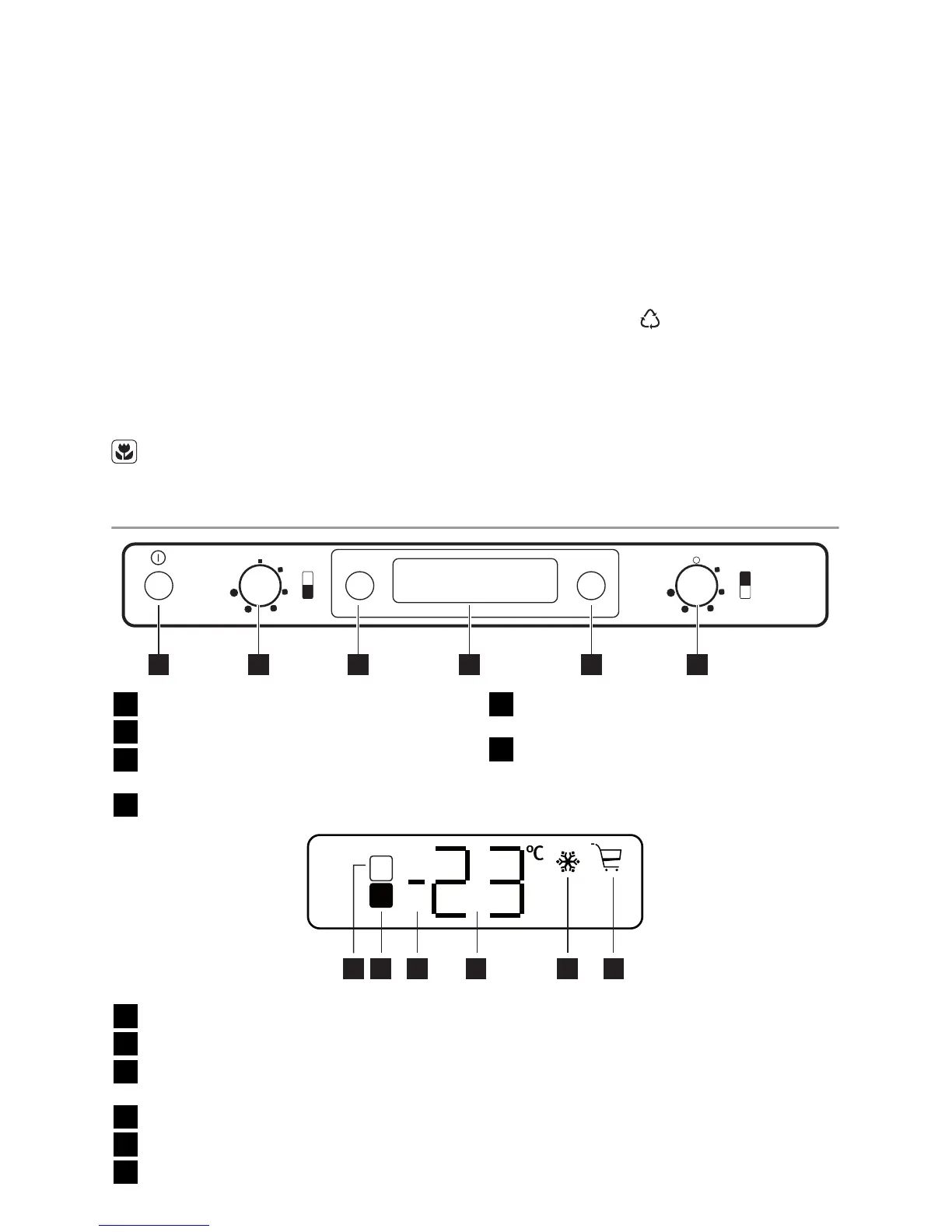
CONTROL PANEL
MODE˚C
123 4 5 6
1
ON/OFF switch
2
Freezer temperature regulator
3
Fridge-Freezer temperature indication
button
4
Display
5
Function button
Alarm reset switch
6
Fridge temperature regulator
DISPLAY
1 2 3 4 5 6
1
Fridge compartment indicator
2
Freezer compartment indicator
3
Positive or negative temperature indica-
tor
4
Temperature indicator
5
Action Freeze function
6
Shopping function
SWITCHING ON
After plugging the plug into the power out-
let, if the display is not illuminated, press
ON/OFF switch.
As soon as the appliance is turned on, the
following signals will appear on the control
panel:
4 electrolux



 To Next Page