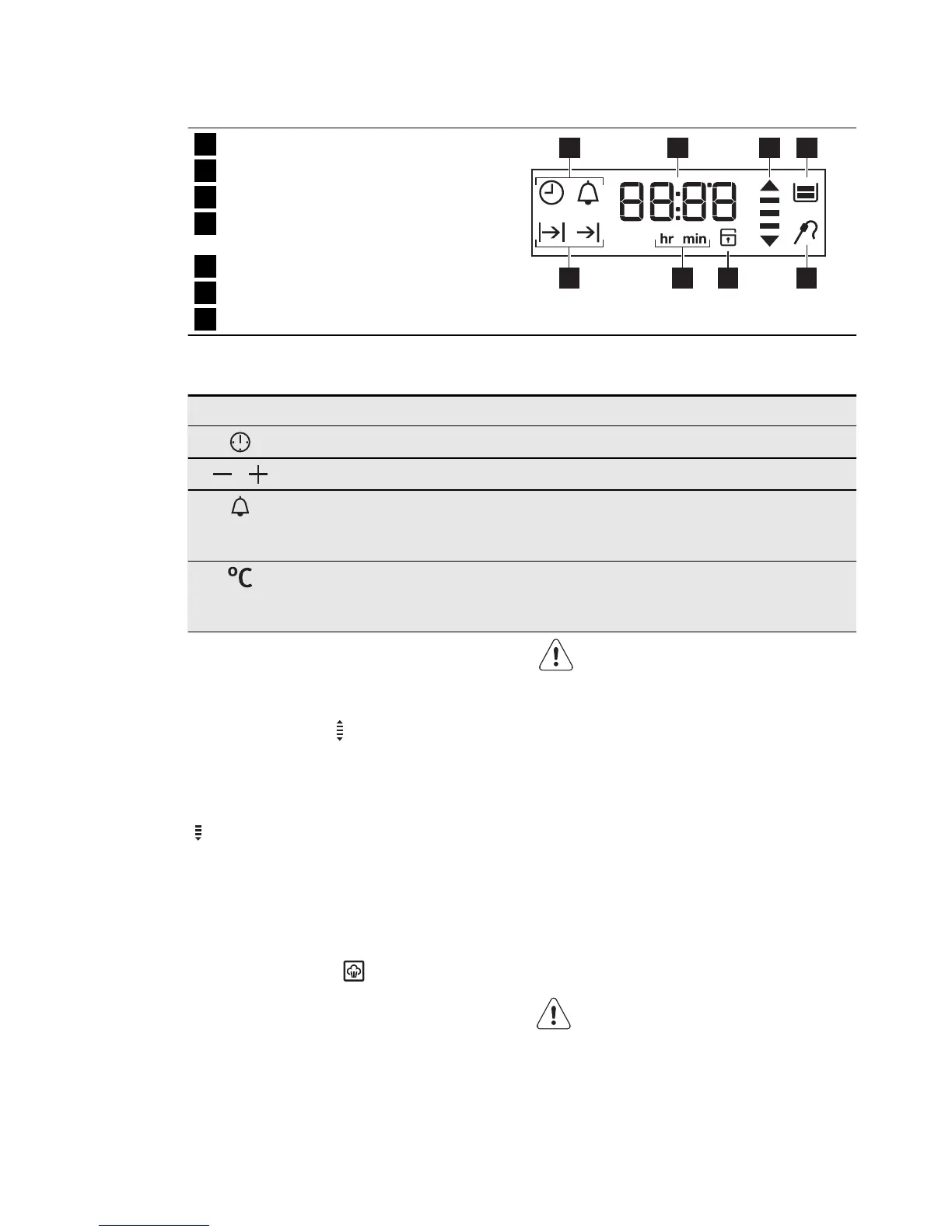
5.4 Display
1
Timer
2
Heat-up and residual heat indicator
3
Water tank (selected models only)
4
Core temperature sensor (selected
models only)
5
Door lock (selected models only)
6
Hours / minutes
7
Clock functions
17 2 3
4567
5.5 Buttons
Button Function Description
Clock To set a clock function.
,
Minus, plus To set the time.
Minute Minder To set the Minute Minder. Hold this button for
more than 3 seconds to activate or deactivate the
oven lamp.
Temperature To check the oven temperature or the core tem-
perature of the food probe (if applicable). Use only
while an oven function is in operation.
5.6 Heat-up and residual heat
indicator
When you activate an oven function, the
bars in the display
come on one by
one. The bars show that the oven temper-
ature increases or decreases.
When you deactivate the appliance, the
display shows the residual heat indicator
if the temperature in the oven is more
than 40 °C. Turn the temperature knob
left or right to show the oven temperature
on the display.
5.7 Steam Cooking
1.
Set the function .
2.
Press the cover of the water drawer
to open it. Fill the water drawer with
water until the Tank Full indicator
comes on. The maximum capacity of
the tank is 900 ml. It is sufficient for
approximately 55 - 60 minutes of
cooking.
Use only water as the liquid. Do
not use filtered (demineralised) or
distilled water. Do not use other
liquids.
Do not put flammable or alcoholic
liquids (grappa, whisky, cognac,
etc.) into the water drawer.
3.
Push the water drawer into its initial
position.
4.
Prepare the food in the correct cook-
ware.
5.
Set the temperature between 130 °C
and 230 °C. Steam cooking does not
give good results in temperatures
above 230 °C.
6.
Empty the water tank after the steam
cooking is completed.
WARNING!
Wait a minimum of 60 minutes af-
ter each use of the True Fan +
Steam function in order to prevent
hot water from exiting the water
outlet valve.
ENGLISH 9







 To Next Page