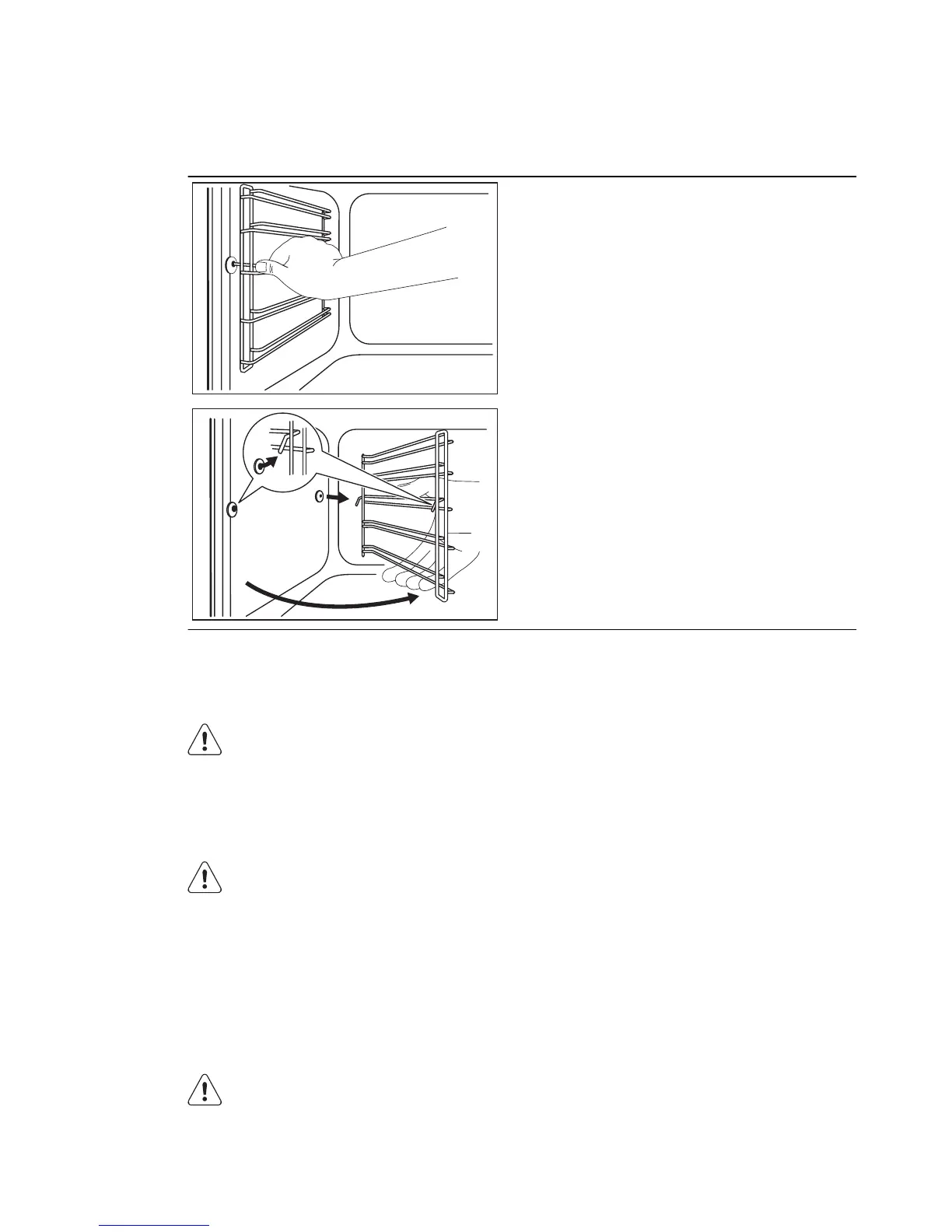
12.3 Shelf supports
Removing the shelf supports
You can remove the shelf supports to
clean the side walls.
1.
Pull the front of the shelf support
away from the side wall.
1
2
2.
Pull the rear end of the shelf support
away from the side wall and remove
it.
Installing the shelf supports
Install the shelf supports in the opposite
sequence.
Valid for telescopic runners:
The retaining pins on the tele-
scopic runners must point to the
front.
12.4 Lamp
WARNING!
There is a risk of an electrical
shock.
The lamp and the lamp glass cov-
er can be hot.
Before you change the lamp:
• Deactivate the appliance.
• Remove the fuses from the fuse box or
deactivate the circuit breaker.
CAUTION!
Put a cloth on the bottom of the
interior of the appliance. It pre-
vents damage to the lamp glass
cover and the cavity.
Always use the same lamp type.
Replacing the lamp at the cavity
ceiling:
1.
Turn the lamp glass cover counter-
clockwise to remove it.
2.
Clean the glass cover.
3.
Replace the lamp with a suitable 300
°C heat-resistant lamp.
4.
Install the glass cover.
Replacing the lamp on the left side of
the cavity.
1.
Remove the left shelf support.
2.
Use a narrow, blunt object (e.g. a tea-
spoon) to remove the glass cover.
Clean the glass cover.
36
www.electrolux.com





 To Next Page