Use maximum 6% acidity vinegar without
any additives.
2. Let the vinegar dissolve the limestone
residue at the ambient temperature for 30
minutes.
3. Clean the cavity with warm water and a
soft cloth.
11.3 Removing the shelf supports
Remove the shelf supports to clean the
appliance.
1. Turn off the appliance and wait until it is
cold.
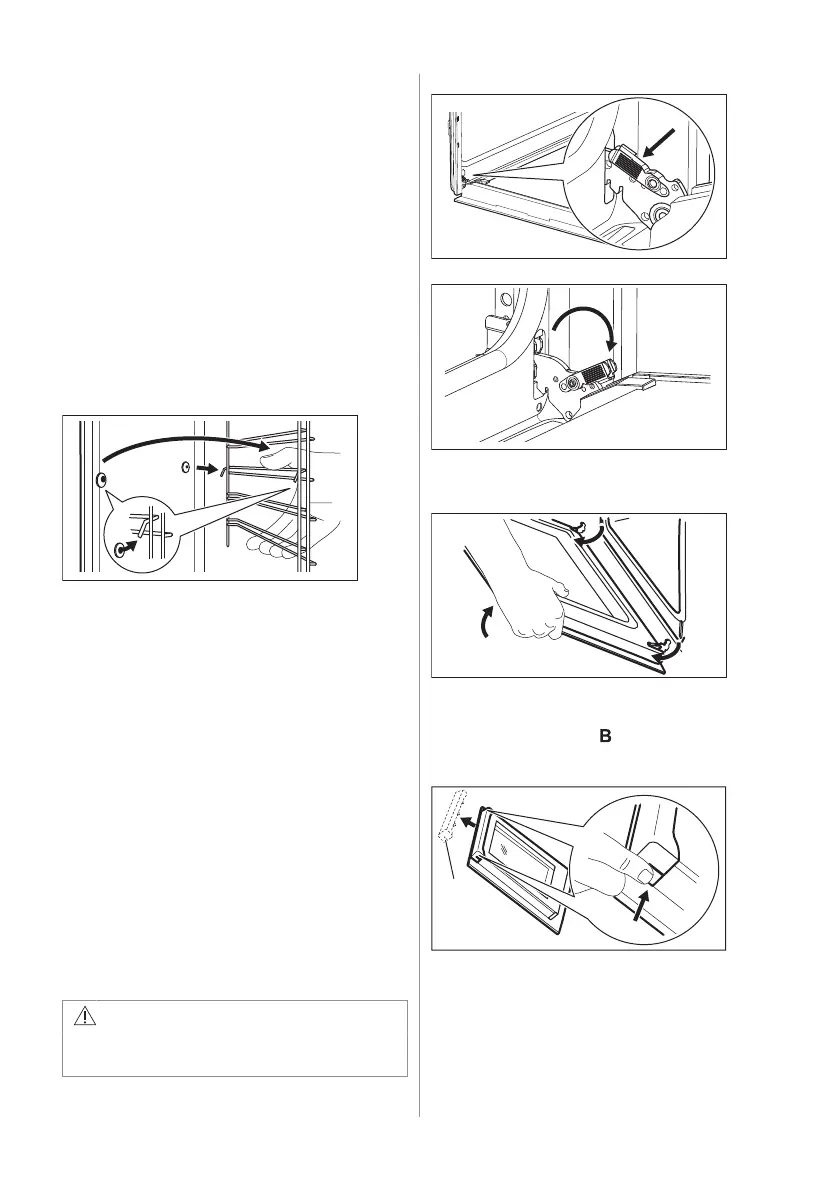
2. Pull the front of the shelf support away
from the side wall.
3. Pull the rear end of the shelf support
away from the side wall and remove it.
4. Install the shelf supports in the opposite
sequence.
The retaining pins on the telescopic runners
must point to the front.
11.4 Aqua Clean
This cleaning procedure uses humidity to
remove remaining fat and food particles from
the appliance.
1. Pour water into the cavity embossment:
200 ml.
2. Wait until the appliance is cold. Dry the
cavity with a soft cloth.
11.5 Removing and installing door
The oven door has two glass panels. You can
remove the oven door and the internal glass
panel to clean it. Read the whole "Removing
and installing door" instruction before you
remove the glass panels.
CAUTION!
Do not use the appliance without the
glass panels.
1. Open the door fully and hold both hinges.
2. Lift and pull the latches until they click.
3. Close the oven door halfway to the first
opening position. Then lift and pull to
remove the door from its seat.
4. Put the door on a soft cloth on a stable
surface.
5. Hold the door trim on the top edge of
the door at the two sides and push
inwards to release the clip seal.
6. Pull the door trim to the front to remove it.
7. Hold the door glass panel by its top edge
and carefully pull it out. Make sure the
glass slides out of the supports
completely.
14 ENGLISH



 To Next Page