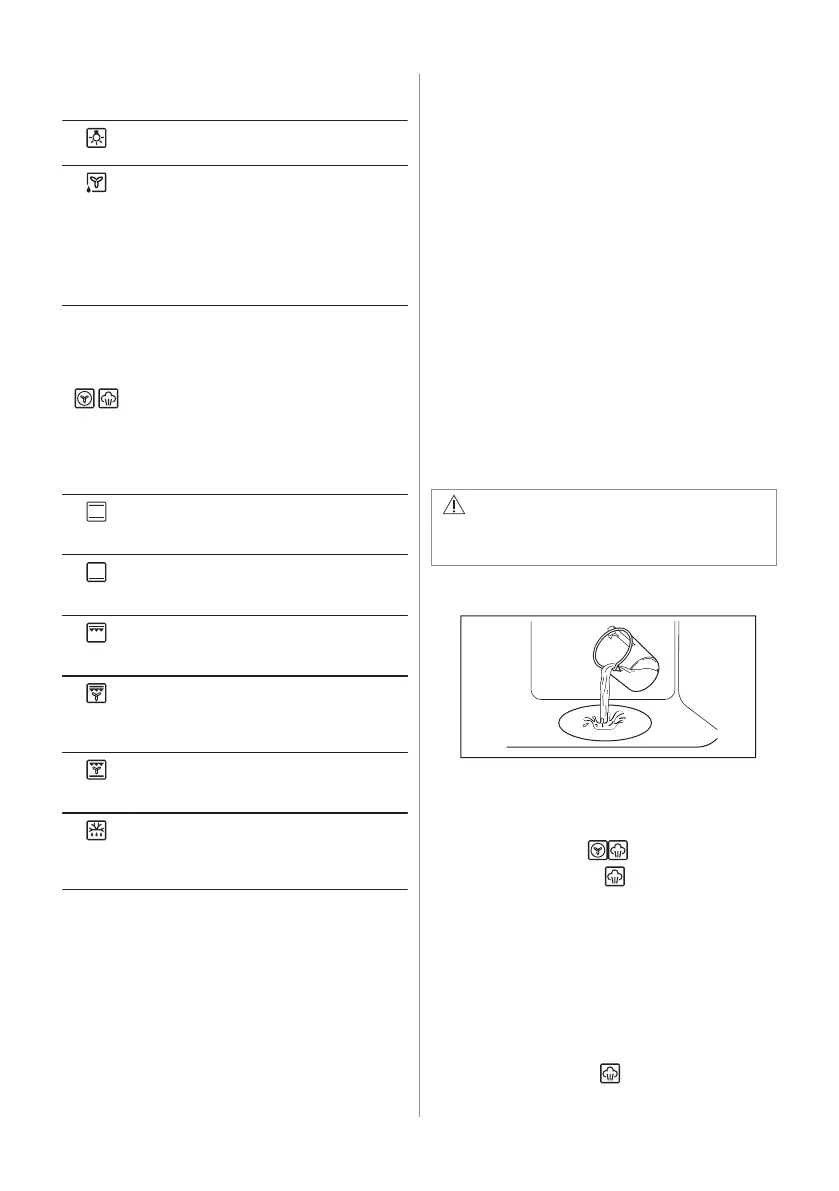
6.1 Heating functions
Light
To turn on the lamp.
Moist Fan Baking
This function is designed to save energy
during cooking. When you use this func‐
tion, the temperature inside the appliance
may differ from the set temperature. The
heating power may be reduced. For more
information refer to "Daily Use" chapter,
Notes on: Moist Fan Baking.
True Fan Cooking / True Fan Cooking
PLUS / Aqua Clean
To roast meat and bake cakes. Set a low‐
er temperature than for Conventional
Cooking as the fan distributes heat evenly
in the oven interior. / To add humidity dur‐
ing the cooking. To get the right colour and
crispy crust during baking. To give more
juiciness during reheating.
Refer to "Care and cleaning" chapter for
more information about: Aqua Clean.
Conventional Cooking
To bake and roast food on one shelf posi‐
tion.
Bottom Heat
To bake cakes with crispy bottom and to
preserve food.
Fast Grilling
To grill thin pieces of food in large quanti‐
ties and to toast bread.
Turbo Grilling
To roast large meat joints or poultry with
bones on one shelf position. To bake gra‐
tins and to brown.
Pizza Function
To bake pizza and other dishes that re‐
quire more heat from below.
Defrost
To defrost food (vegetables and fruit). The
defrosting time depends on the amount
and size of the frozen food.
6.2 Notes on: Moist Fan Baking
This function was used to comply with the
energy efficiency class and ecodesign
requirements (according to EU 65/2014 and
EU 66/2014). Tests according to: IEC/EN
60350-1.
The oven door should be closed during
cooking so that the function is not interrupted
and the oven operates with the highest
energy efficiency possible.
For the cooking instructions refer to "Hints
and tips" chapter, Moist Fan Baking. For
general energy saving recommendations
refer to "Energy Efficiency" chapter, Energy
saving tips.
6.3 Setting a heating function
1. Turn the knob for the heating functions to
select a heating function.
2. Turn the control knob to select the
temperature.
3. When the cooking ends, turn the knobs to
the off position to turn off the appliance.
6.4 Setting the function: True Fan
Cooking PLUS
This function increases humidity during
cooking.
WARNING!
Risk of burns and damage to the
appliance.
1. Make sure that the appliance is cold.
2. Fill the cavity embossment with tap water.
The maximum capacity of the cavity
embossment is 250 ml. Do not refill the
cavity embossment during cooking or
when the appliance is hot.
3. Set the function:
.
4. Press: Plus Steam .
It works only with the function: True Fan
Cooking PLUS. The indicator turns on.
5. Turn the control knob to set temperature.
6. Preheat the empty appliance for 10 min to
create humidity.
7. Place the food inside the appliance. Do
not open the oven door during cooking.
8. Turn the knob for the heating functions to
the off position to turn off the appliance.
9. Press Plus Steam
.
ENGLISH 9



 To Next Page