4. CONTROL PANEL
4.1 Turning the appliance on and off
To turn on the appliance:
1. Press the knobs. The knobs come out.
2. Turn the knob for the heating functions to
select a function.
3. Turn the control knob to adjust settings.
To turn off the appliance: turn the knob for the
heating functions to the off position .
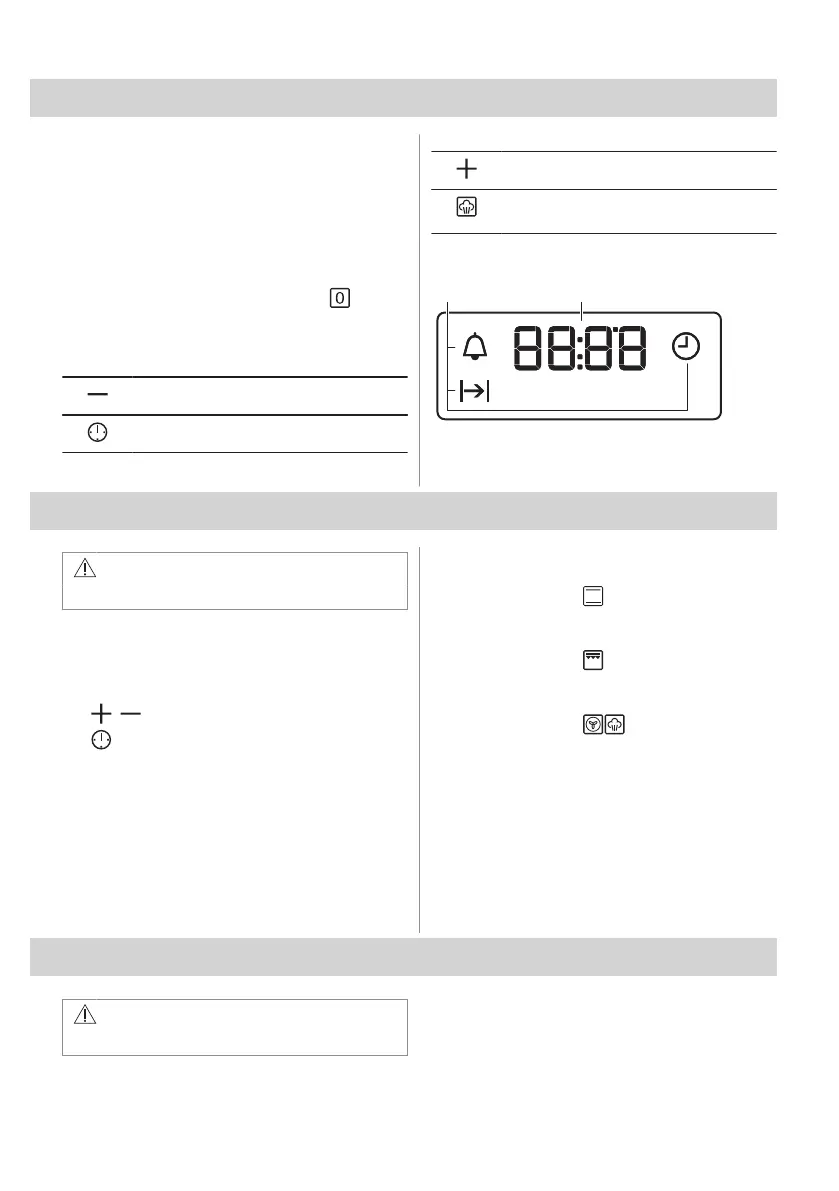
4.2 Sensor fields / Buttons
To set the time.
To set a clock function.
To set the time.
To turn the True Fan Cooking PLUS func‐
tion on and off.
4.3 Display
A. Clock functions
B. Timer
5. BEFORE FIRST USE
WARNING!
Refer to Safety chapters.
5.1 Setting the time
After the first connection to the mains, wait
until the display shows: "12:00".
1. , - press to set the time.
2. - press to confirm it or the set time of
day will be saved automatically after 5
seconds.
5.2 Initial preheating and cleaning
Preheat the empty appliance before the first
use and contact with food. The appliance can
emit unpleasant smell and smoke. Ventilate
the room during preheating.
1. Remove all accessories and removable
shelf supports from the appliance.
2. Set the function . Set the maximum
temperature. Let the appliance operate
for 1 h.
3. Set the function . Set the maximum
temperature. Let the appliance operate
for 15 min.
4. Set the function . Set the maximum
temperature. Let the appliance operate
for 15 min.
5. Turn off the appliance and wait until it is
cold.
6. Clean the appliance and the accessories
only with a microfibre cloth, warm water
and a mild detergent.
7. Put the accessories and removable shelf
supports back to their initial position.
6. DAILY USE
WARNING!
Refer to Safety chapters.
8 ENGLISH



 To Next Page