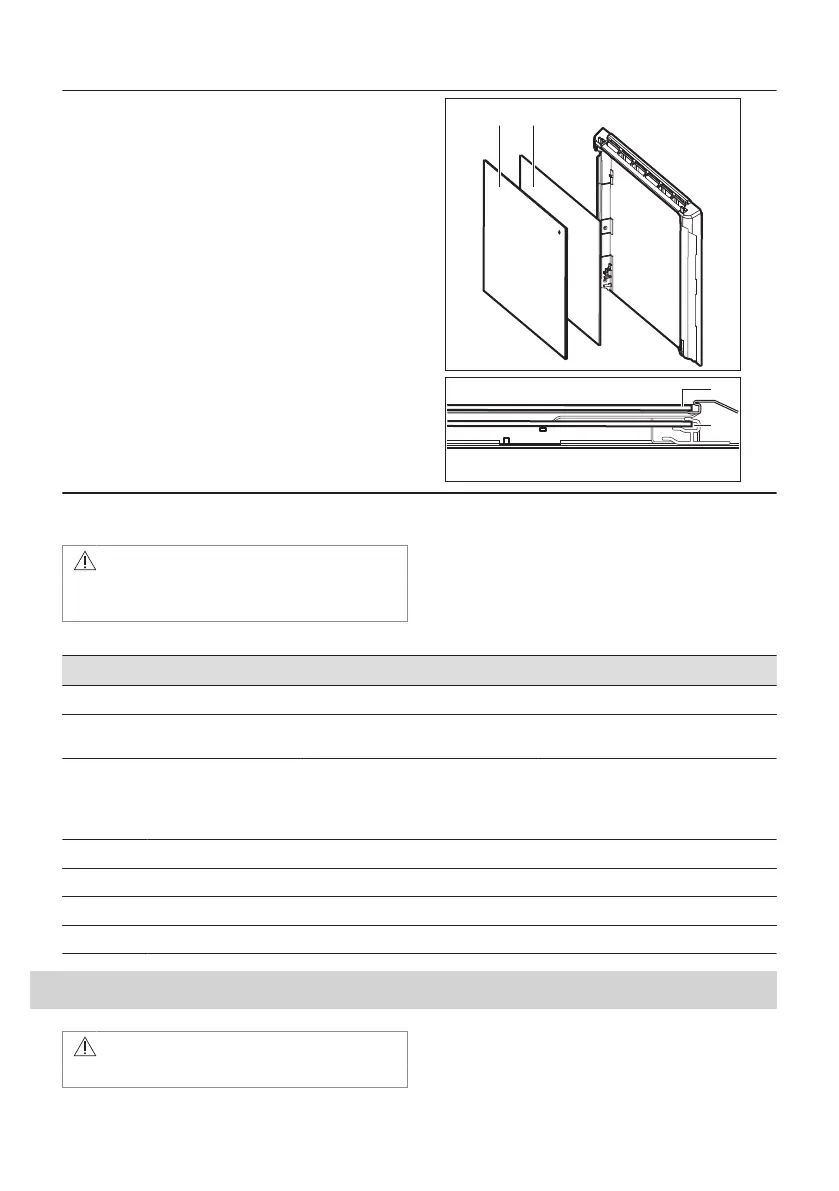
Make sure that you put the glass panels (A, B and C)
back in the correct sequence. Check for the symbol /
printing on the side of the glass panel, each of the
glass panels looks different to make the disassembly
and assembly easier.
When installed correctly the door trim clicks.
Make sure that you install the middle panel of glass in
the seats correctly.
12.6 How to replace: Lamp
WARNING!
Risk of electric shock.
The lamp can be hot.
Before you replace the lamp:
Step 1 Step 2 Step 3
Turn off the oven. Wait until the
oven is cold.
Disconnect the oven from the
mains.
Put a cloth on the bottom of the cav‐
ity.
Back lamp
Step 1 Turn the glass cover to remove it.
Step 2 Clean the glass cover.
Step 3 Replace the lamp with a suitable 300 °C heat-resistant lamp.
Step 4 Install the glass cover.
13. TROUBLESHOOTING
WARNING!
Refer to Safety chapters.
24 ENGLISH



 To Next Page