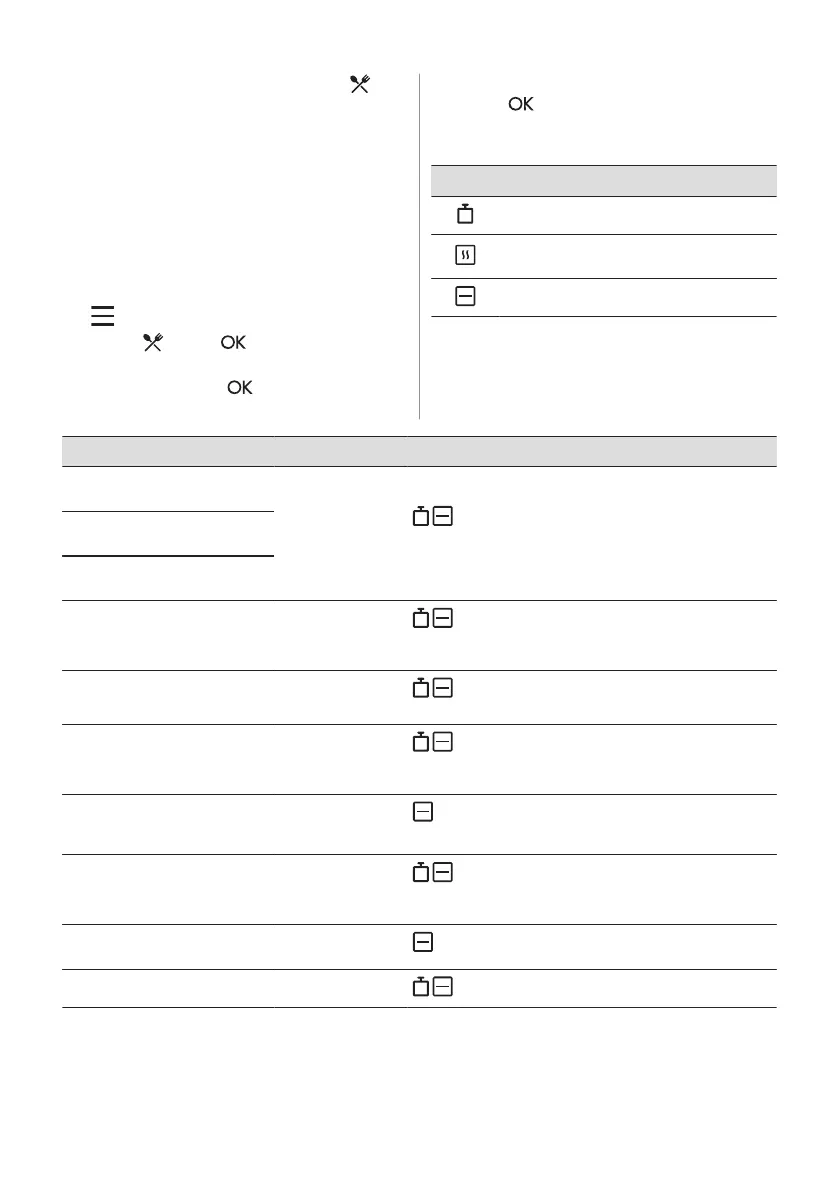
7.4 Setting: Assisted Cooking
Each dish in this submenu has a
recommended heating function and
temperature. You can adjust the time and the
temperature during cooking.
When the function ends, check if the food is
ready.
For some of the dishes you can also cook
with Weight Automatic.
1. Turn the knob for the heating functions to
to enter Menu.
2. Select . Press .
3. Turn the control knob to select a number
of the dish. Press .
4. Place the food inside the appliance.
Press .
Menu: Assisted Cooking
Legend
Weight Automatic available.
Preheat the appliance before you start
cooking.
Shelf level.
The display shows P and a number of the
dish that you can check in the table.
Dish Weight Shelf level / Accessory
P1
Fillet of beef, rare
(slow cooking)
0.5 - 1.5 kg; 5 - 6
cm thick pieces
2; roasting dish on wire shelf
Fry the meat for a few minutes on a hot pan. Insert to the
appliance.
P2
Fillet of beef, medi‐
um (slow cooking)
P3
Fillet of beef, done
(slow cooking)
P4
Veal roast (e.g. shoul‐
der)
0.8 - 1.5 kg; 4 cm
thick pieces
2; roasting dish on wire shelf
Fry the meat for a few minutes on a hot pan. Insert to the
appliance.
P5
Pork roast neck or
shoulder
1.5 - 2 kg
2; roasting dish on wire shelf
Turn the meat after half of the cooking time.
P6
Pork loin, fresh 1 - 1.5 kg; 5 - 6 cm
thick pieces
2; baking tray
Fry the meat for a few minutes on a hot pan. Insert to the
appliance.
P7
Pork spare ribs 2 - 3 kg; use raw, 2
- 3 cm thin spare
ribs
2; roasting dish on wire shelf
Add liquid to cover the bottom of a dish.
P8
Whole chicken 1 - 1.5 kg; fresh
2; roasting dish on wire shelf
Turn the chicken after half of the cooking time to get an
even browning.
P9
Chicken breast 180 - 200 g per
piece
2; baking tray
P10
Meat loaf 1 kg
2; baking tray
ENGLISH 11



 To Next Page