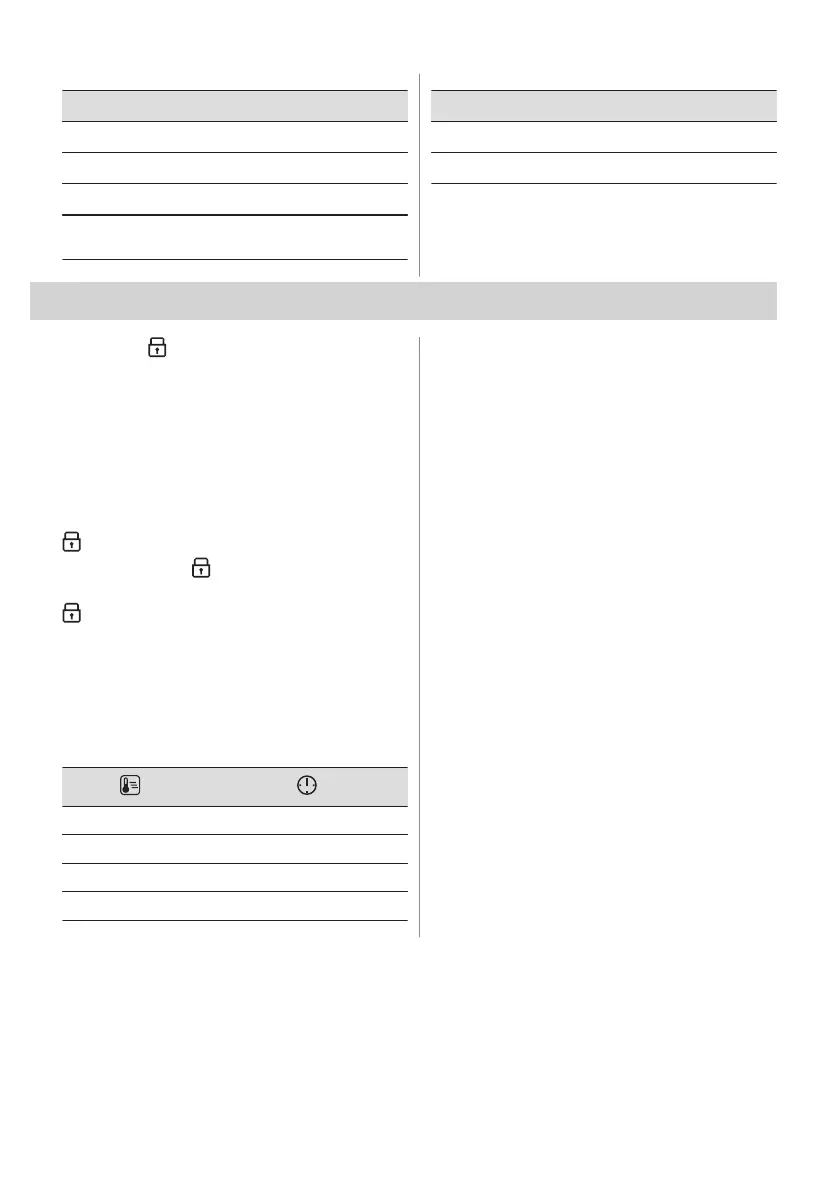
Setting Value
06
Light On / Off
07
Fast Heat Up On / Off
08
Cleaning Reminder On / Off
09
Demo mode Activation code:
2468
Setting Value
10
Software version Check
11
Reset all settings Yes / No
8. ADDITIONAL FUNCTIONS
8.1 Lock
This function prevents an accidental change
of the appliance function.
Turn it on when the appliance works - the set
cooking continues, the control panel is
locked.
Turn it on when the appliance is off - it cannot
be turned on, the control panel is locked.
- press and hold to turn on the function.
A signal sounds. - flashes 3 times when
the lock is turned on.
- press and hold to turn off the function.
8.2 Automatic switch-off
For safety reasons, if the heating function is
active and no settings are changed, the
appliance will turn off automatically after a
certain period of time.
(°C) (h)
30 - 115 12.5
120 - 195 8.5
200 - 245 5.5
250 3
If you intend to run a heating function for a
duration exceeding the automatic switch-off
time, set the cooking time. Refer to the 'Clock
functions' chapter.
The Automatic switch-off does not work with
the functions: Light, Time Delayed Start.
8.3 Cooling fan
When the appliance operates, the cooling fan
turns on automatically to keep the surfaces of
the appliance cool. If you turn off the
appliance, the cooling fan can continue to
operate until the appliance cools down.
ENGLISH 13



 To Next Page