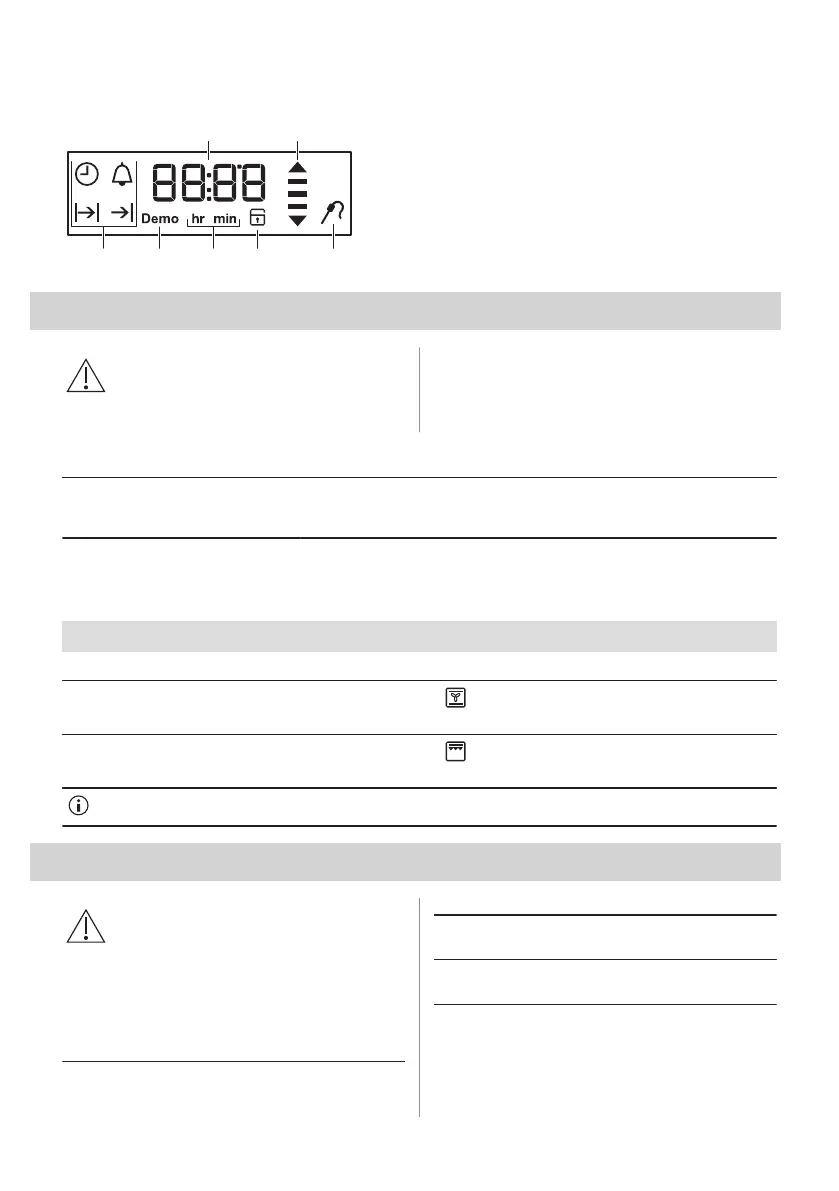
5.2 Display
A. Timer / Temperature
B. Heat-up and residual heat indicator
C. Food Sensor (selected models only)
D. Door lock (selected models only)
E. Hours / minutes
F. Demo Mode
G. Clock functions
6. BEFORE FIRST USE
WARNING!
Refer to Safety chapters.
Set the time before you use the oven.
6.1 Initial Cleaning
Step 1 Step 2 Step 3
Remove all accessories and remov‐
able shelf supports from the oven.
Clean the oven and the accessories
with a soft cloth, warm water and a
mild detergent.
Place the accessories and the re‐
movable shelf supports in the oven.
6.2 Initial preheating
Preheat the empty oven before the first use.
Step 1 Remove all accessories and removable shelf supports from the oven.
Step 2
Set the maximum temperature for the function: .
Let the oven operate for 1 h.
Step 3
Set the maximum temperature for the function: .
Let the oven operate for 15 min.
The oven can emit an odour and smoke during preheating. Make sure that the room is ventilated.
7. DAILY USE
WARNING!
Refer to Safety chapters.
7.1 How to set: Heating function
Step 1 Turn the knob for the heating functions
to select a heating function.
Step 2 Turn the control knob to select the tem‐
perature.
Step 3 When the cooking ends, turn the knobs
to the off position to turn off the oven.
10 ENGLISH



 To Next Page