ENGLISH 17
Press the Finish In touchpad to choose
the end time as you wish. The display
shows the number of hours and the
indicator beside the touchpad is on.
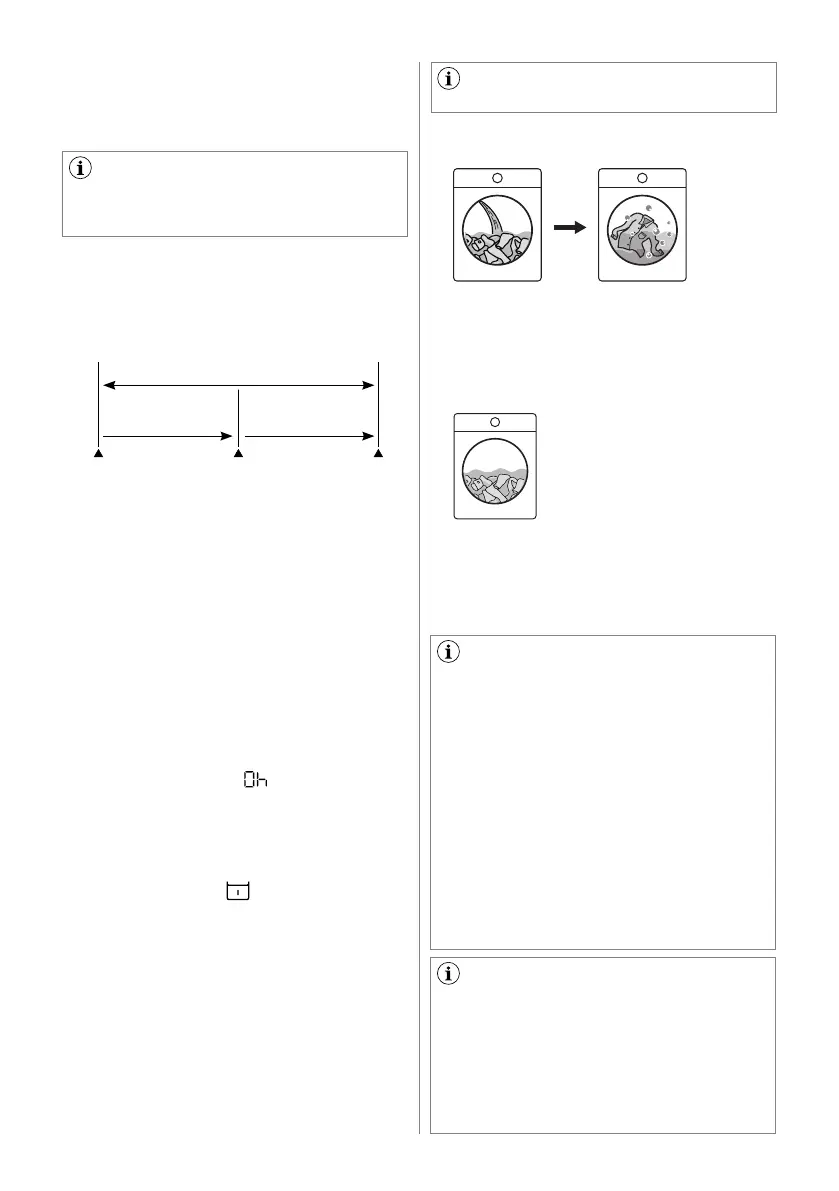
For example, if the programme duration
of your selected programme is 3.20 hours
and you define the "Finish In" time to 6
hours. This means your wash programme
will finish in 6 hours. (See diagram)
"Finish In" Time : 6 hrs.
Countdown
2.40 hrs.
Pressed
Start/Pause
Start the
Programme
End of
Cycle
Working Cycle
3.20 hrs.
After selecting Finish In time, press Start/
Pause touchpad to start the programme.
Machine will then countdown and update
time on the display every hours until it
reaches the starting point of the wash
cycle.
If you wish to modify or cancel Finish
In option after starting the programme,
follow the steps below:
- Set the washing machine to PAUSE by
pressing "Start/Pause" touchpad;
- Deselect this option by pressing "Finish
In" touchpad repeatedly till the display
shows delay time "
";
- Press the "Start/Pause" to start the
programme.
This option must be selected after
choosing the wash programme, and
before pressing the "Start/Pause"
touchpad.
This option allows you to soak heavily
soiled clothes and stained items at
the beginning of the wash before main
washing phase.
This option will increase the duration
of the programme selected for about
50 minutes. And uses more water from
normal wash. The process is as follows.
Soak Touchpad ( )
Add detergent for "Soak" at the
"Prewash" compartment.
1. Fill water and turn the washing drum
(this takes about 20 minutes).
After press the Start/Pause touchpad,
the machine will start to add water to
the washing drum, which will start to
rotate slowly to dissolve detergent
and evenly distribute clothes.
2. Soak (this takes about 30 minutes).
The machine will enter the
process of soaking, The
washing drum will stop and
rotate once in a while in
order to distribute clothes.
3. Once the soaking process complete,
the machine will check the water
level again and will start the selected
programme and continue by using the
same soak water.
If you do not wish to use the soak
water to wash cloth, please follow the
steps below:
1. Press Start/Pause to pause the
washing machine. Then rotate the
programme knob to "Off" to turn off
the machine.
2. Add detergent to the main wash
compartment and select the
programme of your choice. Press
Start/Pause again to start the
selected programme.
The machine will detect and drain
the water in the washing drum out
automatically and fill in water once
again to be used for washing.
Any temperature may be selected,
but "Cold" water is recommended with
this cycle as hotter water may set some
stains.
Use the amount of detergent
recommended for a normal wash cycle.
If desired, use a bleach or a soaking
agent safe for the fabric, by pouring it
into the detergent compartment.



 To Next Page