Child Lock Option (See page 16)
6
www.electrolux.com
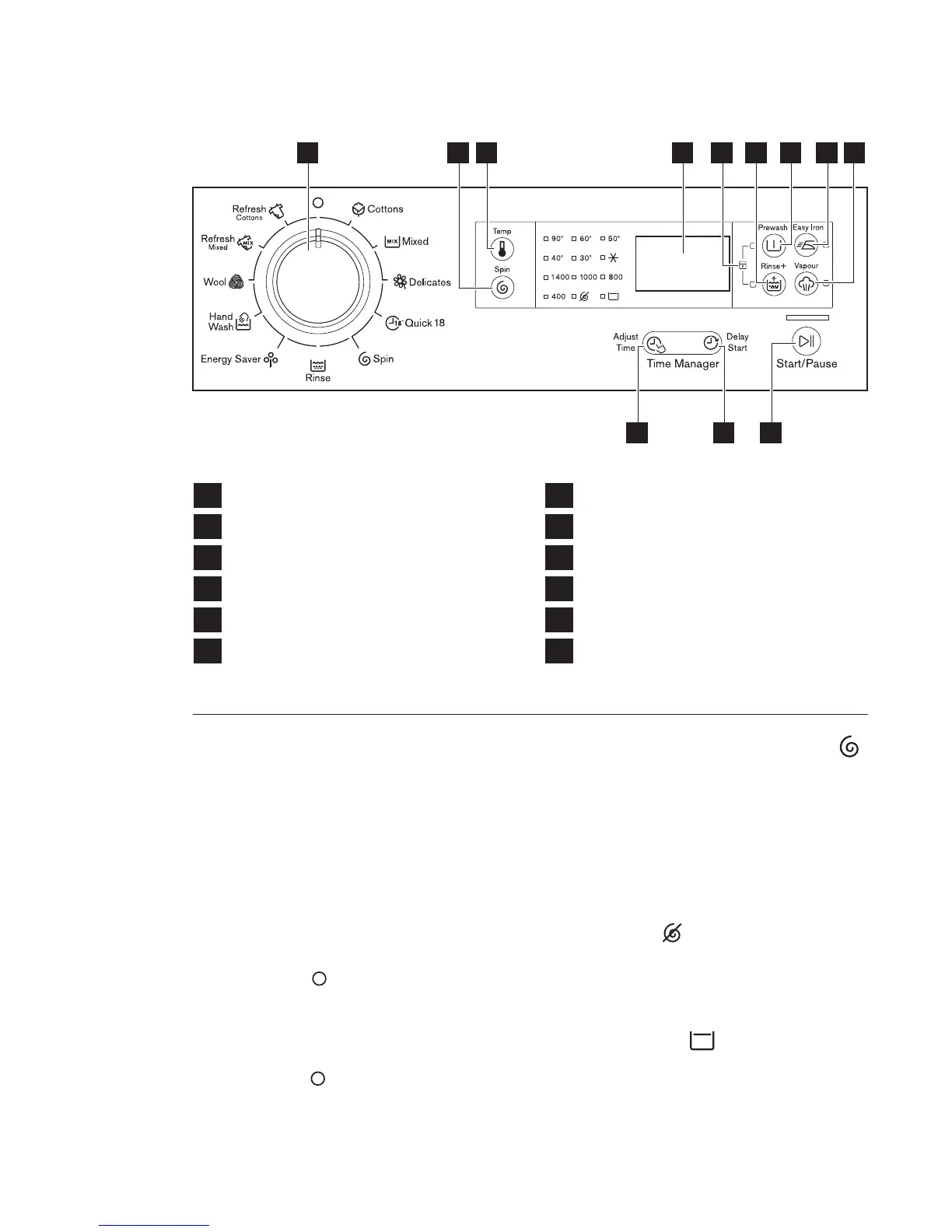
3.1 Program Selector Knob
Turn this knob to select a program.
The washing machine will propose
a temperature and automatically
select the spin value provided for
the program you have chosen.
(See page 9)
The selector knob can be turned
either clockwise or anticlockwise.
Position “ ” to reset program/
switching OFF the machine.
At the end of the program the
selector dial must be turned to
position “ ”, to switch the
machine off.
3.2 Spin Selection Touchpad
Press this touchpad repeatedly to
increase or decrease the spin
speed, if you want your laundry to
be spun at a speed different from
the one proposed by the washing
machine.
No spin option eliminates all the
spin phases and increases the
number of rinses.
No Spin
1
2
Program Selector Knob
3
4
Spin Selection Touchpad
5
Temperature Touchpad
6
Adjust Time Touchpad
Delay Start Touchpad
7
Display
8
Rinse Plus Touchpad
9
Prewash Touchpad
10
Easy Iron Touchpad
11
Vapour Touchpad
12
Start/Pause Touchpad
11
4 5
1 2 86 712 9 103
CONTROL PANEL3.
By selecting this option the water of
the last rinse is not emptied out and
the drum turns regularly to prevent
the laundry creasing.
Rinse Hold



 To Next Page