Heavy Duty
6
1
5432
Remaining Time
8 9
7
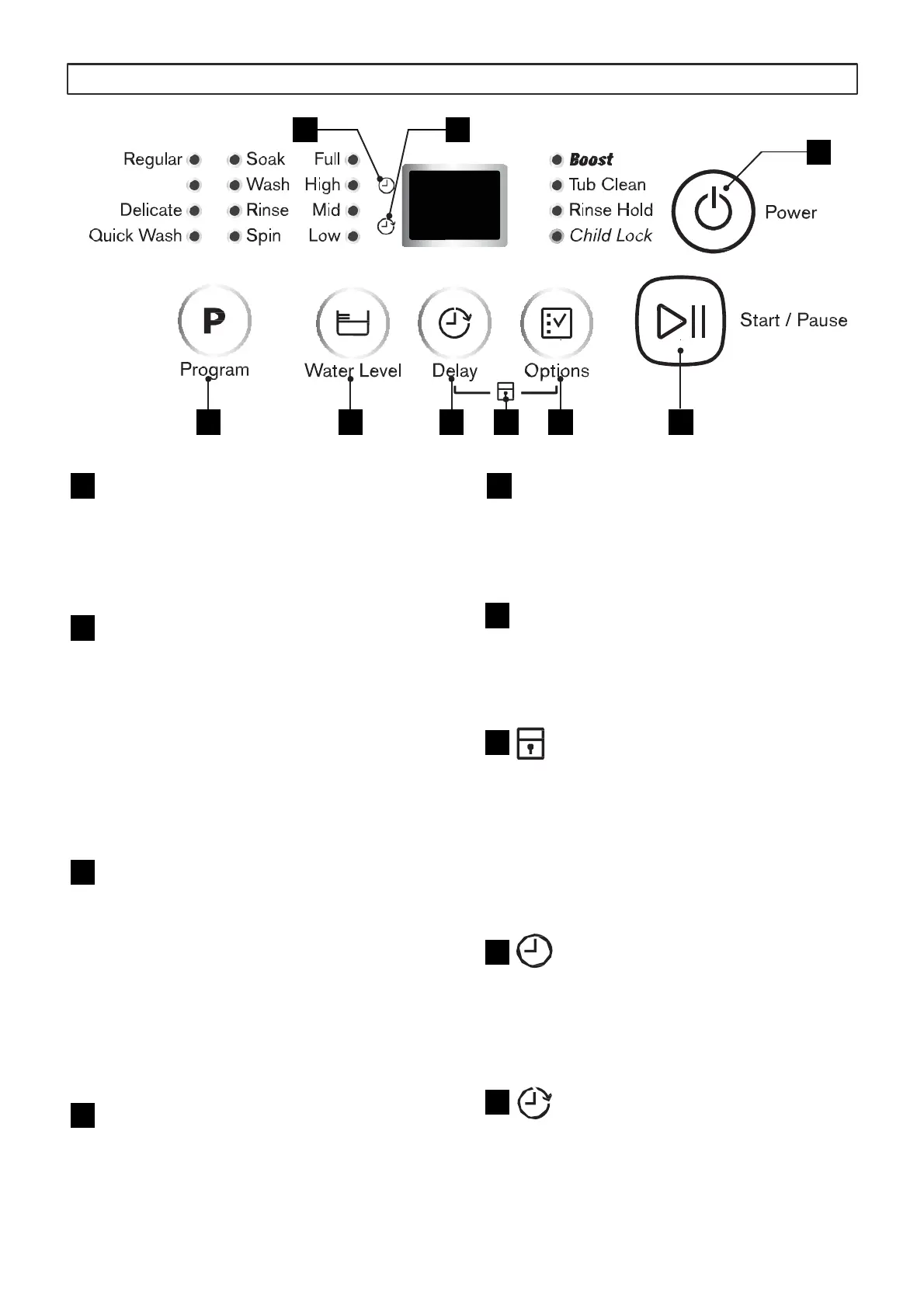
Options
This button is used for selecting
additional options as you require.
Start/Pause
This button is used to start or pause
the washing cycle.
Child Lock
Press “Delay” and “Option” button
together during machine operation to
turn on/off the Child Lock option. The
Child Lock option is indicated by the
LED light.
Time remaining
Time show under this icon represent
the remaining time required by the
machine to finish the washing cycle.
Delay time
Time show under this icon represent
the remaining time before the
machine starts the washing cycle.
Power On/Off
After the machine is switched on and
no selection is made within 5 minutes,
machine will automatically power off.
Program Selector
This button is used for Program
selection. Default program is Regular
with the following program Sequence,
RegularRegular + Soak
Heavy Duty Heavy Duty +Soak
DelicateQuick WashWashRinse
and Spin Spin
Water Level
This button allows you to manually
select your required water level if the
automatic selected level in “Regular”
program is not your preferred. You
can also adjust the water level for
“Delicate” and “Quick Wash”.
Delay
This button allows you to delay the
start of the washing cyle from 1hr up
to 18hr.
1
2
3
4
5
6
7
8
9
CONTROL PANEL
6




 To Next Page