13ENGLISH
Fig. 20
Fig. 21
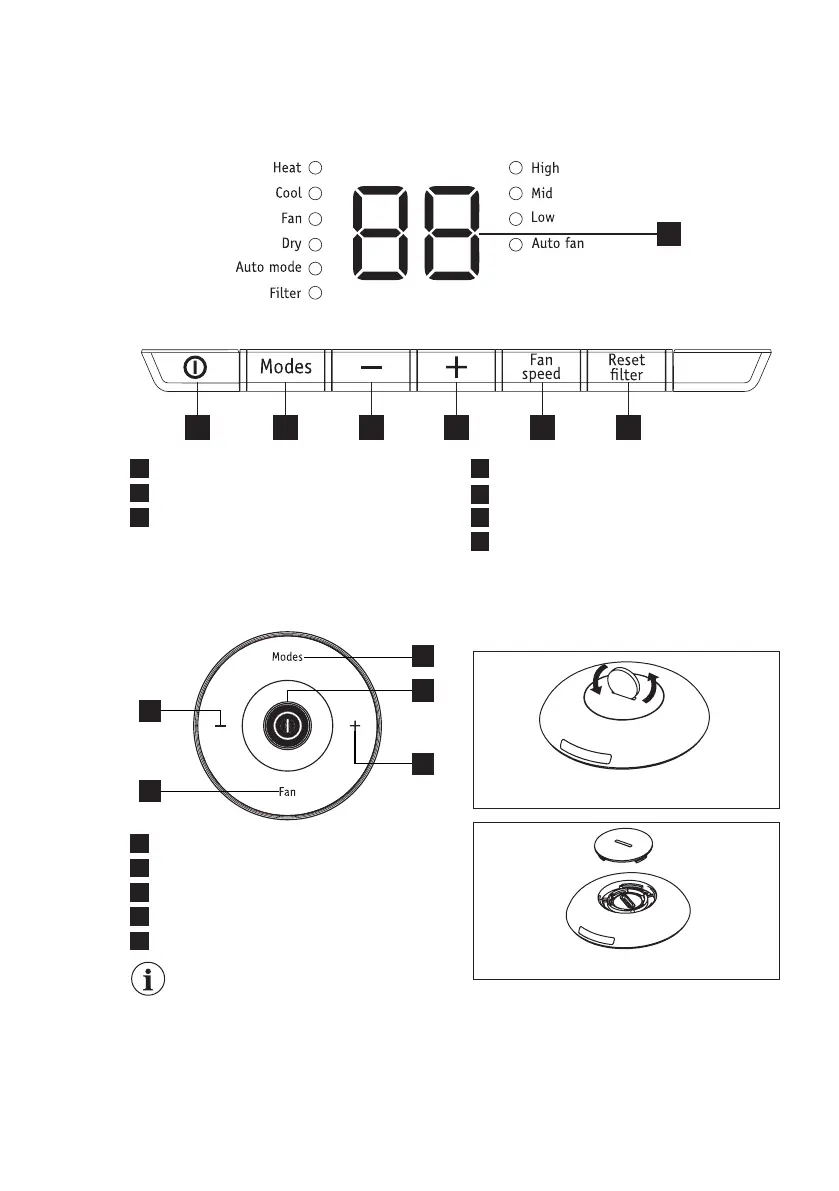
1. Turn over the remote control� In the
button of the remote control there is a
slot�
2. Use a coin or something like that to
rotate the back cover anti-clockwise to
open it�(Fig�20 & 21)
3. Use the same way to open the
protecting cover inside and take out the
battery�(Fig�22)
6. AIR CONDITIONER FEATURES
6.1 CONTROL PANEL
6.2 Remote Control
1
234567
1 4
2
7
6
3
5
Displays temperature Increase temperature
Filter reset button (hold 3 secs to reset)
Turns unit on or off
Sets fan speed
Decrease temperature
Sets mode
Press to turn on or off unit
Press to select fan speeds
Press to increase temperature setting
Press to decrease temperature setting
Press to select modes
2
4
3
5
1
Open the back covers and remove
the protecting lm to activate the
remote control, when use for the
rst time�
To replace the battery



 To Next Page