• clean the oven floor with warm water
and mild detergent.
• clean the inner door glass with warm
water and soft cloth.
1. Set the function .
2. Set the oven temperature to 250 °C
and let the oven operate for 1 hour.
3. Turn off the oven.
4. When the oven cools down, clean the
cavity with a wet soft cloth.
Spots or discolouration of the catalytic
coating have no effect on Catalytic
cleaning.
11.6 Removing and installing
door
The oven door has two glass panels.
You can remove the oven door and the
internal glass panel to clean it. Read the
whole "Removing and installing door"
instruction before you remove the glass
panels.
The oven door may close if
you try to remove the
internal glass panel before
you remove the oven door.
CAUTION!
Do not use the oven without
the internal glass panel.
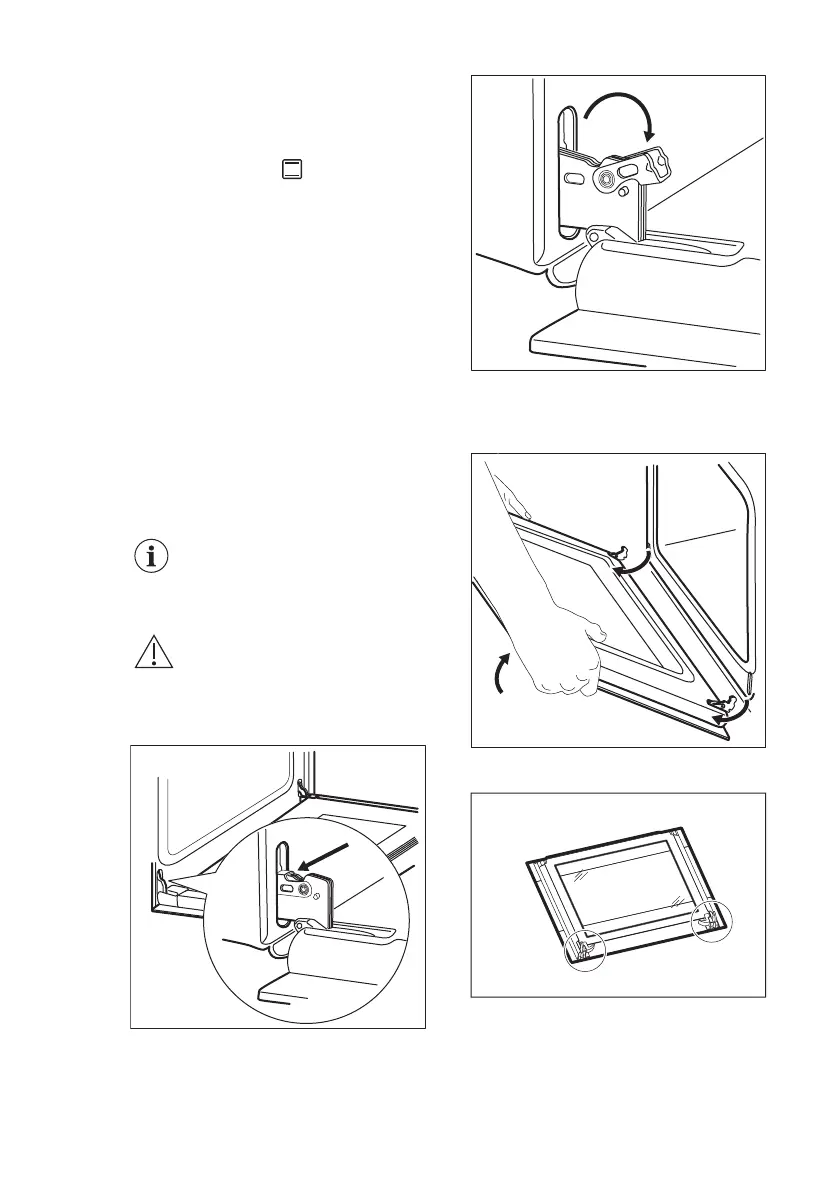
1. Open the door fully and hold both
hinges.
2. Lift and turn the levers fully on both
hinges.
3. Close the oven door halfway to the
first opening position. Then lift and
pull forward and remove the door
from its seat.
4. Put the door on a soft cloth on a
stable surface.
5. Release the locking system to
remove the internal glass panel.
ENGLISH 23



 To Next Page