15
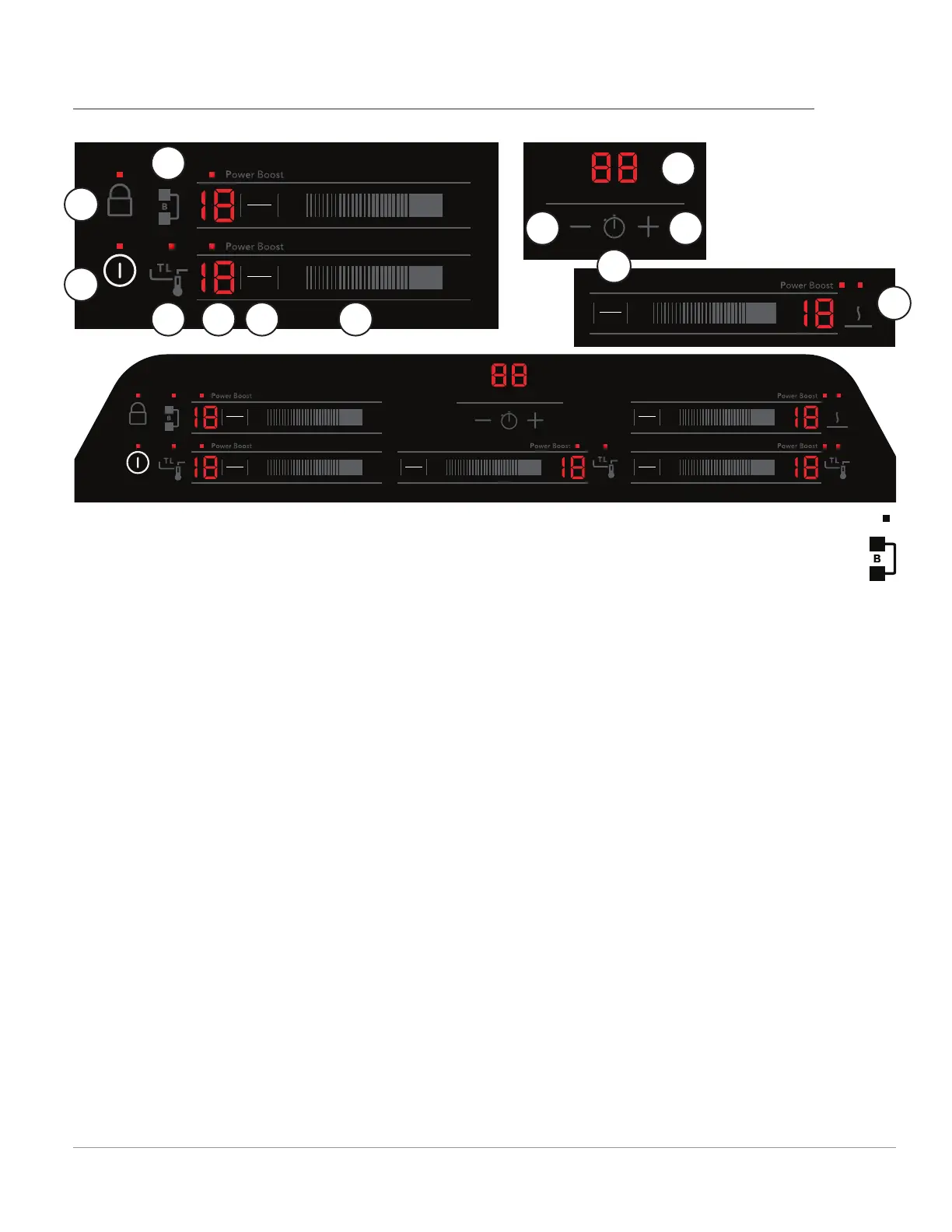
SETTING SURFACE CONTROLS
1. Power: Press to turn on or turn o the cooktop.
2. Lock: Lock the cooktop controls to prevent
accidental activation of cooking zones.
3. Cooking Zone Indicator: The LEDs (4 or 5
depending on the model) indicate cook zones.
The one corresponding to the control’s cook
zone turns red.
4. TempLock: Activates TempLock feature. When
pressed, this feature uses a temperature sensor
to monitor heat and adjust the power to main-
tain a consistent temperature during cooking.
See page 17.
5. Cooking Zone On/O : When cookware is on
the cooking zone, press to turn the zone ON/
OFF.
6. Cooking Zone Power Level: Slide a fi nger
across or press a number to set the power level.
Level 1 is low, level 9 is high, and P is the most
powerful setting.
7. Bridge: The Bridge indicator is visible on Zone
1 if both left cooking zones detect cook-
ware. The Bridge function makes the two
left cooking zones work together to heat a
long piece of cookware, like a griddle.
8. Timer Indicator: Shows the time currently
left on the timer.
9. Serve Warm: Activates the Serve Warm feature.
Cooktop Controls
Serve Warm will set all of the cooking zones to
a low power level to keep foods warm.
a. Reduce Time (-): Press to reduce the amount of time
on the timer.
b. Timer On/Off: Press to turn the countdown timer on
or off.
c. Increase Time (+): Press to increase the amount of
time on the timer.
Timer
ON/OFF
LOCK
POWER
ON
OFF
ON
OFF
ON
OFF
ON
OFF
ON
OFF
1P9
1P
9 1P9
1P
9
1P
9
Timer
ON/OFF
LOCK
POWER
ON
OFF
ON
OFF
1P9
1P
9
ON
OFF
1P9
1
2
3
4 5
6
9
8a
8b
8c
7
8





 To Next Page