Conventional cooking
A
K
J
I H G F E
B C D
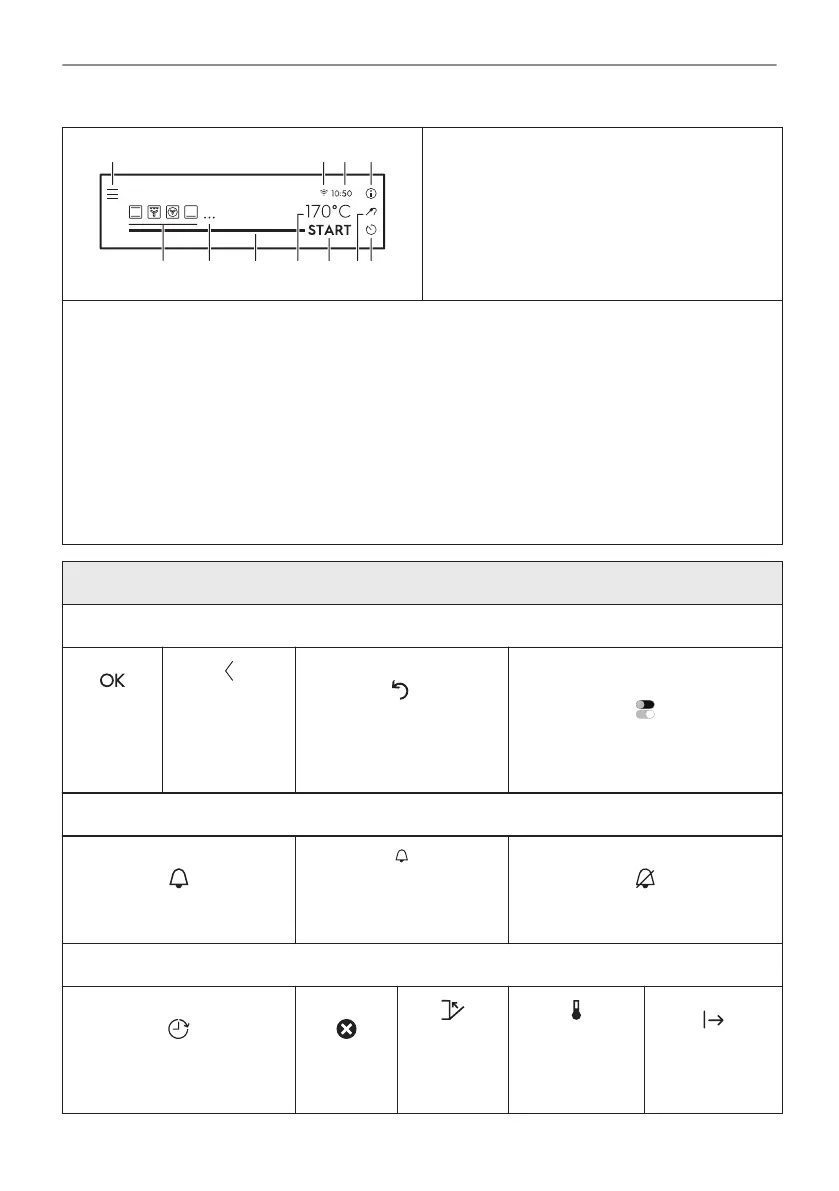
The display with maximum number of functions
set.
A. Menu / Back
B. Wi-Fi
C. Time of day
D. Information
E. Timer
F. Food sensor
G. START / STOP
H. Temperature
I. Progress bar / Slider
J. More
K. Heating functions
Display indicators
Basic indicators - to navigate on the display.
To confirm
the selec‐
tion / set‐
ting.
To confirm the
selection / set‐
ting or to go
one level back
in the menu.
To go one level back in
the menu / undo last ac‐
tion.
To turn the options on and off.
Sound alarm function indicators - when the set time of cooking ends, the signal sounds.
The function is on.
The function is on.
Cooking stops automati‐
cally.
Sound Alarm is off.
Timer indicators
To set the function: Delayed
start.
To cancel
the setting.
The timer
starts after
closing the
oven door.
The timer starts
when the oven
reaches the set
temperature.
The timer starts
when cooking
starts.
14/56
HOW TO TURN OVEN ON AND OFF




 To Next Page