6. DAILY USE
WARNING!
Refer to Safety chapters.
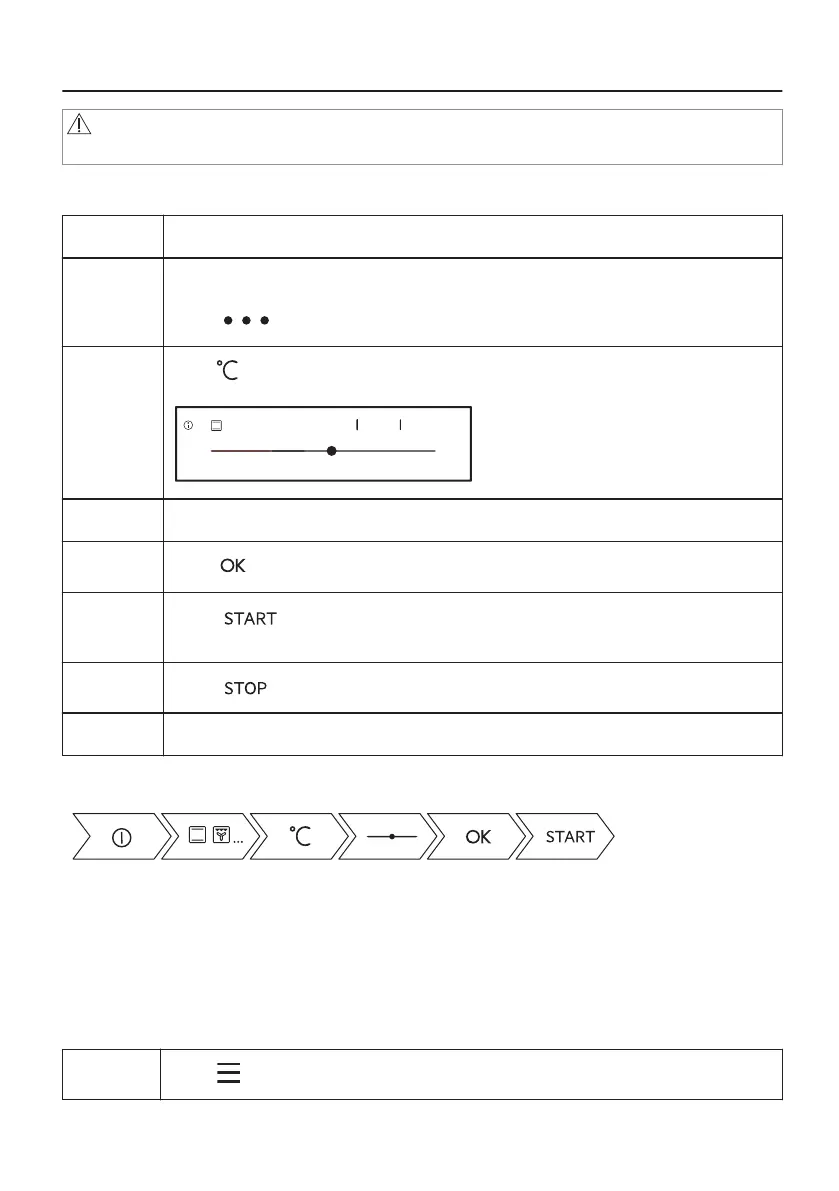
6.1 How to set: Heating functions
Step 1 Turn on the oven.
Step 2 Select a heating function.
The display shows the default heating functions. To see more heating functions
press .
Step 3
Press .
Display goes into the temperature settings.
170°C
-5°C +5°C
210°C
170°C70°C
OK
Step 4 Move the finger on the slider to set the temperature.
Step 5
Press .
Step 6
Press .
Food Sensor can be plugged at any time before or during cooking process.
Step 7
Press to turn off the heating function.
Step 8 Turn off the oven.
Take a shortcut!
6.2 How to set: Assisted cooking
Every dish in this submenu has a recommended function and temperature. Temperature and
time can be adjusted manually according to the user's preference.
For some of the dishes you can also cook with:
• Weight Automatic
• Food Sensor
Step 1
Press .
18/56




 To Next Page