16. IT'S EASY!
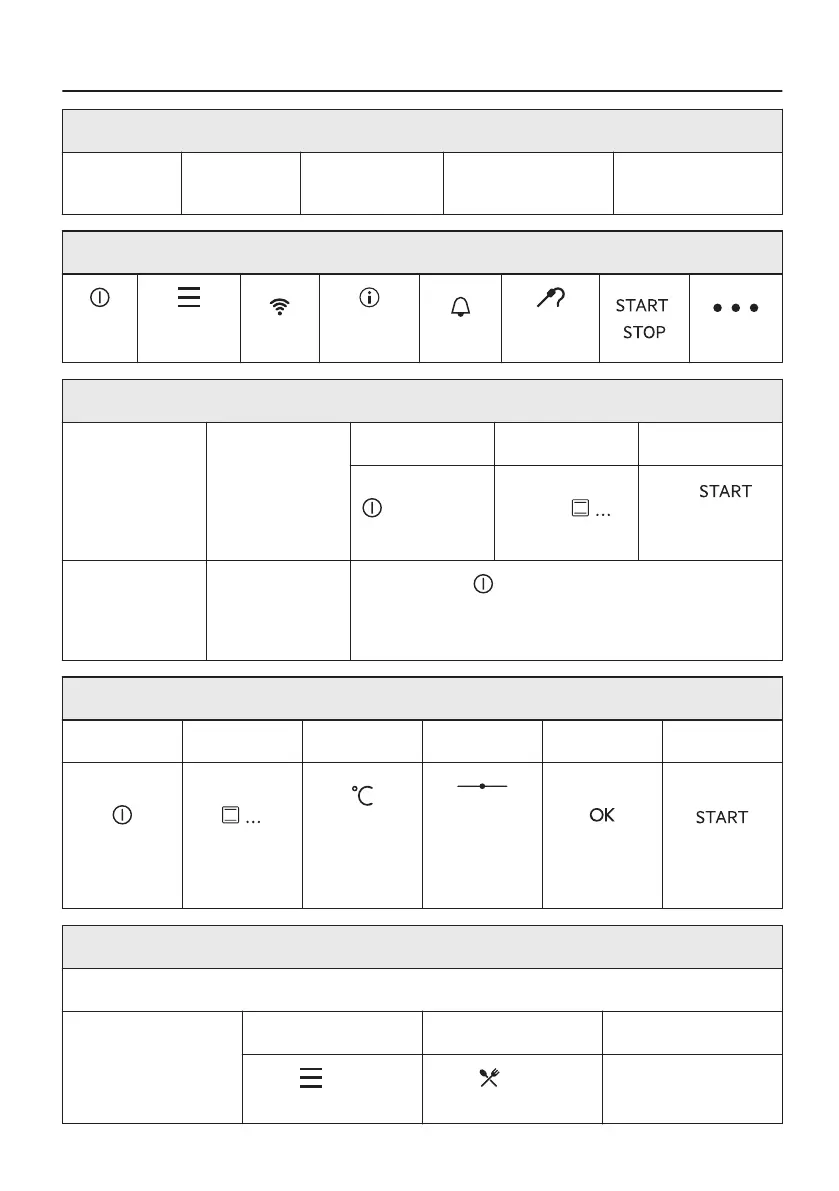
Before first use you have to set:
Language
Display
brightness
Buzzer volume Clock Wireless connection
Familiarize yourself with the basic icons on the control panel and the display:
On /
Off
Menu /
Back
Wi-Fi
Informa‐
tion
Timer
Food sen‐
sor
/
More
Start using the oven
Quick start Turn on the
oven and start
cooking with the
default tempera‐
ture and time of
the function.
Step 1 Step 2 Step 3
Press and hold
.
Press preferred
function
Press .
Quick Off Turn off the
oven at any
time, any screen
or message.
Press and hold until the oven turns off.
Start cooking
Step 1 Step 2 Step 3 Step 4 Step 5 Step 6
Press to turn
on the oven.
Press chos‐
en function.
Press to go
in the tem‐
perature set‐
tings.
Move the fin‐
ger on the
slider to set
the tempera‐
ture.
Press to con‐
firm.
Press to start
cooking.
Get to know how to cook quickly
Use Automatic Programmes to prepare a dish quickly with default settings:
Assisted cooking Step 1 Step 2 Step 3
Press . Press Assisted
cooking.
Choose the dish.
51/56




 To Next Page