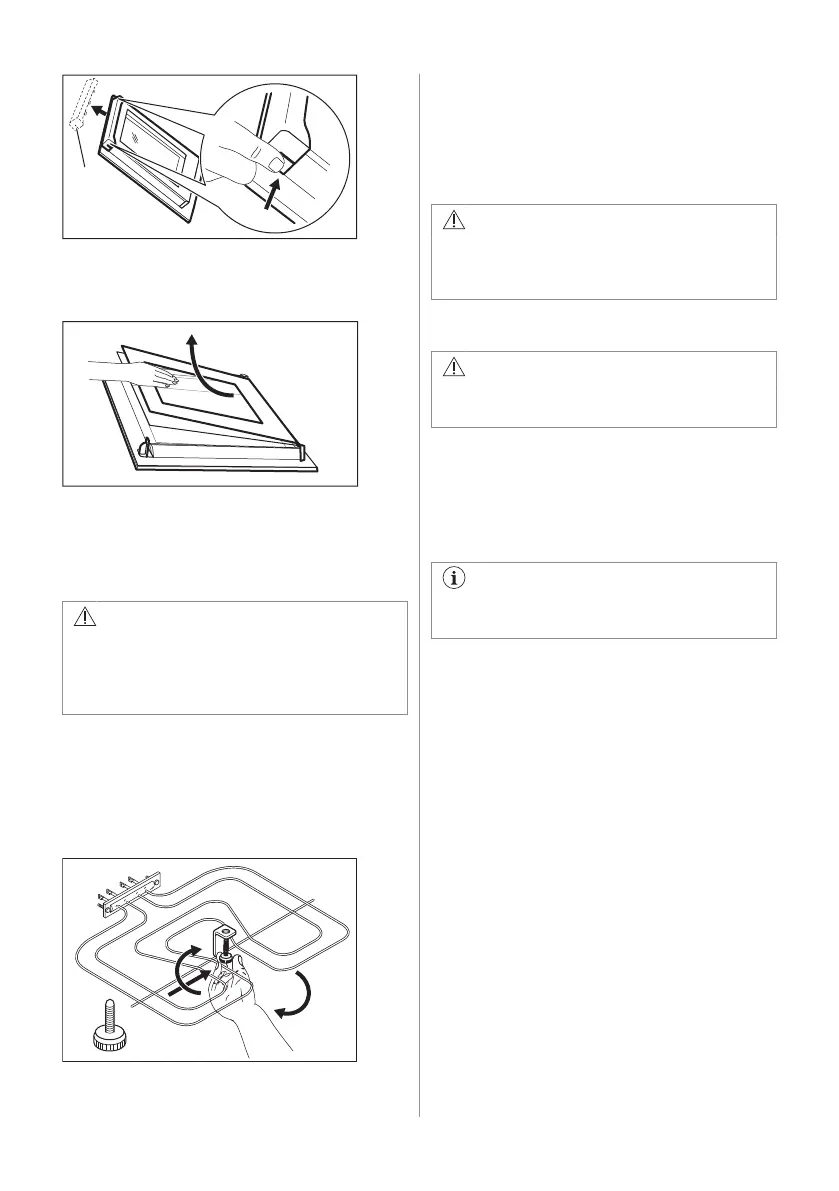
2. Pull the door trim to the front to remove it.
3. Hold the door glass panels on their top
edge one by one and pull them upwards
from the guide.
4. Clean the door glass panels.
To install panels, do the same steps in
reverse.
12.8 How to remove: grill
WARNING!
Deactivate the appliance before you
remove the heating element. Make sure
that the appliance is cold. There is a risk
of burns.
Remove the shelf supports.
You can remove the heating element to clean
the oven ceiling more easily.
1. Remove the screw which holds the
heating element. For the first time, use a
screwdriver.
2. Carefully pull the heating element down.
3. Clean the oven ceiling with a soft cloth
with warm water and a cleaning agent,
and let it dry.
Install the heating element in the opposite
sequence.
Install the shelf supports.
WARNING!
Make sure that the heating element is
correctly installed and that it does not fall
down.
12.9 Replacing the lamp
WARNING!
Risk of electric shock.
The lamp can be hot.
1. Turn off the oven. Wait until the oven is
cold.
2. Disconnect the oven from the mains.
3. Put a cloth on the bottom of the cavity.
The back lamp
The lamp glass cover is at the back of
the cavity.
1. Turn the lamp glass cover
counterclockwise to remove it.
2. Clean the glass cover.
3. Replace the oven lamp with a suitable
300 °C heat-resistant oven lamp.
Use the same oven lamp type.
4. Install the glass cover.
The side lamp
Find the lamp glass cover at the left side of
the cavity.
1. Remove the left shelf support to get
access to the lamp.
2. Use a narrow, blunt object (e.g. a
teaspoon) to remove the glass cover.
32 ENGLISH



 To Next Page