TIMER ON
AIR
DIRECTION
TURBO
TIMER OFF
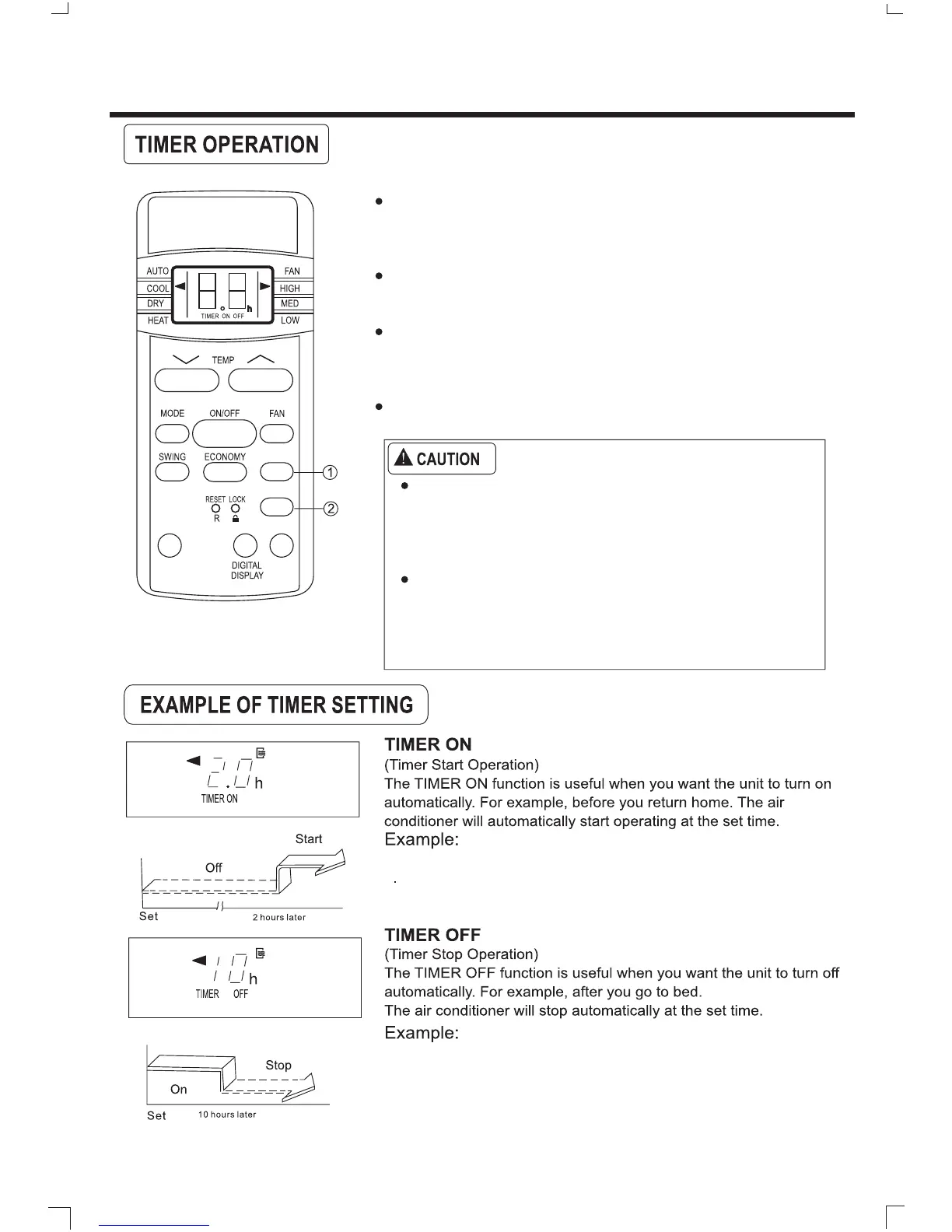
1. TIMER ON button
2. TIMER OFF button
Press this button to initiate the TIMER ON sequence. Each press
will increase the TIMER ON setting in 30 minutes increments. When
the setting time displays 10:00, each press will increase the TIMER
ON setting in 60 minutes increments.
To cancel the TIMER ON program, simply adjust the TIMER ON
time to "0:00".
Press this button to initiate the TIMER OFF sequence. Each press
will increase the TIMER OFF setting in 30 minutes increments. When
the setting time displays 10:00, each press will increase the TIMER
OFF setting in 60 minutes increments.
To cancel the TIMER OFF program, simply adjust the TIMER OFF
to "0:00".
When you select the timer operation, the remote control
automatically transmits the timer signal to the indoor unit
for the specified time. Therefore keep the remote control
in a location where it can transmit the signal to the indoor
unit properly.
The effective operation time set by the remote control for
the timer function is limited to the following settings, 0.5,
1.0, 1.5, 2.0, 2.5, 3.0, 3.5, 4.0, 4.5, 5.0, 5.5, 6.0, 6.5, 7.0,
7.5,8.0,8.5,9.0,9.5,10,11,12,13,14,15,16,17,18,
19, 20, 21, 22, 23, 24.
To start the air conditioner in 2 hours
Press the TIMER ON button until you can see 2.0h on the TIMER
ON display of the remote control.
To stop the air conditioner in 10 hours.
Press the TIMER OFF button until you can see 10h on the TIME OFF
display of the remote control.
10



 To Next Page