29
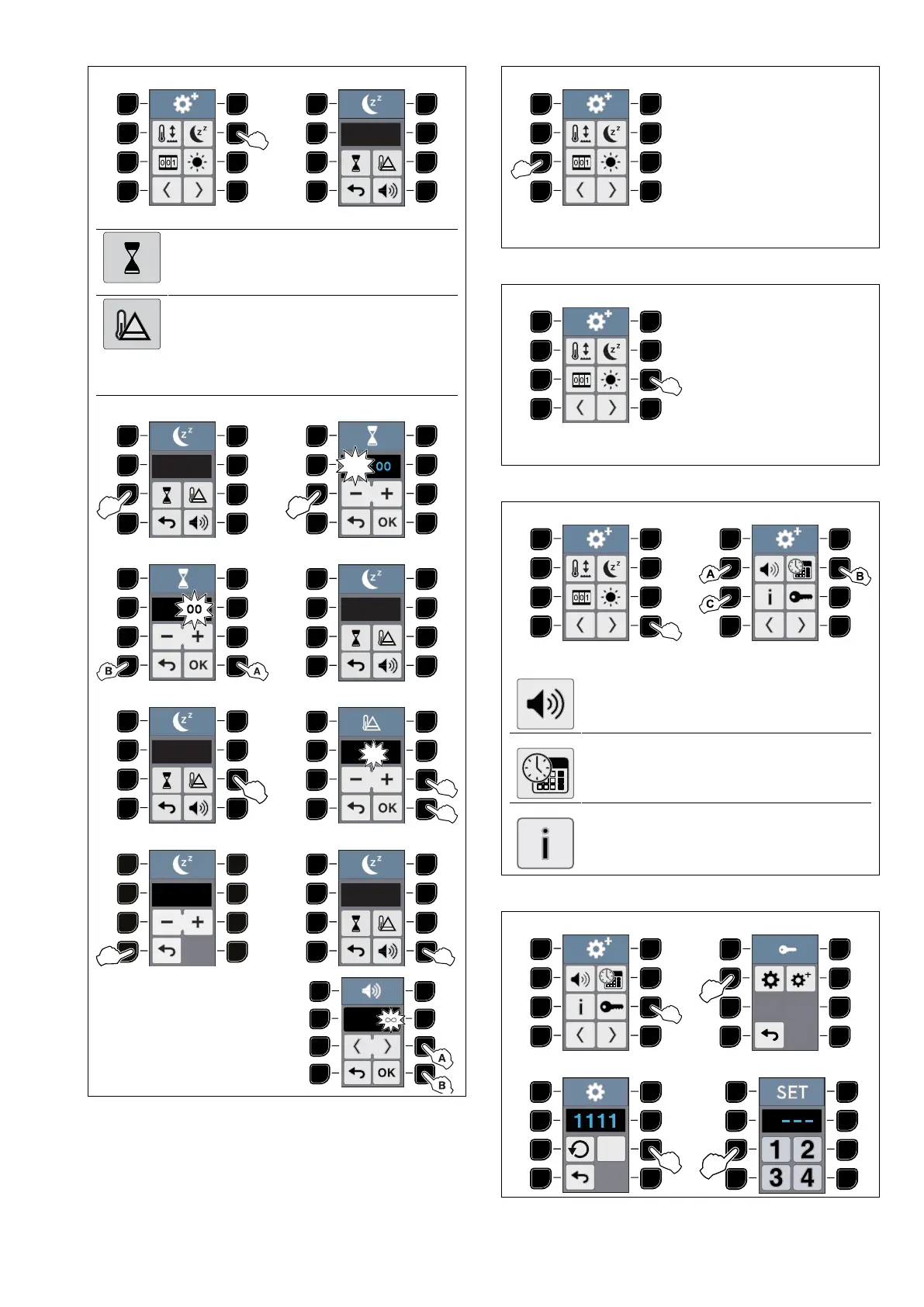
STAND-BY SETTING
1 2
Stand-by time
• You can set the “Stand-by“ up to 59
minutes and 59 seconds.
Upper plate and glass temperature during
Stand-by
• During the “Stand-by“ you can set the
upper plate and the glass up to 80℃ or
176℉ less than the operating temperature.
3 4
5 6
7 8
9 10
For the next steps, please
refer to points 2 – 3 – 4 of
the BUZZER SET UP and
MELODY SET UP tables.
COUNTERS CONTROL
1
For its setting see COUNTERS CONTROL section
described in J.4 Basic settings chapter.
BRIGHTNESS
1
For its setting see BRIGHTNESS section in J.4 Basic
settings chapter.
BUZZER SET UP – TIME SETTING – INFO DATA
1 2
A
BUZZER SET UP
• Please see BUZZER SET UP table in J.4
Basic settings chapter.
B
TIME SETTING
• Please see TIME SETTING table in J.4
Basic settings chapter.
C
INFO DATA
• Please see INFO DATA table in J.4 Basic
settings chapter.
CHANGE PASSWORD
1 2 BASIC SETTINGS
3 4
1





 To Next Page