6
fuel onboard from flow rates specified in the specification for your aircraft and calculations of the fuel
onboard from flow rates that you measured from previous flights. The use of the FP-5 does not eliminate or
reduce the necessity for the pilot to use good flight planning, preflight and in-flight techniques for managing
fuel. If you are not familiar with these techniques, contact the FAA to acquire proper training.
If you have added fuel to the aircraft but have not filled the tanks, set the FP-5 REM value for the fuel remain-
ing shown on the FP-5, plus the fuel added to the tanks as shown on the fuel pump. If you have filled the tanks, set
the FP-5 REM value for the full fuel level (total useable fuel) in the tanks as specified by the airframe manufacturer
in your flight manual. It is important you verify the fuel levels in the tanks before takeoff.
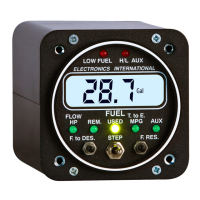
To change the Fuel Remaining shown on the FP-5, perform the following steps:
A. Select the REM display mode (this mode is displayed during power-up).
B. Momentarily push both programming buttons at the same time (you are entering the Add program-
ming mode). The display will show Add at this point.
C. Push either one of the Prg Buttons. The display will show the current fuel remaining. The blinking
left digit indicates that you may program this digit first.
D. Set the Fuel Remaining Level using the following procedure (if you have topped off the tank, see step
"c" below):
a) Select a Digit - The Right and Left Prg Buttons move the blinking digit to the right or to the
left.
b) Advance a Digits Count - Moving the Mode Select Switch to the right will increase the blinking
digits count by one. After the blinking digit reaches 9 it will reset to 0.
c) Change Functions - Each time the Mode Select Switch is pushed to the left, the display will
switch between the Full Fuel Level (set during Power-up Programming) and the current reading.
d) To Exit - To exit the Add Programming Mode, momentarily push both Prg Buttons at the same
time. The programmed values will be stored in memory and no internal batteries or external
power are required to store this information for life.
Fuel remaining is one of the most important calculations the FP-5 can provide. The differences between the
Blinking Digit


 To Next Page