14
USING GSM MODULE (GST1 or GST2)
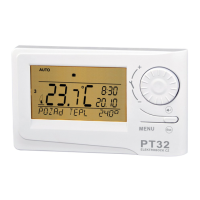
1) Mount and set the PT32 thermostat according to the instructions.
2) Set CONST12 to YES (use GSM); then, set CONST tEL nO and CONST14 according to
the instructions on page 11-12.
3) Insert an activated SIM card in the GST1 (or GST2) module.
4) Interconnect the thermostat and GSM module with a data cable (delivered with GST1 or
GST2). Connect the GSM module power source to the 230 V / 50 Hz mains (the green
LED lights up, and the orange one is blinking on the module).
5) As soon as the orange diode lights up, test correct connection of CONST14
(see page 12: TEST) – connection should always be established automatically within
3 minutes without the TEST function.
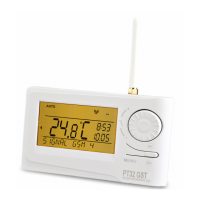
The PT32 thermostat can be controlled by means of a mobile phone by simply extending it by
the GST1 or GST2 module (not included – must be purchased). For correct commissioning,
the following procedure must be followed:
Example of using PT32 in connection with GSM module:
The thermostat is located in an object where anti-freeze temperature (e.g., 7 °C) must be
kept.
1. Connect PT32 strictly according to the instructions.
2. Select the MANU mode.
3. Pushing the “ “ button and turning the “ “ , set the thermostat temperature to 7°C.
4. Before entering the object, enter the “Temp 23” SMS in your mobile phone, and send it to
the module number connected to the thermostat.
The thermostat receives the message and automatically switches the heating system on until
the desired temperature is achieved. Next, the PT32 automatically sends a RETURN SMS to
inform you about the temperature change made. Entering the object, you can adjust the tem-
perature on the thermostat directly at will.
INFORMATION IN THE LCD DYNAMIC LINE
REQUIR TEMP Information on the desired temperature preset
PROGR 3 PERIOd 2
Information on the program preset (e.g., 3) and the time interval running
(interval 2)
HOLIdAY IN 22.7
Only displayed in the holiday mode; informs on the end of holiday when the
thermostat restores the last selected AUTO/MANU mode.
SMS RECEIVEd Information the thermostat received new SMS
SIGNAL GSM x Determines the signal strength at the place where the thermostat is
located; where x is a value within the range from 0 to 5
(with GSM module):
0..undeterminable or no signal detected
1..worst level
5..best level of signal


 To Next Page
 Loading...