Revised March 30, 2005 Versa DRIVE C1
Page 5 of 11 DRAFT COPY User Manual
5.2 Modifying Parameters
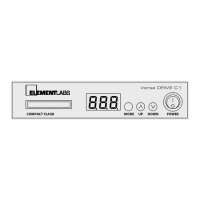
To change the value for a parameter:
1. Press MODE to scroll through the modes.
2. Press UP or DOWN to select a mode you want to adjust.
3. Press the UP and DOWN buttons to adjust the mode value.
The numeric values can roll-over from 255 back to 1, or from 1 backwards to 255, depending on the
mode being used.
4. Press MODE again to save the new value.
5.3 Modes
When the MODE button is pressed, the C1’s display will advance to the next mode. The LED display will show
the name of the mode and then after a short pause will change to display the mode’s current value. When a new
mode is selected, the UP and DOWN buttons can be used immediately; you do not need to wait for the display
to change to the mode’s value.
The Versa DRIVE C1 modes are as follows:
a. Pat (Pattern): Selects the current pattern from 0-255
b.
PLA (Playback): Sets the playback mode to Loo , hld , one , bnc or all
c.
ID (ID): Selects the DMX start address from 0-255
d.
res (DMX Resolution): Sets the DMX resolution mode to either xi or lo
e. brt (Brightness): Sets the output brightness level from 1 to 10
f.
rb (Red Balance): Sets the White Balance level for Red from 0-63
g.
Gb (Green Balance): Sets the White Balance level for Green from 0-63
h.
bb (Blue Balance): Sets the White Balance level for Blue from 0-63
i.
ref (Reference Voltage): Sets the Reference Voltage from 0-15
j.
F#(Firmware): Displays the controller’s firmware version
k. Lnk (Link): Sets the control link as either master or slave
l. LOC (Lock): locks the UP and DOWN buttons
5.3.1 Pattern
The C1 can use up to 255 individual patterns. Patterns 0, 254, and 255 are fixed in the controller’s firmware and
cannot be changed. Patterns 1 – 253 are user-definable and stored on the compact flash card.
Pattern 0: Black
Patterns 1 – 253: User-definable
These are created in Raster MAPPER and stored on the compact flash card.
The filename format is ###XXXXXX.cff
### is three numric digits from 001 through 253
XXXXXX is any number of alphanumeric characters. These are ignored by the
controller.
.cff is the file extension (compact flash format)
Pattern 254: Test Pattern / Solid Colors
This pattern cycles the entire output through red, blue, green, white, odds (odd numbered
pixels in white, even numbered pixels in black), and evens (the inverse of odds).


 To Next Page
 Loading...