PB
PR
RF
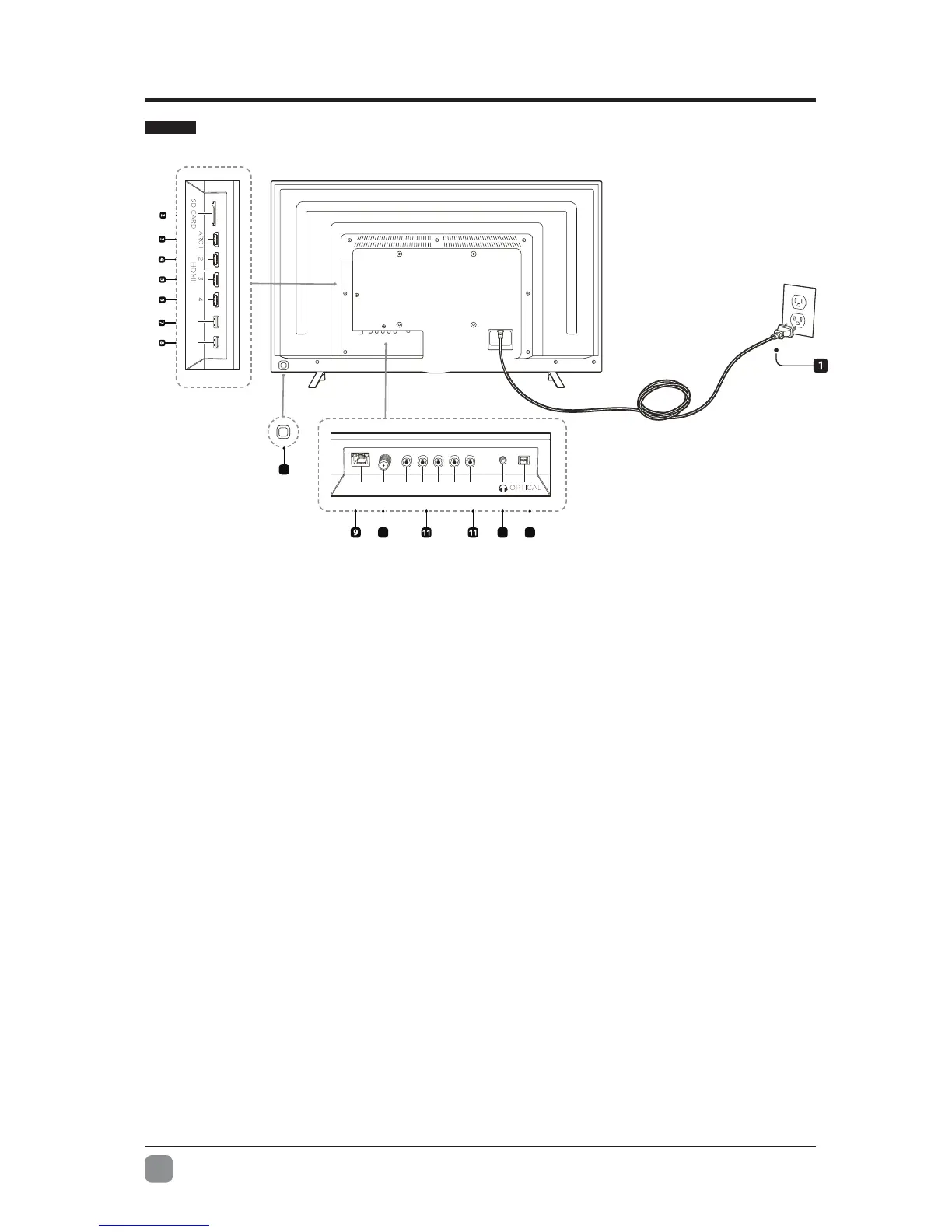
1. Power Cord
Connect to an AC power outlet.
2. SD CARD
Add up to 128GB of additional storage
for apps and games.
3. HDMI 1 with ARC (Audio Return
Channel) support and HDCP 2.2.
Connect this HDMI port to an Audio
Video Receiver or other multimedia
device that supports ARC.
4. HDMI 2 with HDCP 2.2 support.
Connect this port to a multimedia
device.
5. HDMI 3 with HDCP 2.2 support
Connect this port to a multimedia
device.
6. HDMI 4 with HDCP 2.2 support
Connect this port to a multimedia
device.
7. USB 2.0 Port
8. USB 3.0 Port
9. LAN Connection
Connect this port to your router
with an Ethernet cable.
10. RF
Connect to an antenna/cable
to receive over the air/cable
broadcasts.
11. Composite or Component In
Connect to AV devices with
compositeorcomponent(Y/Pb/Pr)
video output sockets. Connect
theAudioIn(L/R)tothedevices
AUDIO OUT sockets.
12. Headphone Jack
Connect to your headphones.
13. Optical Output
Connect a digital sound system to
this jack.
14. Directional Controller
Navigates the TV interface.


 To Next Page