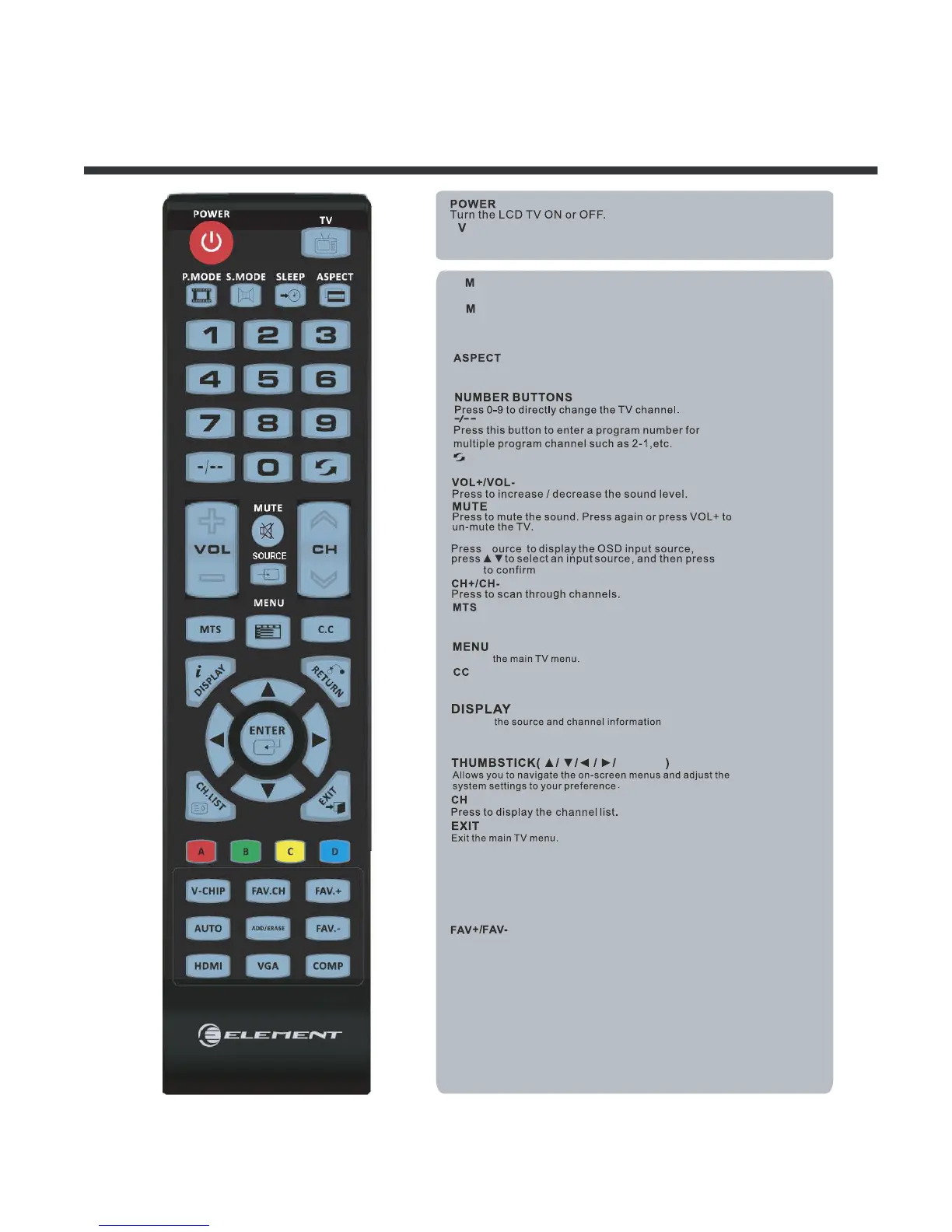
Remote Control Key Functions
10
P
Select the picture mode.
S
Select the sound mode.
SLEEP
Set the Sleep Timer.
Displays
.
ODE
.
ODE
S
T
Press this button,turn to TV source.
Press these two keys to switch to your favourite programs.
Automatically adjust Horizontal / Vertial position( in PC Mode)
Press to diaplay the favourite program list.
Add/Erase channel to favourite program list.
Press to set the closed caption
as follow cc mode on,cc mode off,cc mode on mute
Choos
e Mono,stereo or SAP for analog TV input.
Choose English,French or Spanish
for
DTV input.
Press to select Aspect ratio
( As follow Standard,Wide,Wide Zoom,Zoom,etc.)
Displays
ENTER
ENTER
RETURN
A ,B,C,D
HDMI
V-CHIP
FAV.CH
ADD/ERASE
AU
TO
Return to previous menu.
Return to previous channel viewed.
Push and hold 3 second then store current channel in A ,B,C,D.
Switch to HDMI input.
VGA
Switch to VGA input.
COMP
Switch to COMP input.
Switch to
V-CHIP input.
LIST
.
SOURCE



 To Next Page