14
Chapter 2 Installing the TV
Effective range:
The remote can control the TV from up to 197 inch away, if pointed directly at the
receiver.
13
14
15
16
17
18
19
20
21
22
23
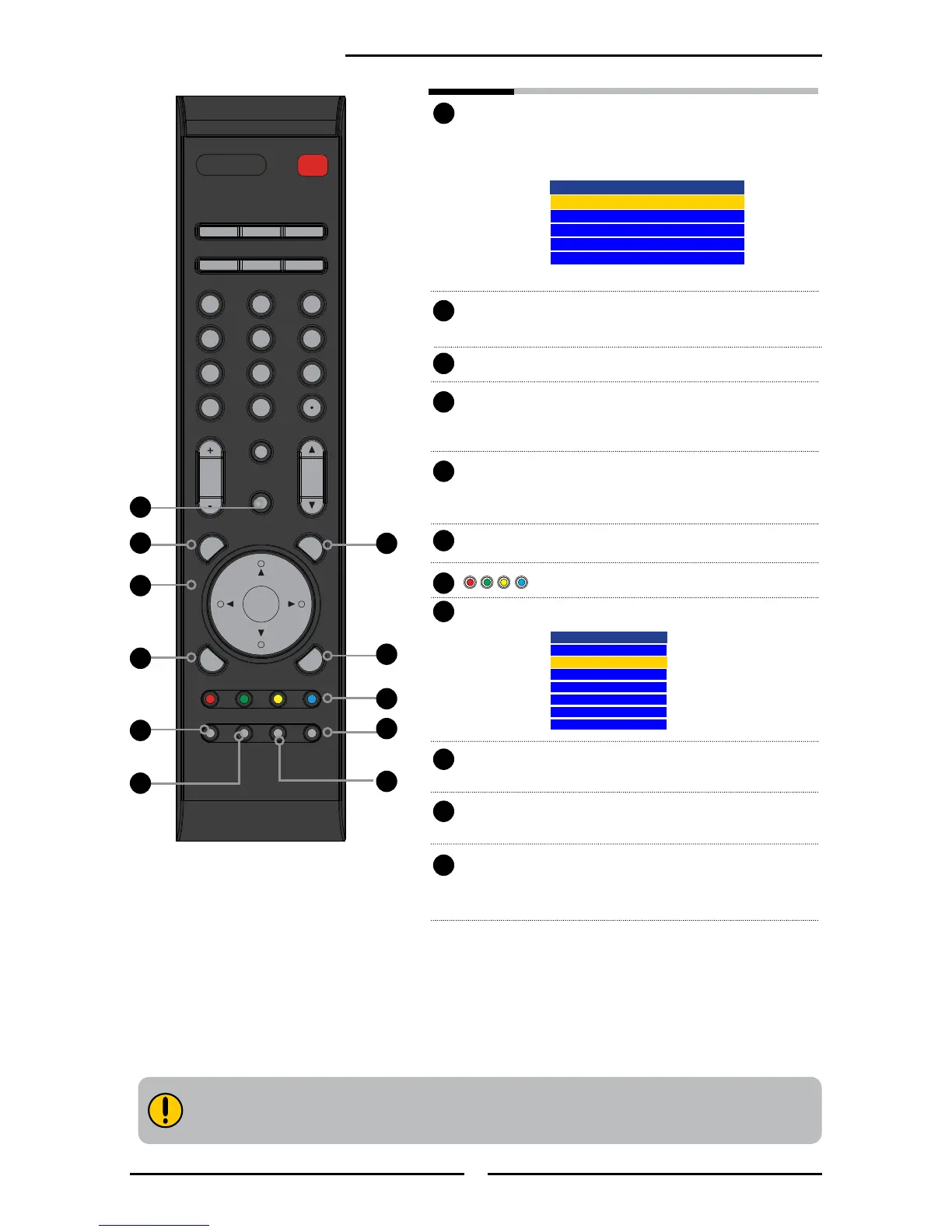
GUIDE Displays the Program Guide on the
screen. Press again to turn GUIDE off.
EXIT Exits the OSD menu.
▲▼►◄
Cycles through OSD options and
OK selects individual menu items. OK
conrms option settings.
INFO Pressing repeatedly displays a variety of
information such as the current channel
and the input source.
MENU Displays the OSD menu on the screen.
In EPG mode, used in EPG function setup.
LIST Displays the received channel list
INPUT Pressing INPUT will display the source
list, use ▲▼ to select the video
equipment connected to the video inputs
of your TV and press OK to conrm:
Channel List
7-1 KABC-DT
9-1 KQED-HD
9-2 KOED-SD
8 CCT
12
13
15
FAV.CH Pressing FAV.CH display favorite
channels.
TIMER Displays the current time on the screen.
FREEZE In TV mode, pressing FREEZE to
freeze the current picture, press again to
restore the picture.
16
14
13
17
15
18
19
22
23
20
21
Input Source
TV(CABLE/ANTENNA)
VIDEO1 (AV)
VIDEO2 (YPbPr)
VIDEO3 (HDMI)
COMPUTER(VGA)


 To Next Page