HDMI 2
HDMI 1
VGA
AUDIO IN
VGA
PB /CB
PR /CR
Y
R
COMPONENT 1
COMPONENT 2
OPTICAL ANT 75
PB /CB
PR /CR
Y
L/MONO
R
L/MONO
Preparation for Using Your New TV
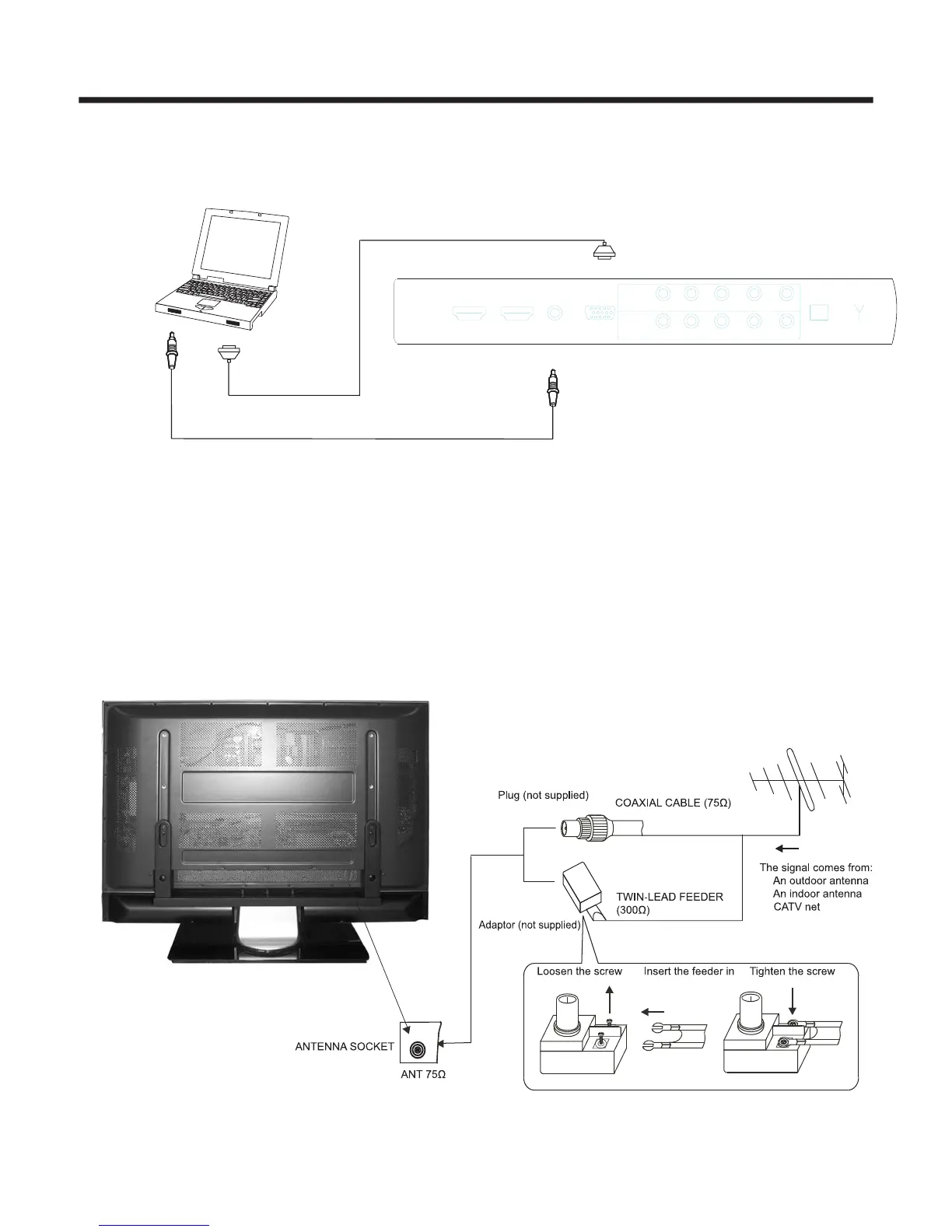
To enjoy televison transmitted by your local TV station, you need an indoor or outdoor antenna
(not supplied). Excellent picture quality requires a good signal so an outdoor antenna is necessary. If you are a
subscriber of your local cable television, the antenna is not needed. Connect the equipment as
follows:
Connecting to an antenna
-7-
PC/NB
To VGA
To speaker
RGB line
Audio line
NOTE: PC mode support resolution: VGA, SVGA, XGA.
You can use your TV as a monitor for your computer by connecting through its 15pin standard RGB
interface and PC audio interface(AUDIO INPUT4). Connect the devices as shown below.
Connecting to a Computer


 To Next Page