-29-
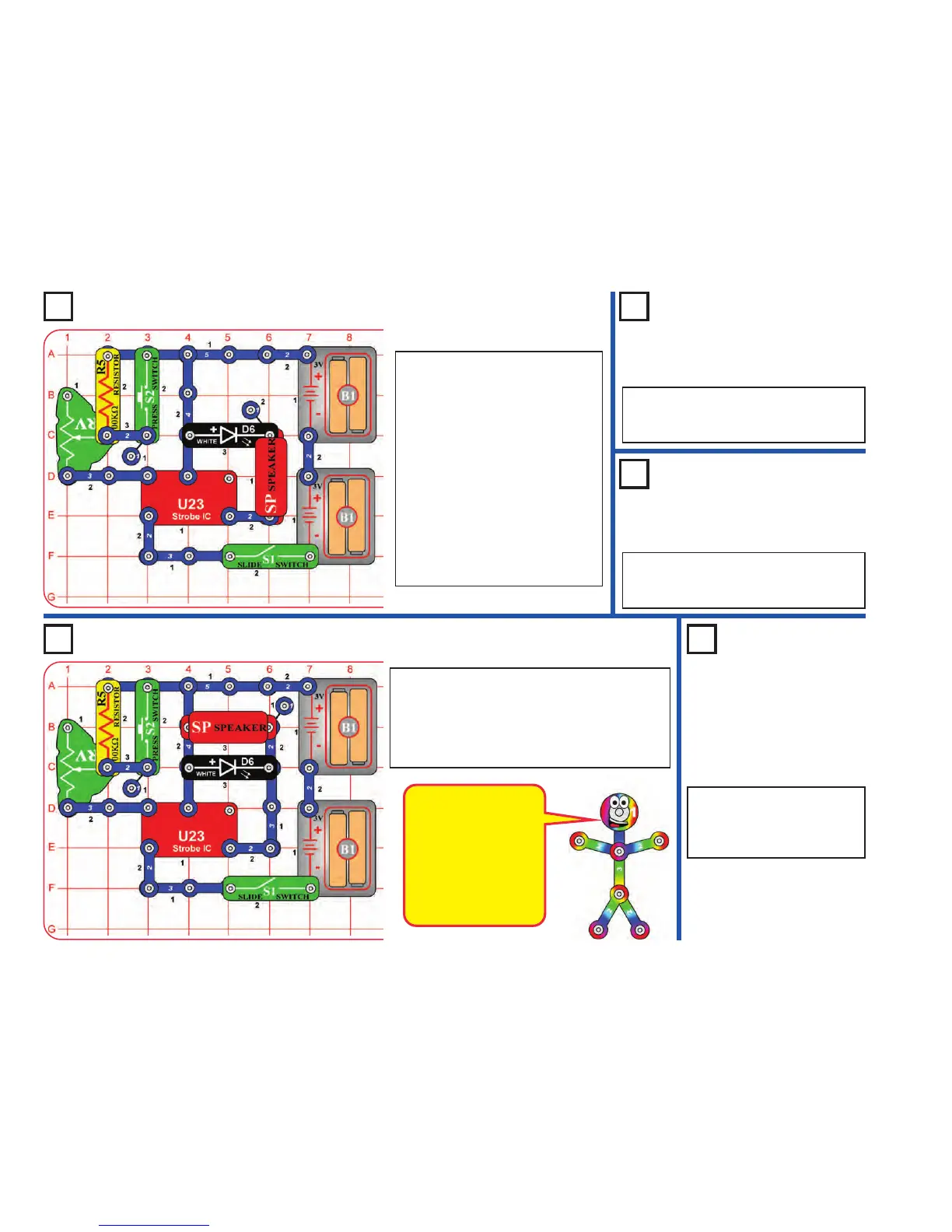
Project 23 Noisy Strobe Light
Project 26 Louder Strobe Light
Modify the project 19 circuit to be
this one, which has the white LED
(D6) next to the speaker (SP). Build
the circuit and turn on the switch
(S1). Adjust the blink rate and sound
using the lever on the adjustable
resistor (RV), and by pushing the
press switch (S2).
Note: In rare cases the circuit may
not work at all settings on RV. If this
happens, move the RV lever to the
side near the strobe IC, turn the
slide switch off and on to reset the
circuit, and only move the RV lever
over a small range.
Project 24
Noisy Red
Strobe Light
Use the preceding circuit but replace the
white LED (D6) with the red LED (D1) or
the color LED (D8).
Project 25
Double
Strobe Light
Use the preceding circuit but replace the
speaker and LED with any two LEDs (red,
white, or color).
Project 27
Louder Color
Strobe Light
Use the preceding circuit but
replace the white LED (D6)
with the red LED (D1) or the
color LED (D8).
Modify the preceding circuit to be this one, which
has the white LED (D6) in parallel with the speaker
(SP). Build the circuit and turn on the switch (S1).
Adjust the blink rate and sound using the lever on
the adjustable resistor (RV), and by pushing the
press switch (S2).
This circuit is louder
than the previous
circuits because the
speaker is in parallel
with the LED instead of
in series with it. This
increases the voltage
across the speaker,
making it louder.










 To Next Page