-77-
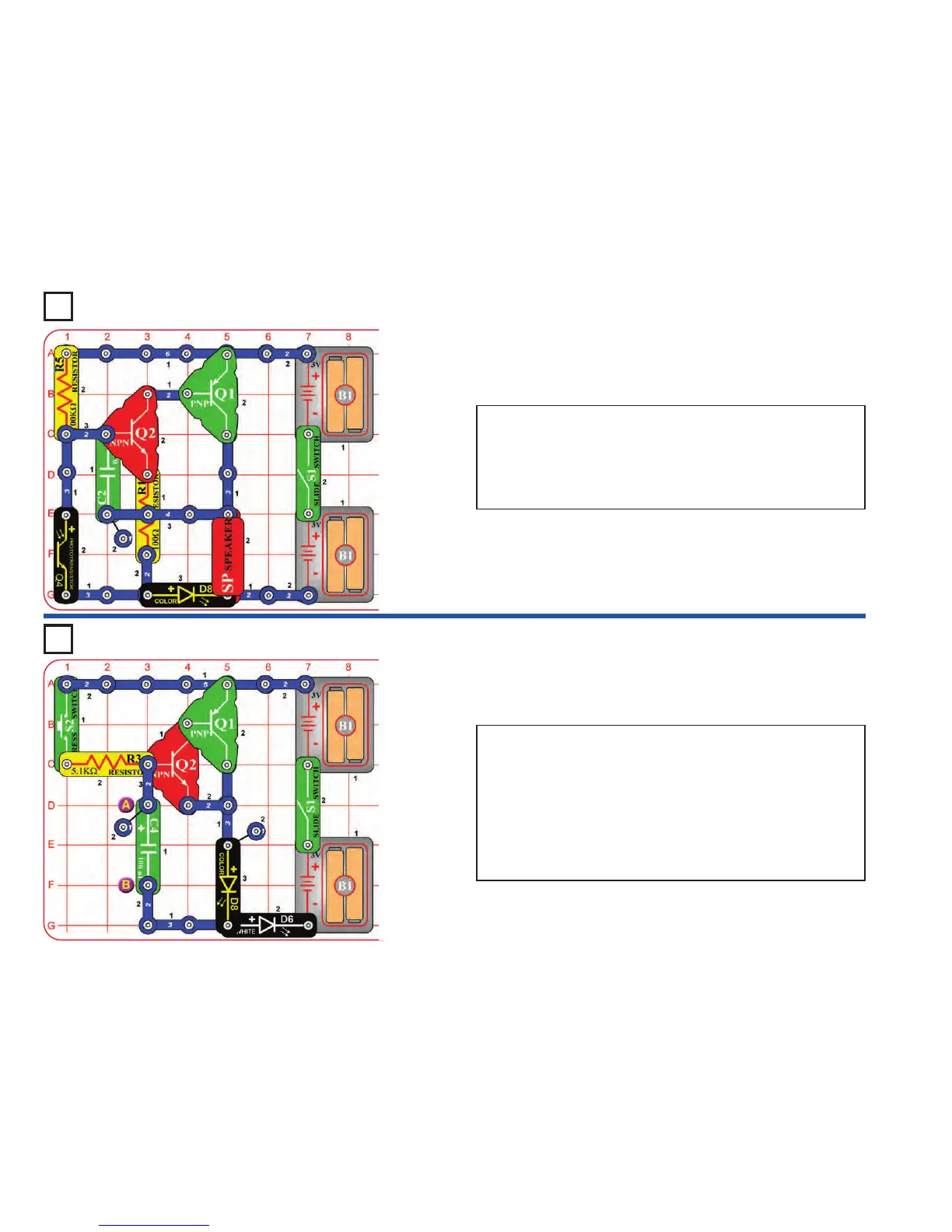
Project 174 Light Buzz
Project 175 Delay Lights
Turn on the switch (S1). If there is enough light on the phototransistor
(Q4), then nothing will happen. Cover the phototransistor with your
finger, now the speaker (SP) makes noise and the color LED (D8)
flashes. Wave your fingers over the phototransistor to vary the sound.
Replace the color LED with the red or white LEDs (D1 & D6). The light
and sound will be a little different.
Turn on the slide switch (S1), and push the press switch (S2). The color
and white LEDs (D6 & D8) come on slowly but will stay bright for a long
time after you release the press switch. Connect the red jumper wire
across points A & B if you get tired of waiting for the LEDs to turn off.
Replace the 5.1kΩ resistor with the 100kΩ resistor. Now you have to
push the press switch for much longer to make the LEDs bright.
Replace the 100µF capacitor (C4) with the smaller 0.1µF capacitor
(C2). Now the LEDs turn on and off much faster, because C2 does not
store as much electricity as C4.











 To Next Page