-45-
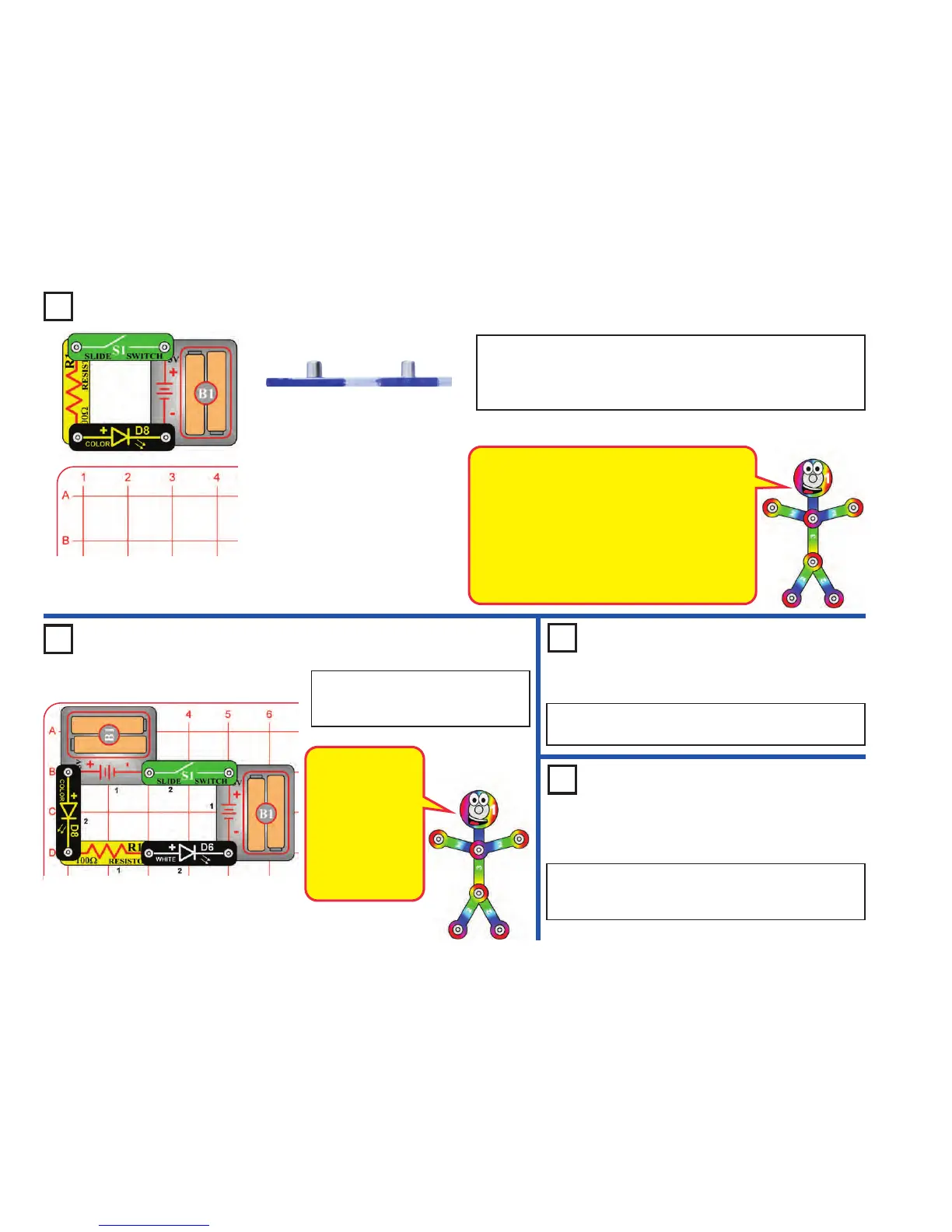
Project 71 One Way Plastic
Project 72 White Blinker
Build the circuit shown, but build it without using the base grid. Turn on
the switch (S1) and view the color LED (D8) light through the base grid.
Then turn the base grid on its side and try to see through it; you can’t.
Try viewing other lights through other clear materials.
Side view of base grid
Build the circuit as shown and turn on
the switch (S1). Both LEDs are
blinking.
The color LED (D8)
has a microcircuit
that changes the
light colors. As it
does this, it changes
the current through
the circuit - which
also affects the
brightness of the
white LED (D6).
Use the preceding circuit, but replace the white LED (D6)
with the red LED (D1).
Project 74
Red & White
Project 73
Red Blinker
Use the preceding circuit, but replace the color LED (D8)
with the white LED (D6). Both LEDs light, but neither in
blinking.
The main surface of the base grid is flat and smooth,
giving a nice transition for light rays to pass through.
If you look closely at the side edges (using a
magnifying glass helps), you will see they are slightly
curved. These curves, and the angle of the light
hitting them, cause more light to be scattered or
reflected than light hitting the main surface. Some
materials can also pass light better in some
directions than in other directions, due to their
physical structure.











 To Next Page