-78-
Project 177
Narrow Range Tone
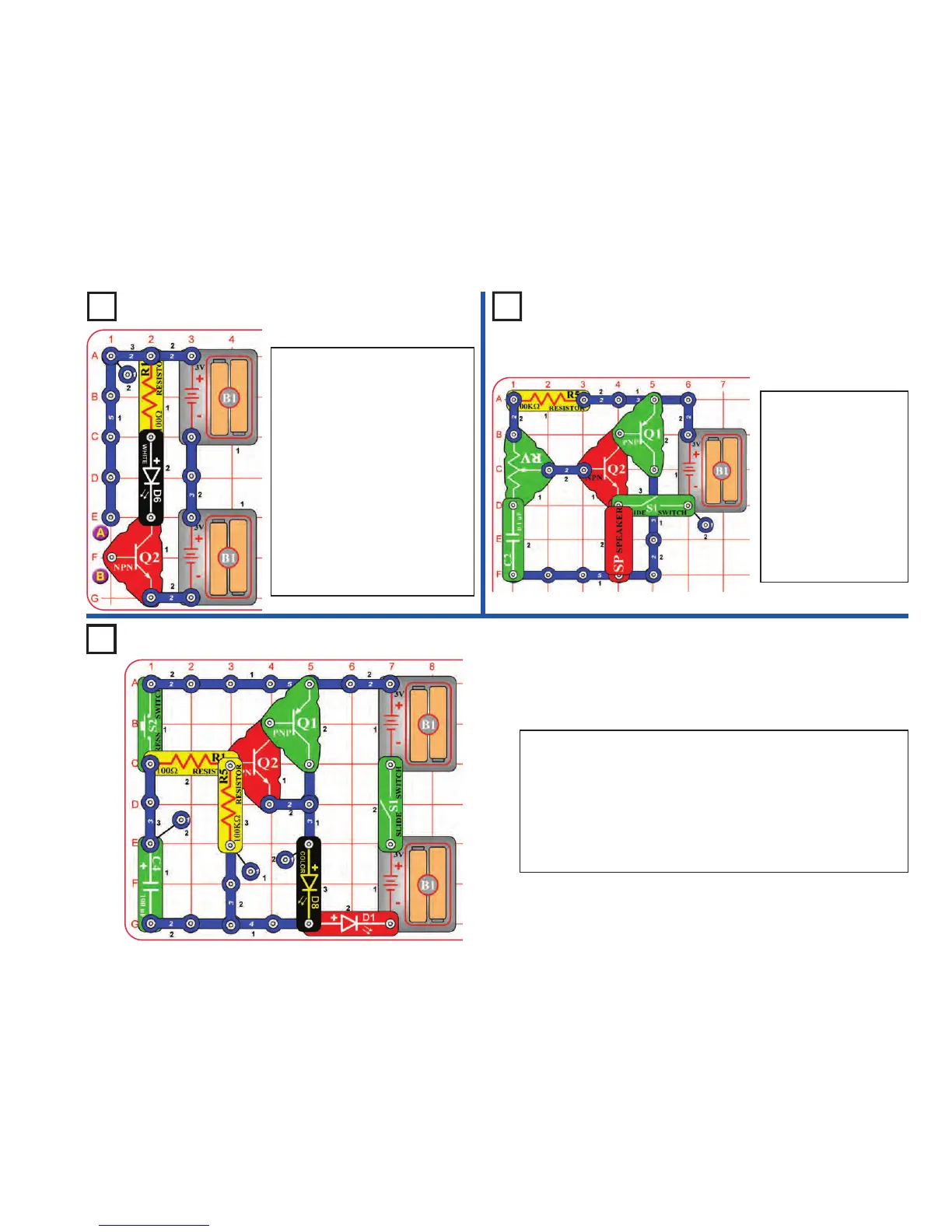
Project 176 Touch Light
Build the circuit. It doesn’t do
anything, and may appear to be
missing something. It is missing
something, and that something is
you.
Touch points A & B with your
fingers. The white LED (D6) may be
lit. If isn’t bright, then you are not
making a good enough electrical
connection with the metal. Try
pressing harder on the snaps, or
wet your fingers with water or
saliva. The LED should be bright
now. You can replace the white LED
with the red or color LEDs (D1 &
D8).
Turn on the switch (S1)
and move the lever on
the adjustable resistor
(RV) around. The circuit
makes a tone sound, but
only over a small range
of settings on RV.
Replace the 100kΩ
resistor (R5) with the
5.1kΩ resistor (R3). The
tone is a little different
now.
Project 178 Slow Off Lights
Turn on the slide switch (S1), and push the press switch (S2). The red
and color LEDs (D1 & D8) stay on for a few seconds after you release
the press switch.
You can change how long the LEDs stay on for by replacing the 100µF
capacitor with the 0.1µF capacitor, by replacing the 100kΩ resistor (R5)
with the 5.1kΩ resistor (R3), or by removing the 100kΩ resistor.
For more fun, try swapping the locations of the LEDs, or replacing either
with the white LED (D6).











 To Next Page