-66-
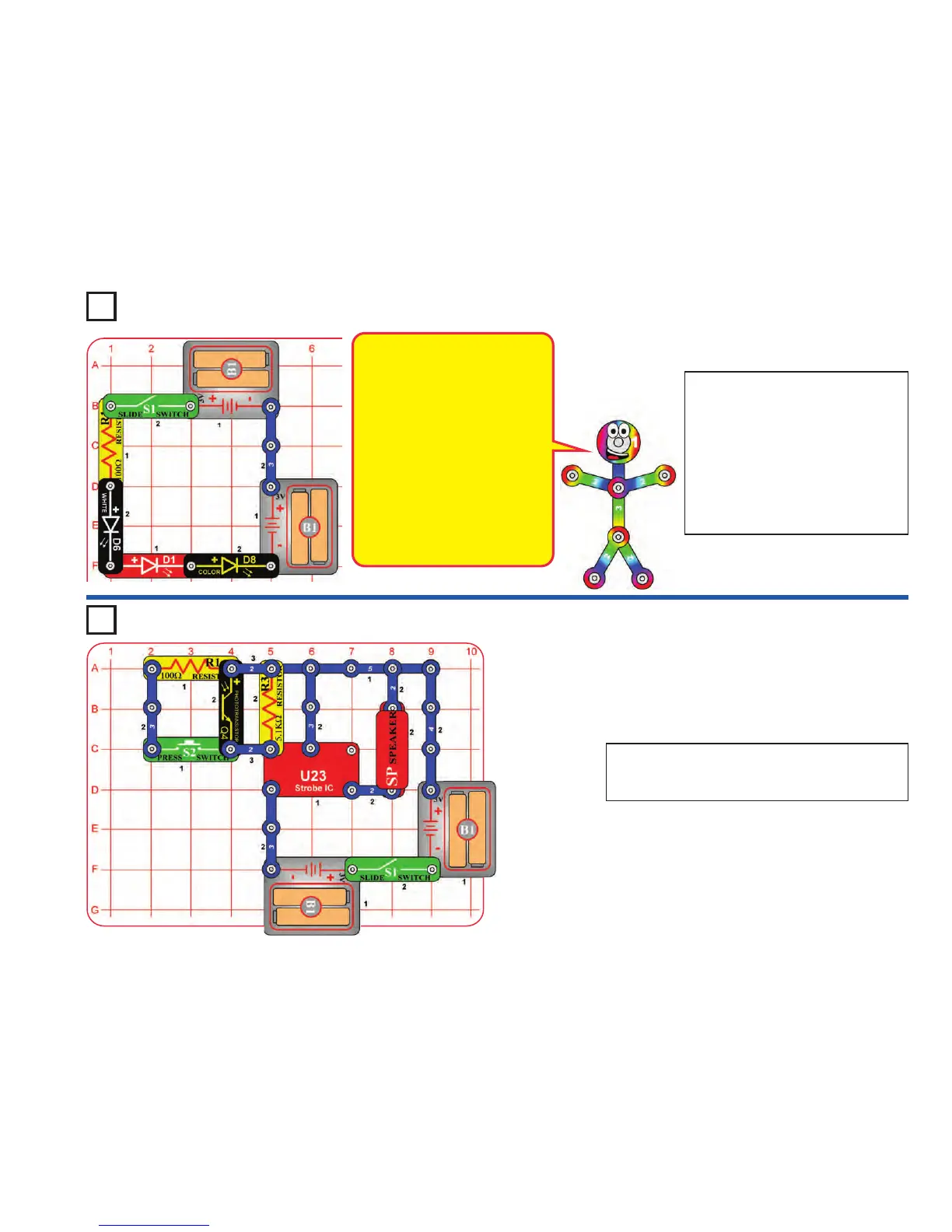
Build the circuit and turn on the switch
(S1). Place the circuit in a dimly lit
room. Some of the LEDs (D1, D6, &
D8) will be blinking, but none will be
very bright. If nothing lights then
replace your batteries.
The LEDs are blinking because a color-
changing circuit in the color LED is
turning that LED on and off, which also
affects the other LEDs.
Project 143 Series Lights
Build the circuit and turn on the slide switch (S1). Vary
the amount of light on the phototransistor (Q4) and
push the press switch (S2) to change the sound.
Project 144 Wacky Sound Control
This circuit has all the parts
connected in a series. Swapping the
locations of any parts in the circuit
(without changing the direction of
their “+” side) will not change how
the circuit works. Try it.
The LEDs are dim because the
batteries need to overcome the
activation voltage level for every
LED in the series before any can
light. That doesn’t leave much
voltage to overcome the resistance
in the circuit. If you replace one of
the LEDs with a 3-snap, the others
will be much brighter. Try it.












 To Next Page