-27-
Project #180
OBJECTIVE: To have an
adjustable resistance control a
Screaming Fan
Project #182
Light Whining
OBJECTIVE: To make different
Replace the 3-snap wire at the upper-left of
the circuit (points A1 and A3 on the base grid)
with the photosensitive resistor (RP), and
wave your hand over it. The whining sound
has changed a little and can now be
controlled by light.
Project #183
More Light
Whining
OBJECTIVE: To make different
Replace the 0.02µF capacitor (C1) with the
0.1µF capacitor (C2). The sounds are lower
in frequency and you can't make the fan spin
now.
Project #184
Motor That
Won’t Start
OBJECTIVE: To make different
Replace the 0.1µF capacitor (C2) with the
10µF capacitor (C3), put the positive (+) side
towards the left). It now makes clicking
sounds and the fan moves only in small
bursts, like a motor that won’t start.
Project #181
Whining Fan
OBJECTIVE: To make different
Replace the 0.1µF capacitor (C2) with the
0.02µF capacitor (C1). The sounds are now a
high-pitch whine and the motor starts a little
sooner.
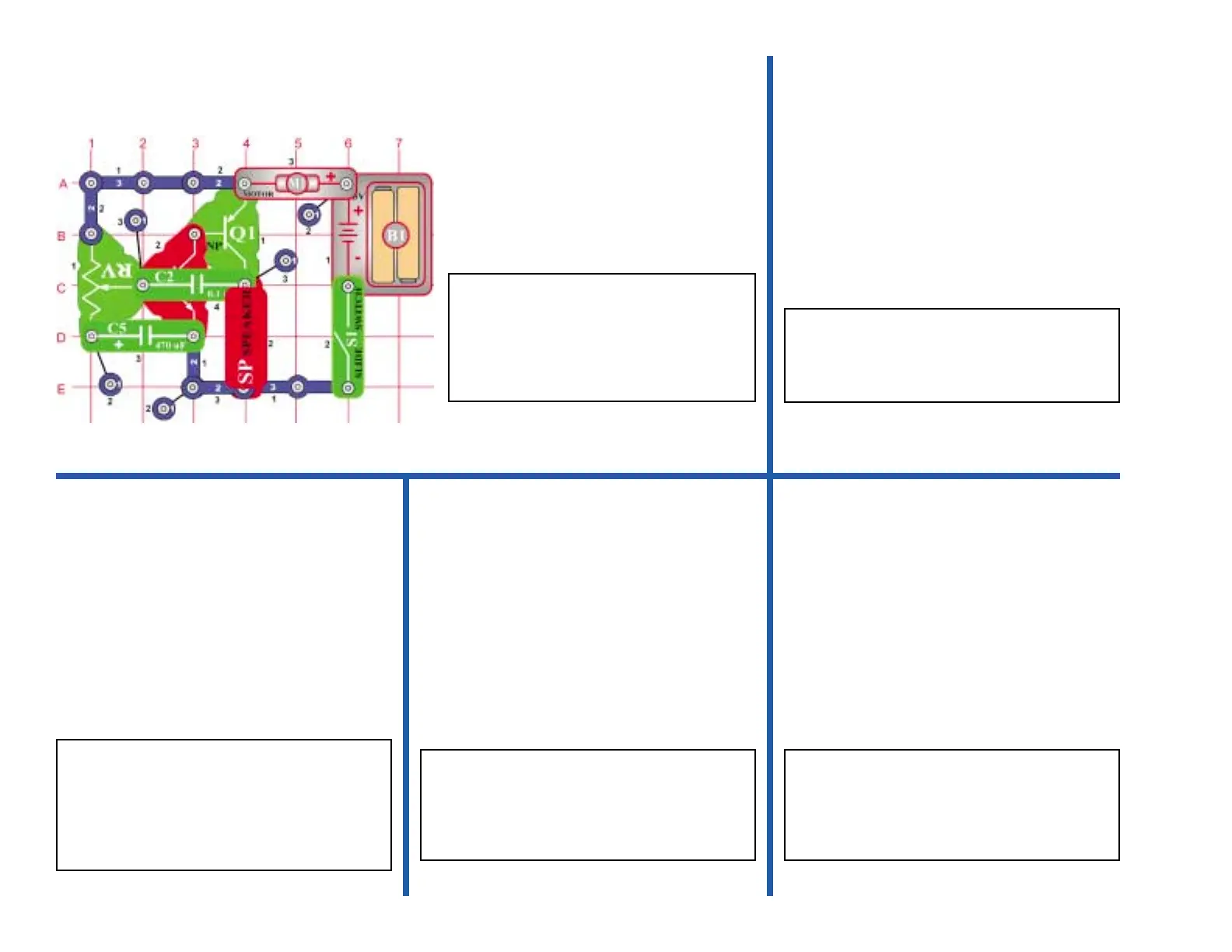
Build the circuit on the left; note that the
0.1µF capacitor (C2) is above the NPN
(Q2). Turn on the switch and move the
setting on the adjustable resistor across
its range. You hear screaming sounds
and the fan spins.


 To Next Page