-55-
Project #262
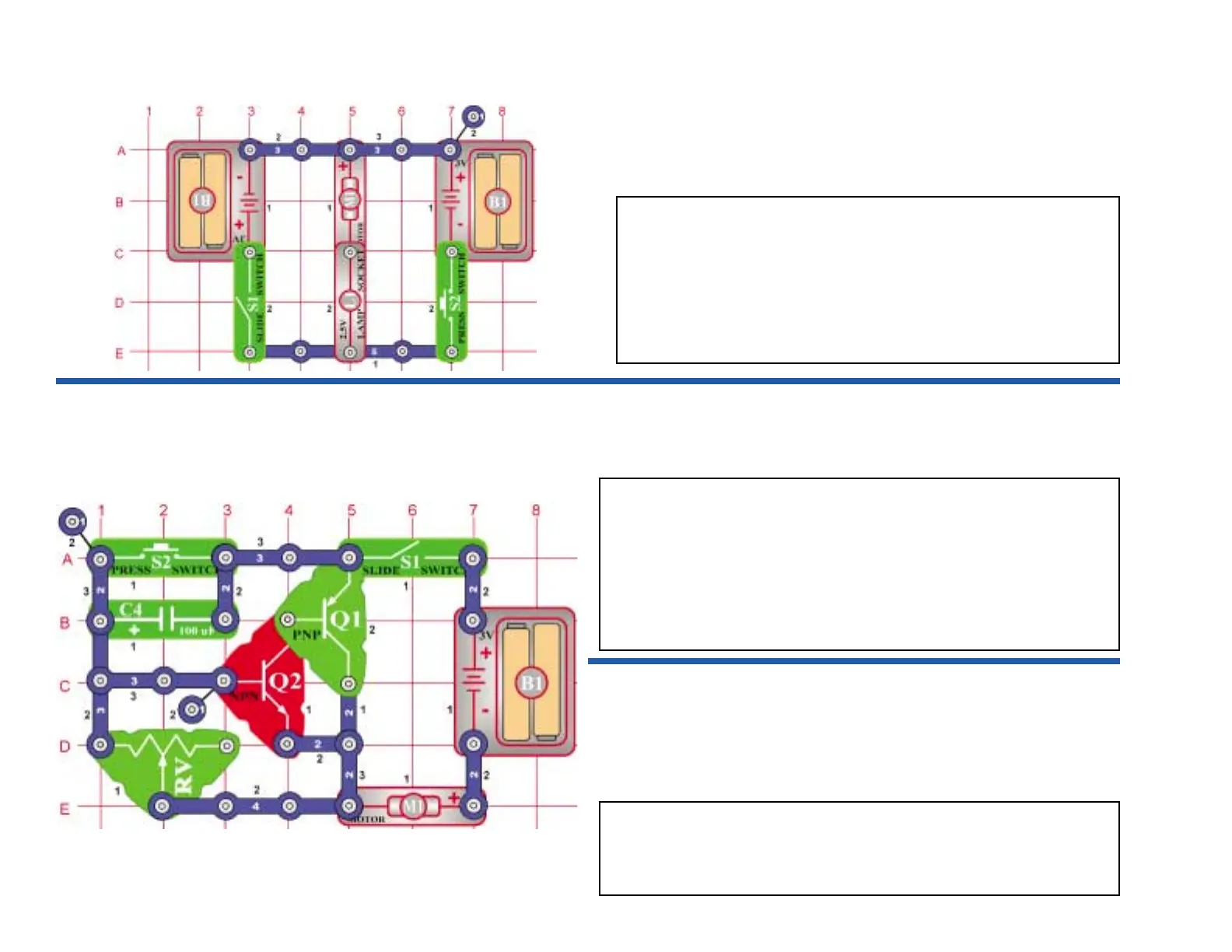
OBJECTIVE: To show how voltage polarity affects a
Place the fan onto the motor. Turn the slide switch (S1) on. The fan
rotates clockwise. When you connect the positive (+) side of the
battery to the positive (+) side of the motor, it spins clockwise. Turn the
switch off and press down the key switch. Now the fan spins the other
way. The positive (+) side of the battery is connected to the negative
(–) side of the motor. The polarity on the motor determines which way
it rotates. Notice that the lamp lights in both polarities. It is not effected
by the polarity changes.
Motor Rotation
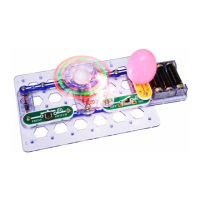
Place the fan onto the motor and set the adjustable resistor control to the far right. Turn the
slide switch (S1) on and then press the press switch (S2) once. The motor will spin and
then stop. Now set the resistor control to the far left and press the press switch again. The
time the fan spins is much less now.
When the press switch is pressed, the current flows through the circuit and the fan spins.
The capacitor charges up also. When the switch is released, the capacitor discharges and
supplies the current to keep the transistors on. The transistor acts like a switch connecting
the fan to the battery. When the capacitor fully discharges, the transistors turn off and the
motor stops. The adjustable resistor controls how fast the capacitor discharges. The more
resistance, the longer the discharge time.
Project #264
Motor Delay Fan (II)
Use the circuit from Project #263. Connect a single snap under one side of the 470µF
capacitor (C5) and then connect it over the top of the 100µF capacitor. Turn the switch on
and press the press switch (S2). Notice that the fan spins longer now. When capacitors
are in parallel, the values are added, so now you have 570µF. The time it takes to discharge
the capacitors is longer now, so the fan keeps spinning.
Project #263
Motor Delay Fan


 To Next Page