The Elite MC5 is a sliding gate opener designed for residential and commercial use, capable of handling gates weighing up to 500 kg and with a length of up to 8 meters. It operates using a rack and gear transmission system, ensuring smooth and reliable gate movement.
Technical Specifications
- Model: MC5
- Power Supply: 110V/60Hz
- Engine Speed: 66 RPM
- Motor Power: 160W
- Remote Control Operating Distance: 30m (frequency: 433.92 MHz)
- Remote Control Mode: One button
- Output Shaft Height: 48mm
- Maximum Door Weight: 500 kg
- Torque Output: 14 N-m
- Switch Limit: Mechanic limit switch
- Noise: <56 dB
- Working Duty: S2, 15 Minutes
- Extra Remote Control Capacity: 20
- Working Temperature: -20°C to +50°C
- Gate Moving Speed: 14m/min
Usage Features
The MC5 offers a range of features designed for convenience, safety, and operational flexibility.
Control and Operation:
The system can be operated via a single-button remote control, which cycles through ON/STOP/OFF (Open/Pause/Close) modes with each press. The remote control also features a manual release key, allowing the gate to be operated manually in case of power failure. To engage manual operation, the unlock handle should be pulled down 90 degrees horizontally, then released to lock.
Control Board (J6 Terminal):
- ANT: Antenna connection for remote control.
- SHELD: Ground connection.
Travel Learning:
Before normal use, the control board must perform a travel learning process. Ensure the limit switch is not activated. Press and hold the "WORK" button; the motor will begin to close, and the closing LEDs will flash. Once the limit switch is activated, the motor will continue to close, and the LEDs will flash again. When the gate activates the limit switch a second time, the learning process is complete.
Extra Button (PAUSE):
This button sets the automatic closing time. When the motor is stopped, press the button, and the STS LED will flash. Pressing it again stops the flashing. The automatic closing time (in seconds) depends on the number of flashes of the STS LED.
Adjusting Knob (TORQUE and TIME):
- TORQUE: Adjusts motor force for safety. Turn clockwise to increase, counter-clockwise to reduce.
- TIME: Adjusts the soft closing time. Turn clockwise to increase, counter-clockwise to reduce. Rotate to minimum to disable this function.
- Note: Default TORQUE and TIME parameters are set to maximum. Adjust as needed. Do not set torque to maximum unless necessary to open the gate.
Dip Switch Settings:
The MC5 features DIP switches for various functional configurations:
- Soft Start Mode:
- OFF: Soft start mode selected.
- ON: Non-soft start mode selected.
- Stroke Limit:
- OFF: N.O. (Normally Open) Stroke limit.
- ON: N.C. (Normally Closed) Stroke limit.
- Automatic Closing Function:
- OFF: Automatic closing function deactivated.
- ON (DIP 3 & 4 combinations):
- DIP 3 ON, DIP 4 OFF: Auto close time is about 3 seconds.
- DIP 3 OFF, DIP 4 ON: Auto close time is about 10 seconds.
- DIP 3 ON, DIP 4 ON: Auto close time is about 30 seconds.
- Motor Installation Position:
- OFF: Motor is in the correct installation position.
- ON: Motor is installed in the left position (changes motor direction).
- External Button K Mode:
- OFF: External button K is for single-channel mode.
- ON: External button K is for OPEN mode only.
- Remote Control Mode:
- OFF: Remote control is in multi-channel mode.
- ON: Remote control is in single-channel mode.
- Electric Lock Function:
- OFF: Electric lock function deactivated.
- ON: Electric lock function activated. The lock will operate 0.5 seconds before the gate opens and stop 2 seconds after the gate opens.
Infrared Connection (Photocell):
The infrared photocell acts as a safety device. If the infrared beam is interrupted during closing, the gate will reverse and open immediately. This feature does not function if the gate is fully open or closed. The distance between the photocell receiver and emitter should be more than 2 meters. If connecting to an NC infrared photo, change to NC port.
Remote Control Operation:
- Single button mode: Each press cycles the gate through close, stop, open, or stop.
- Three button mode: The first button opens, the second closes, and the third stops the gate.
- Programming additional remotes: Remove the cover, press and hold the "S1" programming button for more than 2 seconds. The "LED-LEARN" light will turn on. Press the desired button on the remote; the LED will light for about 2 seconds and then turn off. Up to 25 remotes can be programmed.
- Erasing remotes: Press and hold "S1" until the LED turns on, then release until the LED turns off. All remotes are erased.
Safety Features:
- Thermal Protector: The motor is equipped with a thermal protector that automatically shuts off if the temperature exceeds 120°C and restarts when it drops below 85°C ± 5°C.
- Limit Switch: Used to precisely stop the gate at open and closed positions. If the gate stops at the open limit, pressing "OPEN" will not move it. If it stops at the closed limit, pressing "CLOSE" will not move it.
- Opening Priority: If the "OPEN" button on the external switch is pressed during closing, the gate will reopen.
Installation
Mechanical Installation:
The gate opener should be installed inside an enclosure or yard for protection.
- Preparation: Ensure the sliding gate is correctly installed, the rail is horizontal, and the gate moves smoothly manually.
- Cable Installation: Bury motor, power, and control cables separately in two PVC tubes to prevent damage.
- Concrete Pedestal: Precast a concrete pedestal (400mm x 250mm, 200mm deep) to firmly install the gate opener. Ensure proper distance between the gate and opener.
- Anchors: Use anchor bolts, washers, and nuts, set in the concrete during pouring or use wedge anchors.
- Main Engine Installation:
- Dismantle plastic housing and relevant fasteners.
- Prepare power lines: The number of power supply cable cores should be at least 3, and the cross-sectional area of the cable core should be over 1.5mm².
- Unlock the main engine using the key, and open the manual release bar by rotating it 90 degrees. The output gear and gate can then be rotated easily.
- Rack Installation:
- Fix three nuts (on the same package as the rack) to the rack element.
- Place the first piece of the rack on the gear and weld the first nut to the gate.
- Manually move the gate, then revise the rack that is unhooking from the gear and weld the second and third nuts.
- Move another rack element, manually move the gate, and weld the three nuts as in the first rack until the gate is fully covered.
- Ensure racks engage correctly with the gear. The gap between the rack and gear should be 0.5 mm.
Limit Switch Adjustment:
Install limit switches at both ends of the gate to prevent it from sliding off the racks. Racks must be installed horizontally. Install the limit block as shown in Fig. 5 and Fig. 6. Release the gear with the key, push the sliding gate manually to predetermine the position. Fix the block to the rack and block the gear, push up the release bar. Move the gate electrically, adjust the block to the correct position until the opening and closing positions are as desired.
Maintenance
Regular maintenance is crucial for the longevity and safe operation of the MC5.
- Monthly Inspection: Check the gate once a month to ensure it is balanced and in good working order.
- Photocell Recommendation: For safety reasons, photocells are recommended for all gates.
- Light Bulb Replacement: Disconnect power before replacing the light bulb.
- Manual Review: Read the entire manual before attempting any installation or service.
- Design Changes: The company reserves the right to change design and specifications without notice.
Troubleshooting
| Problem | Possible Cause
The gate cannot open or close normally, and LED does not light. | 1. The power is off. 2. Fuse is burned. | 1. Switch on the power supply. 2. Check the fuse (code FU1), change the fuse if burnt. |
| The gate can open but cannot close. | 1. Photocell is blocked by objects. 2. Infrared sensor function is disabled. |
| The gate can open but cannot close. | 1. Photocell is blocked by objects. 2. Infrared sensor function is disabled. | 1. Remove the obstacle. 2. Make sure that the infrared sensor function is enabled. |
| Gate opens automatically | 1. Automatic close function has been turned on but with incorrect opening direction. | 1. Please refer to the attentions under 4.3.5 to change the opening direction. |
| Remote control doesn't work. | 1. Battery level of the remote control is low. 2. Remote control learning is not completed. | 1. Change the remote control battery. 2. Re-conduct remote control learning. |
| Remote control working distance is too short. | 1. Signal is blocked. | 1. Replace the battery. |
Warranty
General Requirements:
- The product must be purchased from an authorized dealer or distributor.
- For warranty claims, the consumer or distributor must present the product with the defect and the original purchase invoice to an authorized service center.
- The product must not show signs of unauthorized tampering or manipulation.
- Installation must be performed by authorized personnel. Damage due to improper installation is not covered.
- The client must request preventive maintenance from authorized personnel. Damage due to lack of maintenance will void the warranty.
Warranty Periods:
- Motor Reducers: 2 years for manufacturing defects or internal misalignment. Replaced or repaired at no cost.
- Electrical Parts: 2 years for boards and electrical components due to manufacturing defects. Replaced or repaired at no cost.
- Remote Controls: 1 year for manufacturing defects.
- Batteries: 6 months for manufacturing defects, as they are considered wear parts.
Warranty for Spare Parts and Accessories:
- Internal Electronic Boards: 30 days (no installation), 180 days (certified Elite specialist installation).
- Internal Motors: 30 days (no installation), 180 days (certified Elite specialist installation).
- Backup Batteries, Lamps: 180 days (no installation), N.A. (certified Elite specialist installation).
- Centrals, Photocell, Receivers, Sensors, Parachute Brakes, Cameras, and/or Controls: 1 year (no installation), N.A. (certified Elite specialist installation).
- Torsion Springs, Hardware, Hinges, Guides, Torsion Bars, and Racks: 30 days (no installation), N.A. (certified Elite specialist installation).
- Electronic Components, Switches, and Other Spare Parts, Selectors, and/or Locks: 30 days (no installation), N.A. (certified Elite specialist installation).
Conditions for Warranty Effectiveness (Spare Parts):
- Present invoice and work order from an authorized distributor.
- Warranty is subject to technical review by the service center.
Special Service Conditions for Warranty Effectiveness:
- Two preventive maintenances are required during the first year, performed on-site and registered on the FIXER platform (www.fixer.com.co).
- A review must be conducted 30 days post-installation to verify product operation.
- 5D Warranty: If the equipment malfunctions due to manufacturing defects within the first 5 days of purchase, it will be replaced with a new one. The client must deliver the product to the nearest service center or request collection via fixer.com.co within these 5 business days.
Reasons for Denial of Warranty:
- Damage due to electrical discharges, short circuits, or voltage variations.
- Damage due to poor installation or mechanical/aesthetic parts.
- Damage due to product use for purposes not designed or resulting in partial equipment failure.
- Damage caused by accidents or external factors affecting normal operation.
- Reception problems due to interference caused by antennas or objects.
- Lack of preventive maintenance.

 Need help?
 General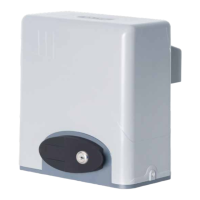

 To Next Page