USING THE COPY CARD
The Copy Card is connected to the serial port (TTL) and allows rapid programming of the instrument parameters.
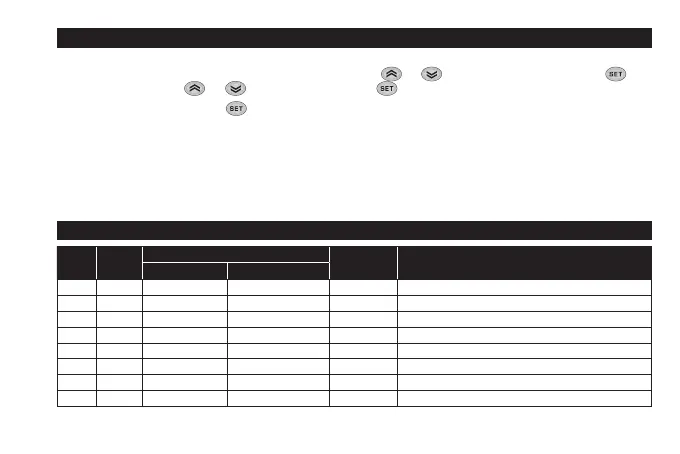
Access Installer parameters by entering ‘PA2’, scroll through the folders using and until folder FPr appears. Select it using , scroll
through the parameters using and , then select the function using (eg. UL).
• Upload (UL): Select UL and press . This function uploads the programming parameters from the instrument to the card. If the
procedure is a success, ‘y’, will appear on the display, otherwise ‘n’ will appear.
• Format (Fr): This command is used to format the copy card (recommended when using the card for the first time).
Important: the Fr parameter deletes all data present. This operation cannot be cancelled.
• Download: Connect the Copy Card when the instrument is switched off. At power-on, data is downloaded from the copy card to the
instrument automatically. At the end of the lamp test, the display will show ‘dLy’ if the operation was successful and ‘dLn’ if not.
NOTE: After downloading, the instrument works with the settings of the new map just downloaded.
H13 PARAMETER CONFIGURATION
H13
D.I.
STATE
FROM KEY OR FROM MENU FUNCTION
STATE
COMMENTS
ENABLED DISABLED
NO open YES YES ON enabled / disabled with each mode
NO closed YES YES OFF enabled / disabled with each mode
NC open YES YES OFF enabled / disabled with each mode
NC closed YES YES ON enabled / disabled with each mode
NOP open YES YES ON enabled only from D.I. / disabled with each mode
NOP closed NO N/A OFF Enabled only when D.I. is reopened
NCP open YES YES OFF enabled with each mode / disabled only from D.I.
NCP closed N/A NO ON enabled with each mode / disabled only from D.I.


 To Next Page