5
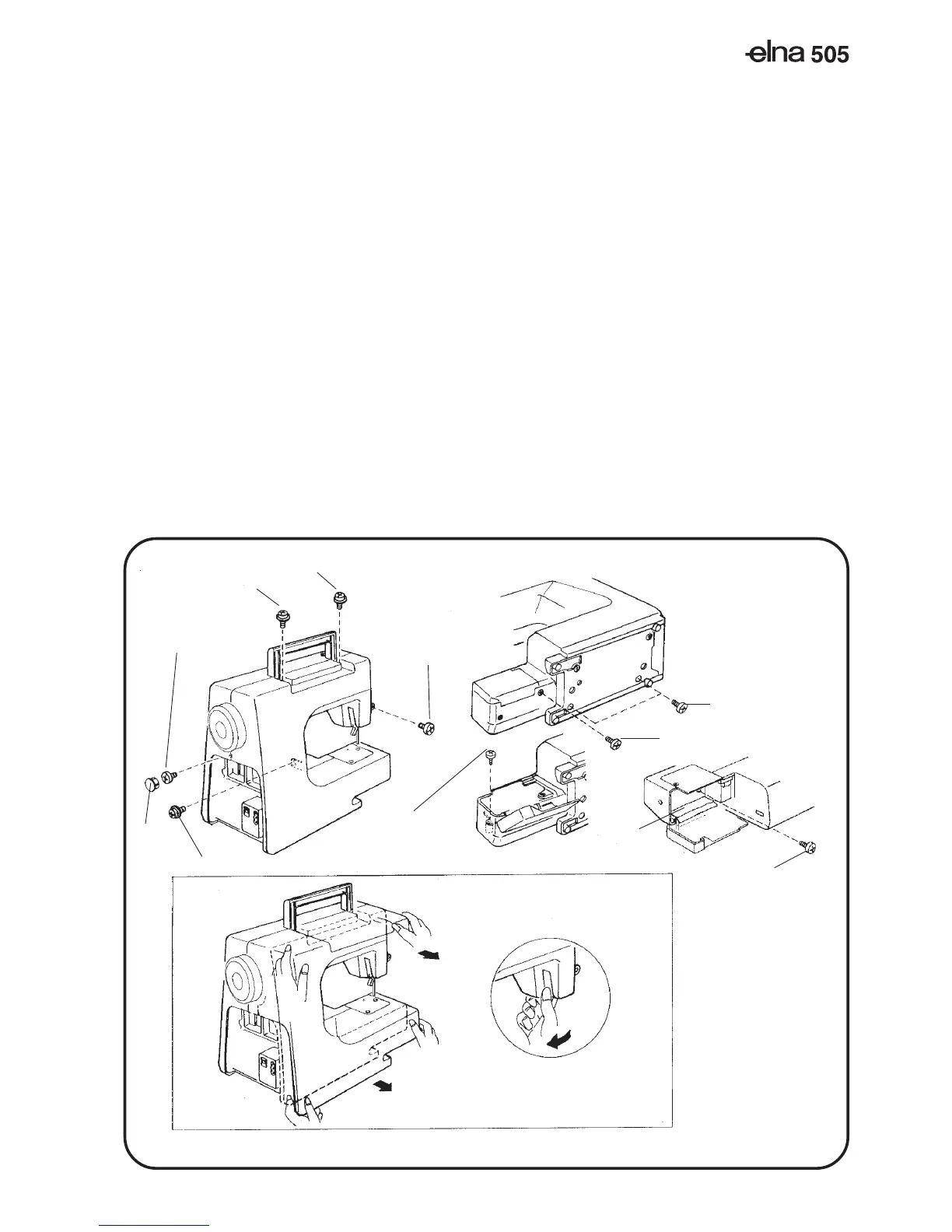
Setscrew(A)
Setscrew(D)
Setscrew(C)
Setscrew(B)
Cap(K)
Setscrew(E)
Setscrew(F)
Setscrew(G)
Setscrew(J)
Setscrew(H)
Lower part (X)
UPPER
PART(Y)
Presser foot lifter part (Z)
Cover (L)
REAR COVER
TO REMOVE:
1. Remove the face cover, and remove the belt cover (see page 1-2).
2. Remove the setscrew (a) and the cover (L).
3. Remove the cap(k) and remove the screws (B), (C), (D) and (J).
4. Loosen the setscrew (E), (F), (G) and (H).
5. Remove the rear cover.
NOTE: Dismantle the rear cover in the order of the lower part (X), upper
part (Y), then presser foot lifter part (Z).
TO ATTACH:
6. Mount the rear cover in reverse procedure of the removing.
SERVICE ACCESS (5)



 To Next Page