36
Adjustment of Needle Plate Setting Knob
(Changing to Standard Serging or Rolled
Hemming)
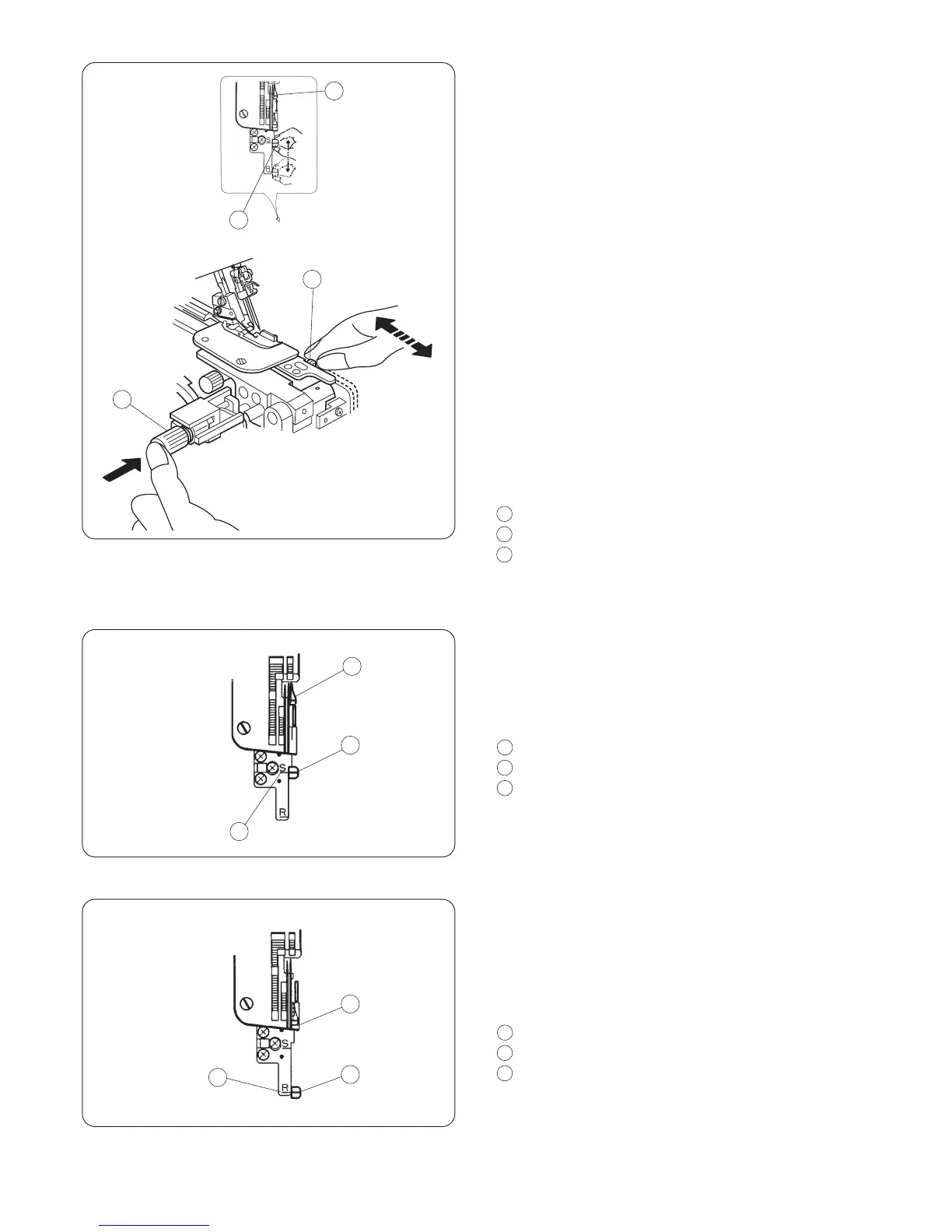
The needle plate setting knob is connected with the
chaining finger.
The chaining finger will slide back and forth when
you set the needle plate setting knob at "S" or "R".
1. Turn off the power switch and unplug the
machine.
2. Open the looper cover and side cover.
Deactivate the upper knife (refer to page 38).
3. Push the cutting width adjusting dial to the right
as far as it will go, then, move the needle plate
setting knob to the guide line of S (for Standard
Serging) or R (for Rolled Hemming).
Release the cutting width adjusting dial to the left
gently.
4. Activate the upper knife (refer to page 38).
Close the looper cover and side cover.
Chaining finger
Needle plate setting knob
Cutting width adjusting dial
(A) Standard Serging
* The chaining finger is located beside the needle
plate as shown in diagram (A) for guiding the flat
edge of the fabric for overlock sewing.
Chaining finger
Needle plate setting knob
Guide line S
(B) Rolled Hemming
* Pull the needle plate setting knob toward you
from “S” to “R” position, so the edge of the fabric
will be rolled for hemming, picot edging and
narrow hemming sewing.
Chaining finger
Needle plate setting knob
Guide line R
(A)
(B)
1
2
2
3
1
2
3
1
2
3
1
2
3
1
2
3
1
2
3


 To Next Page