61
q
w
q
Creating a new folder
Press the new folder key and the keyboard window will
open.
q New folder key
Enter a folder name and press the OK key.
A new folder is created under the assigned name.
q
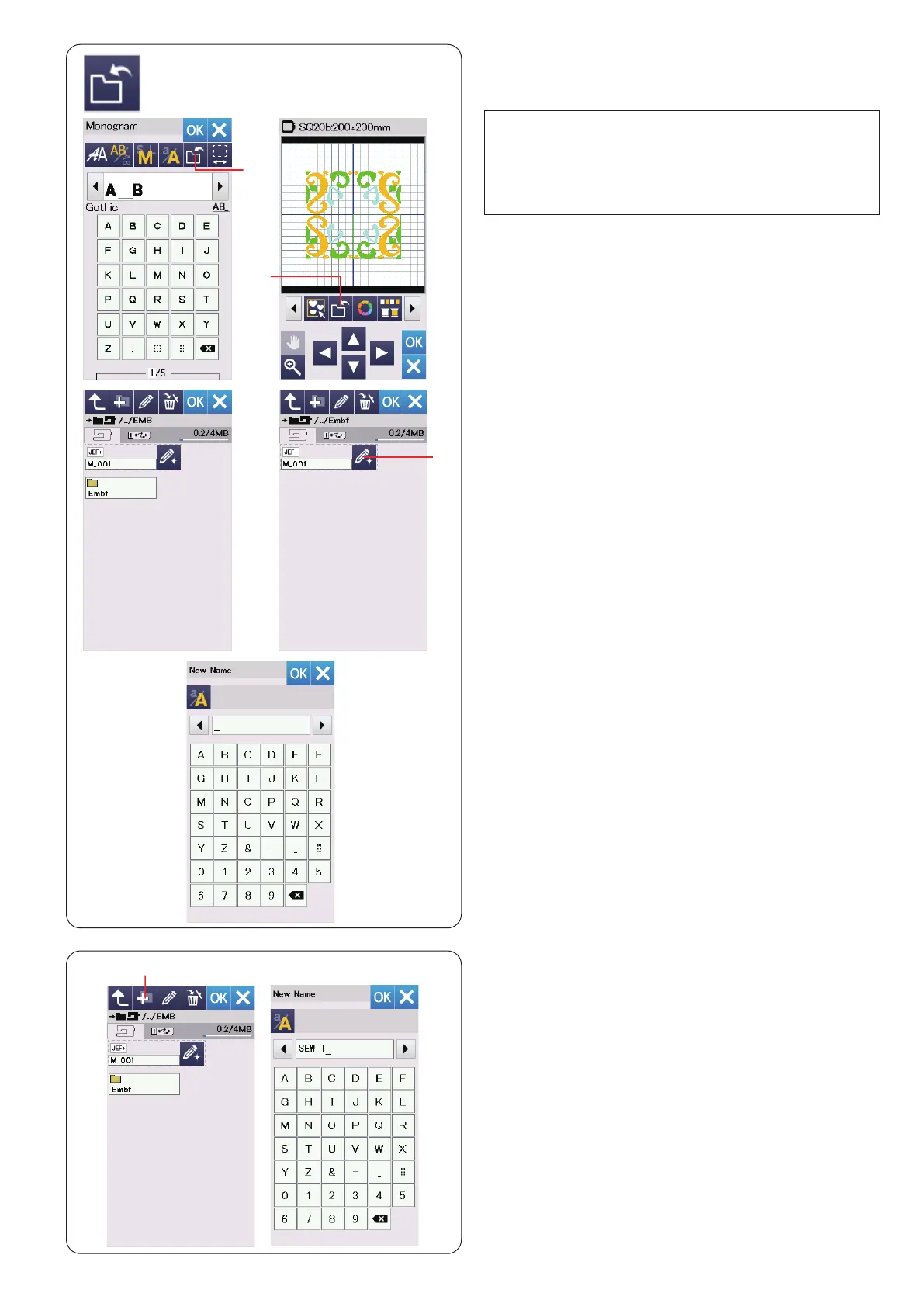
Saving and Opening a File
You can save original embroidery designs as les in the
built-in memory and/or USB ash drive.
A folder labeled “Embf” is displayed on the screen.
To select a folder, press the folder icon.
File names are assigned automatically in numerical order
starting from M_001.....
Press the OK key and the le is saved in the selected
folder.
To assign a particular name to the le, press the rename
key.
w Rename key
The keyboard window opens.
Enter a new name and press the OK key.
The le is saved under the new name.
When you attempt to save a le with a name that already
exists, the conrmation message will appear.
Press the OK key to overwrite the existing le or press
the X key if you do not want to overwrite it.
NOTE:
• This model supports FAT16 and FAT32 formats only.
If the USB ash drive is not read, check the format of
it (refer to pages 73-74).
• Do not use a USB card reader and USB
hub.
Press the save le key and the save le window will
open.
q Save le key


 To Next Page