73
q
w
z
x c v
e
r
t
Formatting USB Flash Drives
NOTE:
Formatting of USB ash drive must be carried out on
a personal computer using Microsoft Windows.*
For Windows 11 and 10 users, screen shot samples
using Windows 11 are shown.
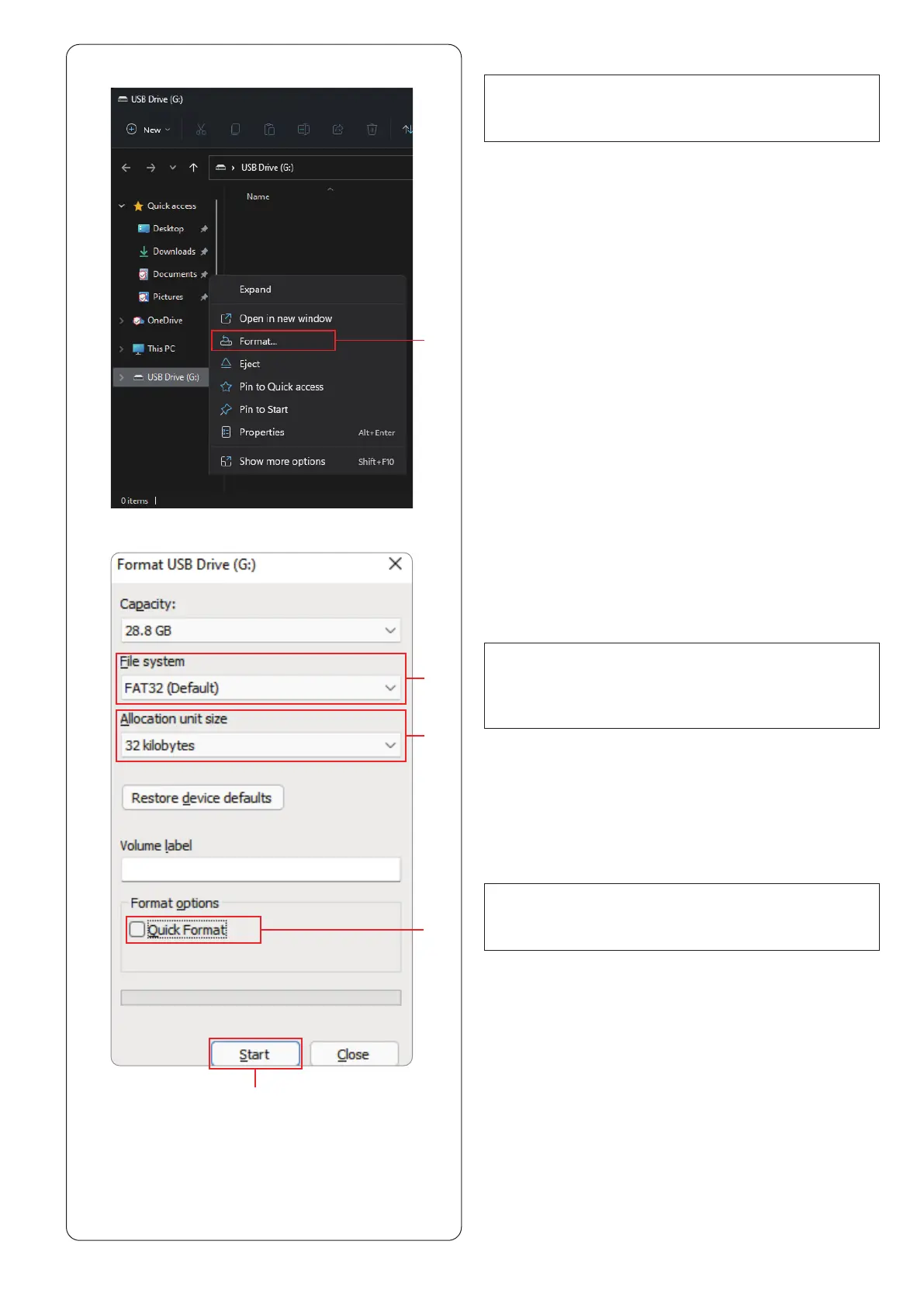
z Using File Explorer, right click on the USB ash drive.
Click format.
q Format
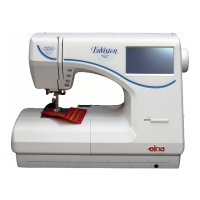
x Format dialogue will be displayed. Select FAT16 or
FAT32 from le system.
w File system
NOTE:
Do not check the quick Format.
r
Quick Format
v Click the start key.
t Start key
c From allocation unit size, select a size of 32 kilobytes
or less.
e Allocation unit size
NOTE:
If FAT16 or FAT32 cannot be selected, use other PC.
Do not use Windows 8.1 for formatting.
Or use other USB ash drive which can be read.
* Windows is a registered trademark of Microsoft
Corporation.


 To Next Page